
What your browser really sends: HTTP request headers and cookies
What HTTP request headers your browser sends on one tap: Host, User-Agent, Accept and any cookies that match, why they cost bytes, and how to keep them small.
In this lesson you will learn
- What an HTTP/1.1 request is made of: request line, header fields, blank line, optional body
- Why a stateless protocol needs cookies, and how a session ID cookie works
- Which stored cookies the browser attaches to a request, and how big they are allowed to get
- What 431 Request Header Fields Too Large means and how HPACK changes header cost in HTTP/2
Builds on Lesson 44: Polling vs webhooks: how the job tells you it is done 6 min read Next: Ask for exactly the fields you want (GraphQL)

Drafted with AI assistance, then checked and edited by a human engineer · How we write
When you tap a link, your browser sends HTTP request headers: Host, User-Agent, Accept and, if any stored cookies match, a Cookie header. Over HTTP/1.1 a request line naming the method, the page and the version comes first. A normal browser navigation GET has no body, so everything it sends is metadata, and in our seeded simulation of a modeled Chrome-style first visit that was 675 bytes across 14 headers.
What HTTP request headers does a browser send?
After DNS finds the server and a connection opens, the browser writes the request. In HTTP/1.1 that is plain text with a fixed shape, defined in RFC 9112:
# modeled request with 2 cookies, HTTP/1.1 (shortened; full version in the lab)
GET /article HTTP/1.1                      <- request line: method, target, version
Host: localhost:8045                       <- header fields, one per line
User-Agent: Mozilla/5.0 (Macintosh; ...) Chrome/142.0.0.0 Safari/537.36
Accept: text/html,application/xhtml+xml,...
Accept-Language: en-US,en;q=0.9
Cookie: sid=6c07f0ceda49673f4255dcf1066c87ab; theme=light
                                           <- empty line: the headers end here
                                           <- body: none for a navigation GET
The request line is a method, the request target and the protocol version, separated by single spaces. Header field lines follow (name, colon, value), then an empty line and an optional body (RFC 9112 section 2.1). Every line ends in CRLF, the bytes \r\n.
Host names the site, so one server can host many. Accept and Accept-Language state your preferred formats and languages, User-Agent describes the browser, and Cookie carries what the site stored earlier. A Layer 7 load balancer can route on any of these. Responses carry their own headers, such as the caching rules from Part 37.
Our simulation: how many bytes is one modeled request?
Our lab script labs/sd-45/simulate-http-request-bytes.mjs is a seeded simulation (seed 4545); no browser or curl ran. It builds four HTTP/1.1 requests from header lists modeled on desktop Chrome 142 on macOS and on curl's defaults, then counts them. Header bytes include the request line and the closing empty line. Our run on 2026-11-19 printed:
| Modeled request (simulation, not a capture) | Headers | Header bytes | Body bytes |
|---|---|---|---|
| Chrome-style GET, first visit | 14 | 675 | 0 |
Same GET with 2 cookies (sid, theme) | 15 | 734 | 0 |
| Chrome-style form POST | 20 | 910 | 37 |
| curl-style GET | 3 | 84 | 0 |
The two cookies added 59 bytes. The form POST had about 24.6 times more header bytes than form data. The modeled User-Agent line alone was 131 bytes, and the modeled Chrome GET had about 8 times the header bytes of the modeled curl GET. Real headers vary with browser version, platform and settings, so these numbers show the shape of the effect only.
HTTP is stateless, so how does a site remember you?
The RFC 9110 abstract calls HTTP "a stateless application-level protocol": each request can be understood on its own.
An app that wants to recognise you can use cookies. One common design: after you sign in, the server creates a random session ID, stores your session under it, and replies with Set-Cookie: sid=.... Your browser sends sid back on later requests, and the server looks it up. Other designs use a signed token in a cookie or an Authorization header. Whatever the app stores in cookies travels in each matching request.
Which cookies does the browser send?
A request carries a Cookie header only when some stored cookie is eligible. RFC 6265 section 5.4 says the browser puts those cookies in the Cookie request header, and never more than one Cookie header per request. RFC 6265 checks the domain (an exact host, or a parent domain if the cookie set Domain), the path, and the Secure flag, which limits a cookie to secure connections. Browsers also apply SameSite, defined after RFC 6265, and their own privacy policy, which can hold cookies back on cross-site requests.
Matching cookies ride on images, scripts and API calls as well as the page. Assume a page view makes 30 requests to the same host and every one carries the two modeled cookies:
# cookie-arithmetic (assumed numbers, HTTP/1.1, before any compression)
59 bytes per request x 30 requests = 1,770 bytes for one page view
How big can cookies get?
RFC 6265 section 6.1 sets minimums that general-use browsers should support: at least 4096 bytes per cookie (name, value and attributes together), at least 50 cookies per domain, and at least 3000 cookies in total.
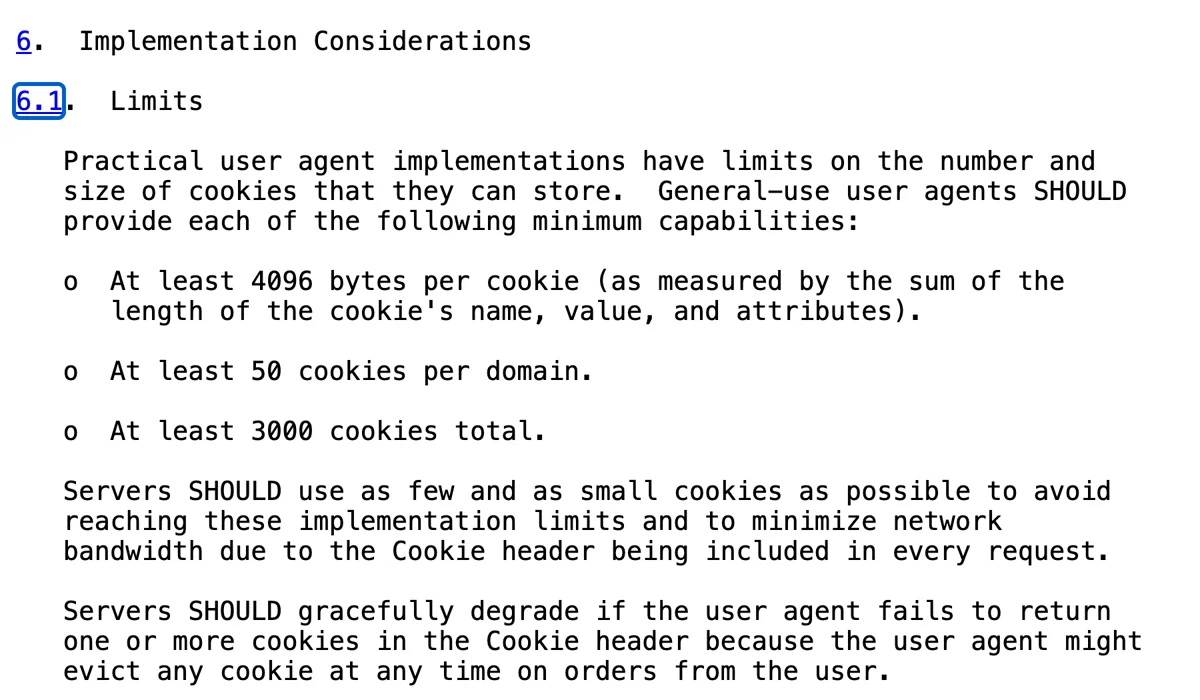
Fifty cookies of 4096 bytes would be 204,800 bytes stored for one domain; only names and values go in the Cookie header, but even a fraction of that is heavy on every request that carries them. The same section asks servers to use "as few and as small cookies as possible".
What is 431 Request Header Fields Too Large?
RFC 6585 section 5 defines status 431, Request Header Fields Too Large: the server will not process the request because its header fields are too large, either all together or one field. The RFC calls its new status codes optional, so a server may answer 431 or reply some other way.
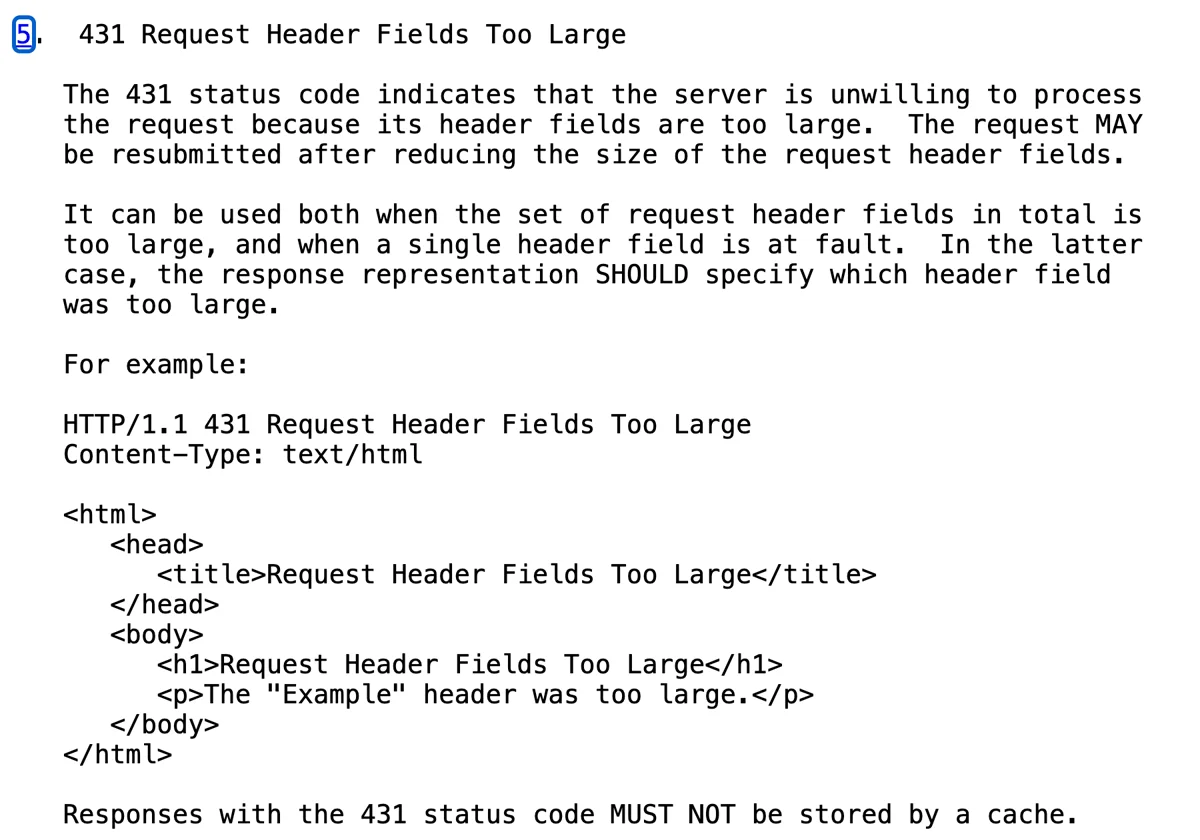
Cookies are a common cause and easy to miss in testing: a fresh profile carries none, while a long-time user can hit the error. One long field, such as a large token, or the total across all fields can also trip the limit. The RFC allows a resend after the headers shrink, and when a single field is the problem it recommends the response name that field. Compare 429 Too Many Requests, which is about request rate (how AI APIs use 429); 431 is about the size of one request.
To debug a 431, find the hop that rejected the request, since each proxy, load balancer and server sets its own limit, and check its documented limit. Compressed bytes on the wire and decoded field size are different measures: HTTP/2 compression (below) can make a request small in transit while its decoded headers still exceed that limit.
Do HTTP/2 and HTTP/3 send the same headers?
HTTP/2 and HTTP/3 carry the same HTTP semantics using different framing and pseudo-header fields; some HTTP/1.1 fields are prohibited. The request line's control data goes in pseudo-header fields, and :authority carries the authority information. RFC 9113 section 8.2.2 forbids connection-specific fields such as Connection in HTTP/2. HTTP/2 compresses headers with HPACK (RFC 7541): a read-only static table of frequent fields, a dynamic table that both sides update as fields are encoded and decoded, and optional Huffman coding for literal strings. A long User-Agent or Cookie value sent before on the connection can then go as a short table reference. Encoders may skip indexing sensitive fields and entries can be evicted, so a short reference is not guaranteed. RFC 9113 section 8.2.3 also lets HTTP/2 split the Cookie header into one field line per cookie, so a changed cookie does not force the unchanged ones to go out in full again. HTTP/3 has its own header compression.
Our lab counts HTTP/1.1 bytes only; the same requests over HTTP/2 can take fewer bytes on the wire.
Our take: keep every request light
Every request pays for its headers, and cookies are the part you control. Keep them few and small. Use a small opaque session ID where server-side sessions fit your design; carts or settings can live server side. Omit Domain for a host-only cookie and set it only when subdomains need it. Set Secure and SameSite deliberately. Path controls when a browser sends a cookie; it is not a reliable security boundary (RFC 6265 section 4.1.2.4).
Then check what you send: open DevTools, pick one request and read its request headers. With an AI coding assistant, this prompt is a first pass:
Review my app's cookies: list each cookie's name, size, Path, Domain, expiry and SameSite,
and flag any that every request carries without needing it.
What we saw when we ran it
We ran node labs/sd-45/simulate-http-request-bytes.mjs. The macOS you see in the output is part of the modeled headers, not a record of the machine that ran it. The script builds the requests by hand and feeds them to an in-process parser, so no browser or curl ran and nothing here is a capture. The parser received 2440 simulated bytes and framed them into 4 requests.
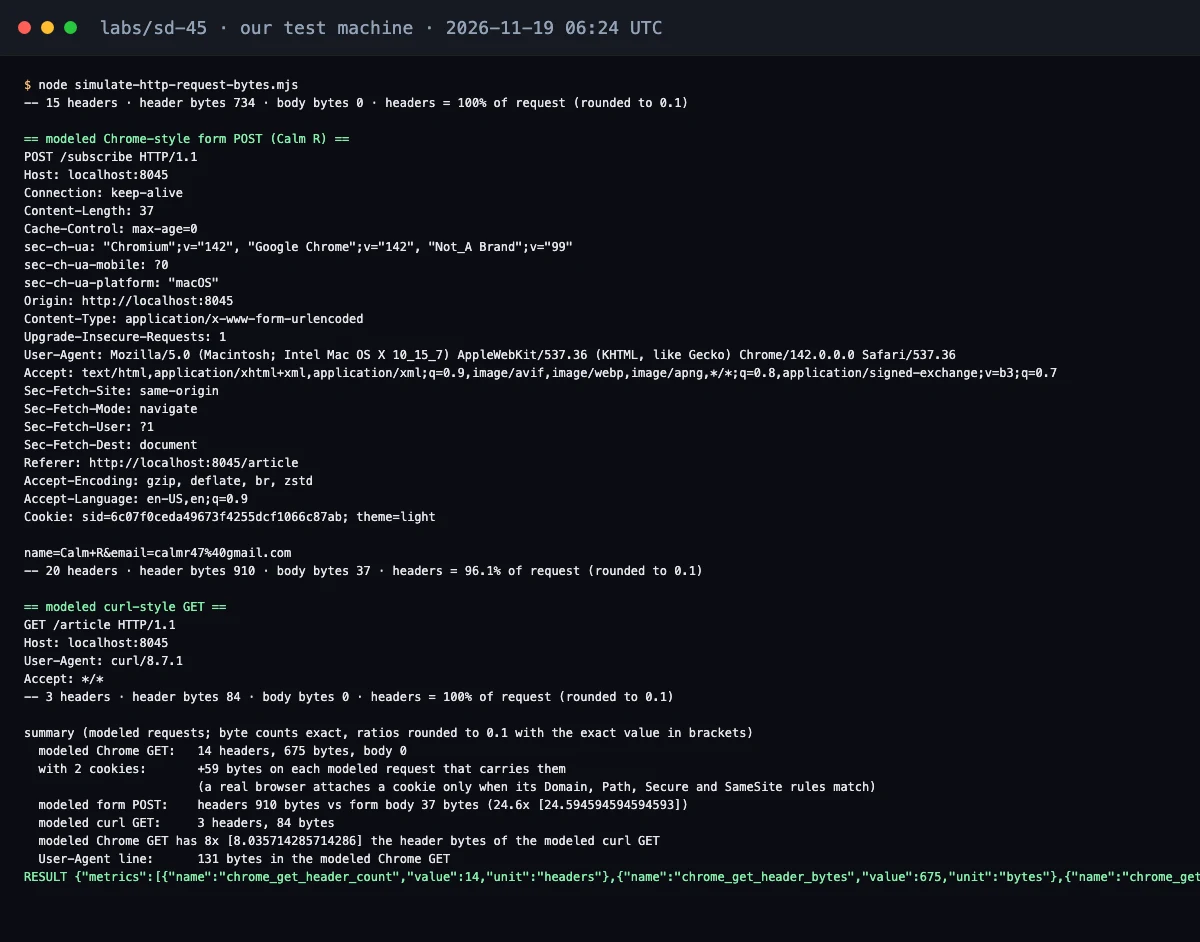 The last part of our terminal after the run: the end of the GET with 2 cookies, then the form POST and the curl GET.
The modeled Chrome-style first visit came out at 14 headers and 675 header bytes, with a body of 0 bytes. The modeled curl GET was 3 headers and 84 bytes. Adding 2 cookies put 59 bytes on each modeled request that carried them. The form POST surprised us most: 910 bytes of headers to send a 37 byte form body, so the header bytes were about 24.6 times the body size. The User-Agent line alone took 131 bytes.
In the modeled requests we built, headers made up most of each request. A small request with a bigger body would look different. Eligible cookies may also ride along on each request whose Domain, Path, Secure and SameSite rules match, subject to the browser's privacy policy, so the cookie list is the part worth keeping short.
The first line our parser read follows the request line format in RFC 9112, section 3: a method, the request target and the protocol version.
FAQ
What does a browser send when you click a link?
An HTTP request: the method (GET) and the path, header fields such as Host, User-Agent and Accept, and a Cookie header if any stored cookies match. HTTP/1.1 puts method, path and version in a request line; HTTP/2 and HTTP/3 use pseudo-header fields. A normal browser navigation GET has no body.
Are cookies sent with every request?
Only with requests they match: the browser checks domain, path, the Secure flag, SameSite and its own privacy policy. A cookie set for a whole site can ride on pages, images, scripts and API calls.
What causes 431 Request Header Fields Too Large?
The server found the request's header fields too large, in total or one field. Large cookies are a common cause; a long token or the total size can trigger it too. Clearing the site's cookies often helps. Site owners should find the rejecting hop and check its limit.
This article describes general HTTP behaviour from the public RFCs (checked 2026-11-19) and our own seeded simulation. The simulated requests are hand-built models of Chrome-style and curl-style headers, not captures of real traffic. It does not describe any company's private systems.
Frequently asked questions
What does a browser send when you click a link?
An HTTP request: the method (GET) and the path, header fields such as Host, User-Agent and Accept, and a Cookie header if any stored cookies match. HTTP/1.1 puts method, path and version in a request line; HTTP/2 and HTTP/3 use pseudo-header fields. A normal browser navigation GET has no body.
Are cookies sent with every request?
Only with requests they match: the browser checks domain, path, the Secure flag, SameSite and its own privacy policy. A cookie set for a whole site can ride on pages, images, scripts and API calls.
What causes 431 Request Header Fields Too Large?
The server found the request's header fields too large, in total or one field. Large cookies are a common cause, but another field or an aggregate limit can trigger it too. If cookies caused the error, clearing the affected site's cookies can help. Site owners should identify the oversized field and check limits at each proxy and server.
Sources
- RFC 9112: HTTP/1.1 (section 3, Request Line)rfc-editor.org
- RFC 9110: HTTP Semanticsrfc-editor.org
- RFC 6265: HTTP State Management Mechanism (cookies)rfc-editor.org
- RFC 6585: Additional HTTP Status Codes (section 5, 431)rfc-editor.org
- RFC 7541: HPACK, Header Compression for HTTP/2rfc-editor.org
- RFC 9113: HTTP/2 (section 8.2.3, Compressing the Cookie Header Field)rfc-editor.org

Written by a software engineer and system architect with 10+ years of building production web, payment, ticketing and accounting systems in Japan and Nepal. About us