Layer 4 vs Layer 7 Load Balancer: Internals and Trade-offs
Layer 4 vs layer 7 load balancer internals: connection tracking, HTTP routing, keep-alive imbalance, draining, and measured lab costs.
In this lesson you will learn
- What a layer 4 balancer sees (the 5-tuple and a connection table) and what a layer 7 balancer does with every HTTP request it parses
- Why keep-alive, HTTP/2 and gRPC turn one decision per connection into a hot server, and how draining and connection limits fix it
- How NGINX stream vs http, HAProxy mode tcp vs mode http, Envoy and Linux IPVS map onto the two layers, and what reading the request costs
Builds on Lesson 16: Load balancing algorithms: round robin, least conn, hash 21 min read Next: Horizontal vs vertical scaling
Drafted with AI assistance, then checked and edited by a human engineer · How we write
Short answer
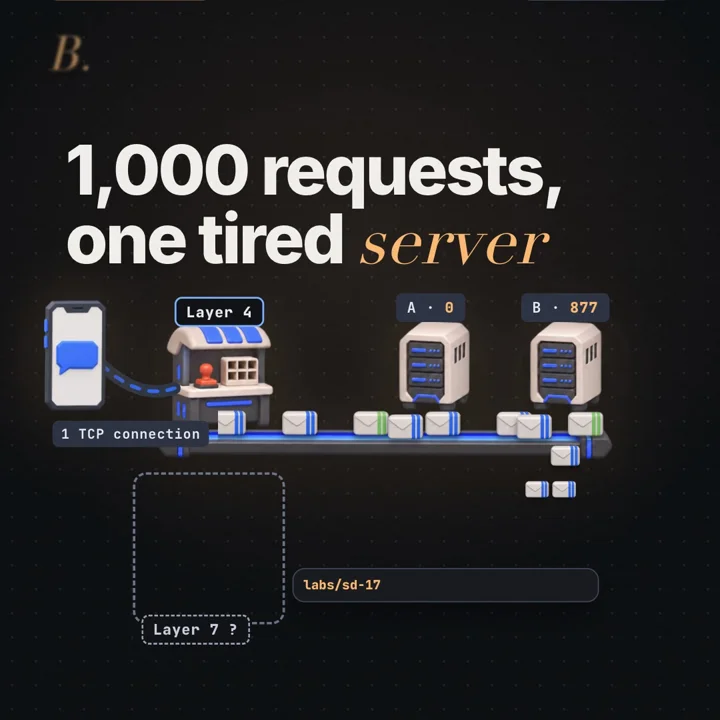
A layer 4 load balancer picks a server once per TCP connection from addresses and ports. A layer 7 balancer parses HTTP and picks per request, so it can route by path. In our seed 17 lab, 1,000 requests on one kept-open connection all went to server B under layer 4 (1 decision) and split 500/500 under layer 7 (1,000 decisions), for about 1.7 µs more processing time per request.
| One kept-open connection, 1,000 requests | Layer 4 made 1 routing decision: A 0, B 1,000 (100% to B). Layer 7 made 1,000 decisions: A 500, B 500 with round robin |
|---|---|
| 50 new connections, 1,000 requests | Layer 4 sent 400 to A and 600 to B (busiest 60%); layer 7 sent 500 to each |
| Path rule, /images/* must go to B | 322 of 1,000 requests on 50 connections were /images. Layer 7 sent 100% to B by rule; layer 4 put 32.9% there only because of each connection's IP:port hash |
| Extra processing time per request | Full layer 7 2,845 ns minus layer 4 1,150 ns = 1,695 ns (about 1.7 µs), median of 200 batch averages. A difference between whole simulated paths, which also differ in chunking, allocation and downstream parsing |
| Layer 4 over going direct | 1,150 ns minus 1,105 ns = 45 ns for the byte copy and table lookup |
| Setup and dates | Our in-process lab (labs/sd-17), seed 17, Node v22.13.1, Apple M2 Pro, no network, no TLS, no responses. Timings from the recorded run on 2026-11-04; a re-run on 2026-11-05 gave 1,625 ns for the layer 7 overhead, routing identical |
The layer 4 vs layer 7 load balancer choice determines whether routing happens per transport flow or per application request. A layer 4 load balancer chooses a server once per TCP connection and never reads the HTTP inside, so every request on one kept-open connection lands on the same server. A layer 7 balancer parses each request and chooses again every time, which spreads the load and allows path rules, at the price of extra processing per request. This part covers when your balancer needs to read the request and what reading it costs.
Prerequisites
TCP is a byte stream. TCP delivers ordered bytes with no message boundaries. The stream is cut into segments (up to about 1,460 bytes of payload on a typical Ethernet path) at points unrelated to the application, so one segment can hold half a request or the end of one and the start of two more. Opening a connection costs a handshake, and TLS another; what happens in the first 100 ms after you type a domain walks through both.
HTTP puts the boundaries back. An HTTP/1.1 request is a request line, header lines and an empty line, all ending in CRLF, then a body sized by Content-Length or chunked coding. To find request two, you must parse request one. Connections are persistent by default (RFC 9112, section 9.3): a client sends request after request until one side closes.
What a load balancer decides. Part 15, load balancer vs reverse proxy, placed the balancer in the request path. Part 16, how round robin, least connections and hashing pick a server, compared the rules. This part asks what the rule is applied to: a connection or a request.
Definitions
Layer 4 load balancer: a balancer at the transport layer (TCP or UDP) that chooses a backend from addresses and ports when a connection or flow starts, then sends all of that flow's bytes to the same backend without parsing the application protocol.
Layer 7 load balancer: a balancer that terminates the client's connection, parses the application protocol (here HTTP) and chooses a backend per request, using host, path, method, headers or cookies.
5-tuple: source IP, source port, destination IP, destination port and protocol, the values that identify a TCP or UDP flow.
Connection table: the balancer's map from 5-tuple to chosen backend. A flow's first packet misses and triggers a decision; later packets hit the entry and follow it.
Keep-alive: reusing one TCP connection for many HTTP requests; the HTTP/1.1 default.
Multiplexing: many concurrent requests on one connection. HTTP/2 uses numbered streams ([RFC 9113](https://www.rfc-editor.org/rfc/rfc9113)); gRPC runs on HTTP/2.
TLS termination: decrypting TLS at the balancer, which holds the certificate, so it can read the HTTP inside.
X-Forwarded-For: a header a proxy adds with the client's IP, because the backend's TCP peer is now the proxy. The standard form is Forwarded (RFC 7239).
Connection draining: taking a backend out of rotation for new work while work already assigned to it finishes.
Layer 4 vs layer 7 load balancer: how routing works
These are the HTTP/1.1 bytes used by the lab (cookie shortened). Request boundaries can cross arbitrary receive chunks.
GET /images/p212.jpg HTTP/1.1\r\n
Host: shop.local\r\n
User-Agent: okhttp/4.12.0\r\n
Accept: */*\r\n
Cookie: session=1x7k2...; theme=dark\r\n
Connection: keep-alive\r\n
\r\n
The lab sends 1,000 of these back to back on one connection, cut into segments of 64 to 1,460 bytes at random points. A layer 4 balancer sees those segments. Nothing in a segment says a request starts at byte 917; learning that means running an HTTP parser over the stream, which is what makes a balancer layer 7.
So the two designs decide on different units: layer 4 per connection, layer 7 per request. With many short connections the units nearly coincide and both spread load well. When one connection carries many requests they diverge, which is the opening picture: one decision sent all 1,000 requests to one server.
What does a layer 4 balancer actually do?
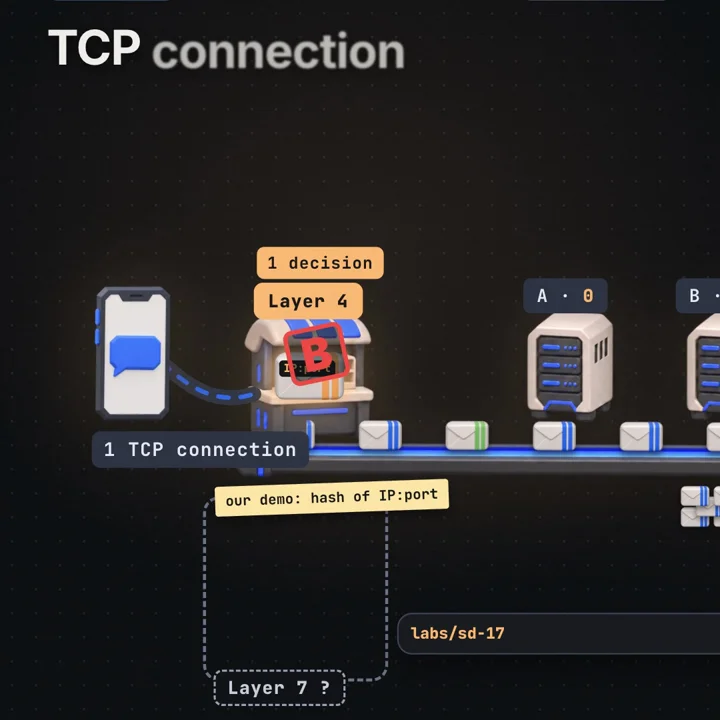
How the decision sticks depends on the implementation. In a packet forwarder such as IPVS, the core is a lookup: for each packet the kernel looks up the 5-tuple in its connection table. A miss means a new flow (for TCP, normally a SYN): run the scheduling rule, store the backend, forward. A hit means the decision exists and the packet follows it, after a hash lookup and an address rewrite. A TCP proxy keeps no such table of its own. The kernel's TCP stack already demultiplexes packets to sockets, so the proxy chooses a backend when it accepts a connection, opens an upstream socket and pairs the two; from then on it relays the byte stream between them with reads and writes (HAProxy's mode tcp works this way). In both shapes scheduling happens once per flow, but forwarding work continues for every packet or byte. In our lab the layer 4 path cost 45 ns per request more than going direct (1,150 ns minus 1,105 ns), for a byte copy plus a map lookup in JavaScript.
The rule can be any from Part 16, applied to connections. NGINX's stream module defaults to round robin and offers least_conn, hash (optionally consistent) and random (ngx_stream_upstream_module). HAProxy in mode tcp uses the same balance algorithms as in HTTP mode. Linux IPVS has schedulers such as rr, wlc, sh (source hashing) and mh (Maglev hashing). Our lab uses an FNV-1a hash of client IP and port, mod 2: cheap, deterministic and blind to how much work a connection will bring.
Layer 4 balancers come in three shapes:
TCP proxy. NGINX stream, HAProxy mode tcp and Envoy's TCP proxy filter accept the client's connection, open a second one to the backend and copy bytes both ways. They terminate TCP but not HTTP. The backend sees the proxy's IP unless the proxy sends the PROXY protocol header first. Our lab's layer 4 balancer has this shape.
NAT forwarding. IPVS in masquerading mode rewrites packet addresses inside the Linux kernel: destination to the backend on the way in, source back to the virtual IP on the way out. Replies must pass through the balancer, and there is one TCP connection end to end.
Direct server return (DSR). IPVS direct routing rewrites only the destination MAC address. The backend holds the virtual IP on loopback (without answering ARP for it) and replies straight to the client. The balancer sees only the inbound half, which suits large responses such as downloads, but it can never count response codes or times.
All three share the limit: no routing /images/* elsewhere, no retrying one failed request, no per-route error counts, no added headers. The partial exception is TLS passthrough, where the balancer peeks at the unencrypted ClientHello and routes on the server name (SNI), as NGINX's ssl_preread module does. That is still one decision per connection.
What does a layer 7 balancer do with each request?
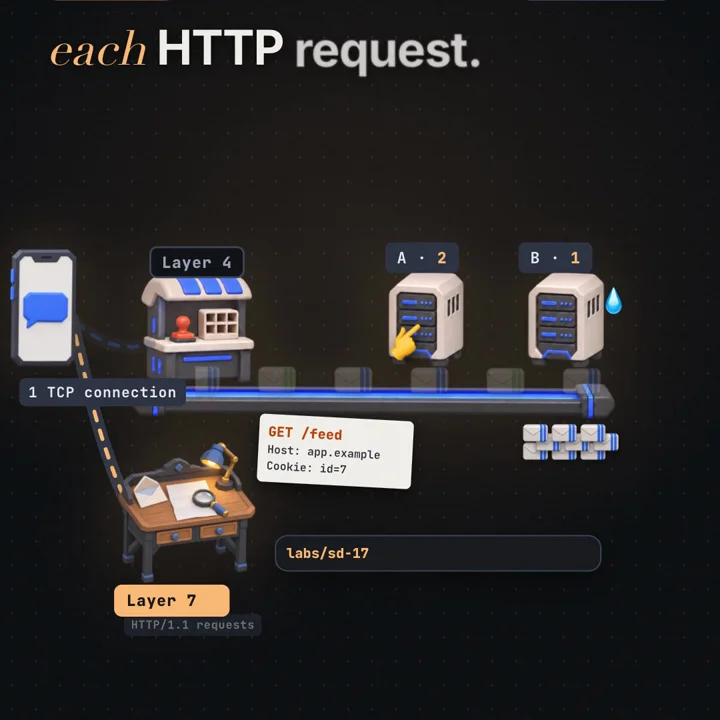
A layer 7 balancer is an HTTP reverse proxy that routes every request. One request passes through six steps:
- Terminate the client's TCP connection and, usually, TLS.
- Parse the byte stream to find the request line, headers and body length. With HTTP/2 it decodes frames and HPACK-compressed headers per stream.
- Match routing rules on host, path, method, a header or a cookie to select a pool (NGINX
locationplusupstream, HAProxyuse_backendwith ACLs, an Envoy route and cluster). - Pick a healthy backend in that pool with the balancing rule.
- Rewrite the request: hop-by-hop headers such as
Connectionremoved,X-Forwarded-Forand oftenX-Forwarded-Protoadded. - Send and relay over a pooled backend connection, then read the response and return it.
In step 6, client connections and backend connections are separate. A client can hold one connection to the proxy for an hour while its requests spread over twenty backends through pools of reusable connections: keepalive in an NGINX upstream, Envoy's connection pools, http-reuse in HAProxy. HAProxy in mode http picks a server per request by default; option prefer-last-server exists for when you want it to stay put.
Our lab's layer 7 balancer runs steps 2 to 5 for every request: a streaming parser finds each request, /images/* goes to B by rule, the rest alternate by round robin, and each request is rebuilt with X-Forwarded-For. No TLS, no responses.
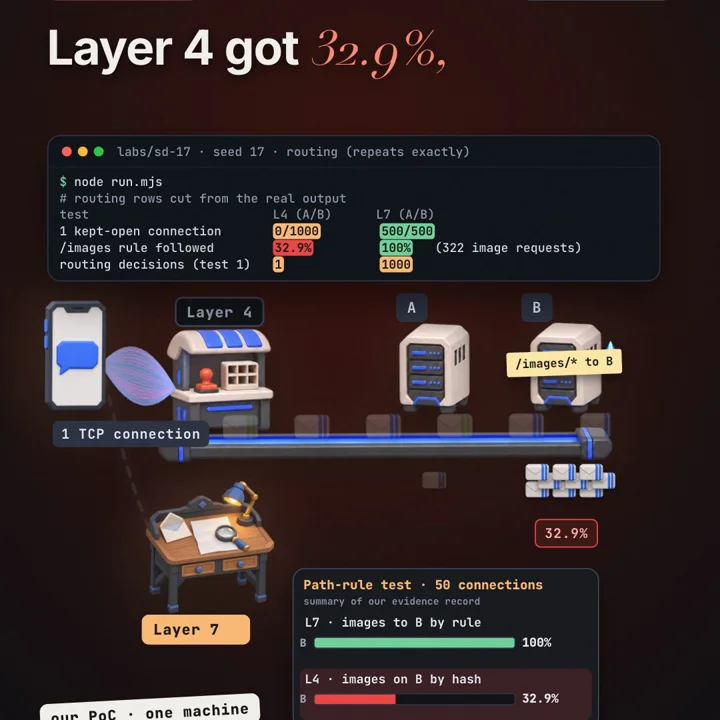
The path rule test sent 1,000 requests on 50 connections, 20 each, each request an image path with probability 30%; 322 came out as images. Layer 7 sent all 322 to B, ending at A 339, B 661: the 322 images plus the other 678 split 339 and 339. Layer 4 never saw a path. Its hash sent 17 of 50 connections to B (A 660, B 340), and 106 of the 322 image requests happened to ride those connections: 106 / 322 = 32.9%.
X-Forwarded-For needs a trust boundary. Any client can send a fake one. NGINX's $proxy_add_x_forwarded_for appends the peer address to whatever arrived (ngx_http_proxy_module), so the leftmost entry is client-controlled; backends should believe only entries added by proxies they know (the realip module's set_real_ip_from).
TLS has its own cost profile. Reading the path of an HTTPS request means decrypting it, so the proxy holds the private key. TLS adds handshake work per connection and record encryption and decryption per byte (RFC 8446). Re-encryption to backends adds a separately configured upstream TLS leg, whose handshakes the upstream pool amortizes. Their cost relative to parsing depends on connection reuse, payload size, cipher and hardware; measure it on your own proxy.
Why do keep-alive, HTTP/2 and gRPC make layer 4 imbalance worse?
Layer 4 balances connections; servers feel requests. If connection i carries ri requests, a server's load is the sum of ri over its connections, and a few heavy connections dominate it.
With one connection, our test made one decision and split 0 and 1,000. With fifty connections of 20, the hash put 20 on A and 30 on B, so 400 and 600, busiest 60%. That is ordinary chance: with a fair coin per connection, the share over 50 connections has a standard deviation of √(0.25 / 50) ≈ 7.1 points, so 60% is about 1.4 deviations out. More connections converge; fewer, longer ones get worse. Layer 7 gave exactly 500 and 500 in both tests.
HTTP/1.1 keep-alive is the mild case: browsers and pooled service clients reuse a handful of connections for a long time, and you get the balance of those few.
HTTP/2 is sharper. Many concurrent streams share one connection, up to the peer's SETTINGS_MAX_CONCURRENT_STREAMS, and RFC 9113 (section 9.1) says clients SHOULD NOT open more than one HTTP/2 connection to a given host and port.
gRPC is the extreme. Clients open a channel at startup and keep it for the life of the process. Assuming exactly one backend TCP connection per client pod, four client pods behind a layer 4 balancer can reach at most four of twenty server pods concurrently, and newly added pods get nothing until clients reconnect. A channel can be configured to use several HTTP/2 connections, which widens the spread but is still decided per connection (gRPC performance guidance). Long-lived streaming RPCs remain pinned even behind layer 7: the proxy picks a backend when the stream starts and cannot move the messages of that existing RPC, so use application-level partitioning or coordinated stream reconnection when needed.
Fixes, in rough order of preference:
- Balance per request. A layer 7 proxy that speaks HTTP/2: Envoy balances each stream (HTTP connection management), NGINX proxies gRPC with
grpc_pass, HAProxymode httpspeaks HTTP/2 on both sides. - Balance in the client. gRPC libraries can resolve every backend address and round robin over them.
- Limit connection life. For opaque layer 4 forwarding, configure graceful connection rotation at the backend HTTP server or in the client, because only they see request boundaries. NGINX HTTP endpoints can use
keepalive_requests(1,000 by default) andkeepalive_time(1 hour by default) (ngx_http_core_module);keepalive_timeoutonly expires idle connections, so it never bounds a continuously busy one. Envoy hasmax_requests_per_connectionandmax_connection_duration. Forced closure at the layer 4 tier is not a substitute: it cannot wait for a request boundary, so it can interrupt requests mid-flight (NGINXstreamproxy_timeoutcloses only after inactivity). Each graceful reconnect gives layer 4 a fresh decision, paid for with a handshake.
How much state does each layer hold?
Both layers keep per-connection or per-request state, and each kind has a ceiling. Little's law sizes all of it: items held = arrival rate × time each item is held.
Layer 4: the connection table. One entry per flow, kept for the flow's life plus a state timeout. Linux IPVS defaults to 900 s for an established TCP entry, 120 s after FIN and 300 s for UDP (ipvsadm -l --timeout shows them, ipvsadm --set changes them). Worked example, illustrative numbers: 20,000 new connections per second, each held 60 s including its closing timeout, gives 20,000 × 60 = 1,200,000 entries. A short idle timeout frees memory but silently breaks idle long-lived flows, whose next packet then misses the table. IPVS also has memory-pressure defences (amemthresh, drop_entry) and expire_nodest_conn, which expires entries for a removed real server so their packets stop being forwarded into nothing (IPVS sysctl documentation). Watch: active and inactive connection counts per real server (ipvsadm -L -n --stats, ipvsadm -L -n), and entry growth against memory.
Layer 7: upstream pools, pending requests and streams. Labelled example: 100,000 requests/s × 0.050 s mean upstream time = 5,000 requests in flight across the proxy tier. With HTTP/1.1 upstreams, one connection carries one active request, so that needs roughly 5,000 busy upstream connections plus idle spares. With HTTP/2 upstreams the 5,000 are streams, multiplexed subject to the backend's SETTINGS_MAX_CONCURRENT_STREAMS: at 100 streams per connection, at least 50 connections. Proxies cap these on purpose. Envoy's circuit breakers default to 1,024 each for connections, pending requests and active requests per cluster and priority, so the 5,000 in-flight example overflows a default cluster unless spread over enough proxy instances or raised; excess requests fail fast with 503 instead of queueing (connection pooling). Each upstream connection also uses a local port: Linux's default ip_local_port_range of 32768 to 60999 gives 28,232 ports per proxy source IP toward one backend IP and port, which churn without keep-alive can exhaust while closed sockets sit in TIME_WAIT. Watch: active upstream connections, pending requests and overflows (Envoy upstream_cx_active, upstream_rq_pending_active, upstream_rq_pending_overflow), upstream connect failures (upstream_cx_connect_fail), and per-backend latency.
Equal counts are not equal load. The lab's 500 and 500 are request counts. If A's 500 requests cost 5 ms of CPU each and B's cost 20 ms, A does 2.5 CPU-seconds of work and B 10. Round robin cannot see that. Envoy LEAST_REQUEST uses active-request counts, so it reacts to queueing. NGINX least_conn uses active upstream connections; with non-pipelined HTTP/1.1 upstreams this approximates outstanding requests, but the two metrics are not generally interchangeable, especially once connections are multiplexed. Weights help when backends differ in size. Judge balance by per-backend CPU, in-flight requests and latency percentiles, not by request or connection counts alone.
How do you remove a server without dropping requests?
The same unit difference decides how a deploy removes a backend.
At layer 4, existing connections stay put. An IPVS weight of 0 stops new connections while table entries keep forwarding; HAProxy's runtime API offers set server <backend>/<server> state drain. For a kept-open connection that may take hours, and the balancer cannot close it gracefully because it cannot see request boundaries. Cutting TCP can kill a request halfway.
So the backend tells the client to leave. In HTTP/1.1 it sends Connection: close on a response and the client reconnects for its next request (RFC 9112, section 9.6), giving layer 4 a new decision. In HTTP/2 it sends GOAWAY with the last stream ID it will process (RFC 9113, section 6.8); the client finishes open streams and starts new ones elsewhere. A layer 4 drain is a cooperation: stop new connections, have the application announce closing, and cut what remains at a deadline of, say, 30 to 60 seconds.
At layer 7, draining is per request. The proxy stops choosing the backend, lets in-flight requests finish and closes its pooled connections; clients notice nothing. The health checks that remove a failed backend on their own are covered in what happens when the main server dies at 3 a.m..
How much does reading the request cost?
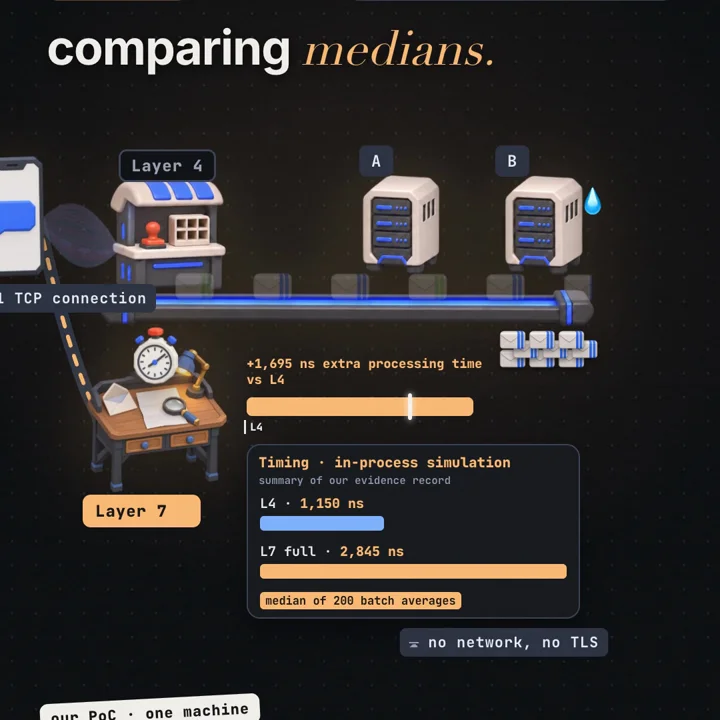
The lab times four paths over the same seeded stream of 2,000 requests on one connection, cut into the same segments: direct to a backend, L4, L7parse (parse and route, forward the original bytes) and L7full (also rebuild the request). Every path includes a backend parse, but the paths are not otherwise identical: L4 delivers arbitrary chunks to one backend parser, L7 delivers complete requests to two backend parsers, and the rebuild adds a header the backend must also parse. The numbers below are differences between whole simulated paths; they include changes in chunking, allocation, routing and downstream parsing. Each path gets 40 untimed warmup rounds and 200 timed rounds in rotating order; a round is elapsed performance.now() time divided by 2,000. Medians of those 200 batch averages, from the recorded run on 2026-11-04 (results.json, timing):
path        median ns per request
direct            1,105
L4                1,150
L7 full           2,845      (p90 of the 200 batch averages: 3,013)

L4 minus direct          1,150 - 1,105 =    45 ns
L7 full minus L4         2,845 - 1,150 = 1,695 ns   about 1.7 µs
  L7parse minus L4                       1,208 ns
  L7full minus L7parse                     487 ns
  check                  1,208 + 487   = 1,695 ns
ratio                    2,845 / 1,150 ≈ 2.47x
Splitting them into parsing, routing and rebuilding costs would need a controlled benchmark that holds chunking, allocation and backend work fixed, for example timing each balancer against a sink that does not parse.
Timings move between runs; routing does not. A re-run on 2026-11-05 on the same machine gave 1,097 ns for layer 4, 2,722 ns for full layer 7 and a difference of 1,625 ns (1,169 for L7parse minus L4, 456 for L7full minus L7parse), with identical routing counts. JIT warmup, garbage collection and CPU frequency shift nanosecond measurements by a few percent.
This is processing time of our JavaScript code on one Apple M2 Pro under Node v22.13.1, in one process, with no network hops, handshakes, backend waits or responses (a real layer 7 proxy parses those too). Production proxies are written in C, C++ or Rust and IPVS runs in the kernel, so their absolute numbers differ. The shape carries over: layer 4 usually schedules once per flow but still incurs forwarding work per packet or byte. Layer 7 additionally parses application messages and can schedule per request. As arithmetic only, 1,695 ns is 1.695 seconds of processing per million requests in this code. A network round trip inside a data center is typically tens to hundreds of microseconds. The lab measures neither networking nor TLS, so it says nothing about how either compares with parsing on a real proxy.
Worked example
The video's scenario: your app holds one kept-open connection and sends 1,000 requests through a balancer in front of servers A and B. The lab (labs/sd-17/run.mjs) is an in-process simulation over real HTTP/1.1 bytes; routing repeats exactly for seed 17.
setup (our lab, not production)
  2 backends A, B; no sockets, everything in one Node process
  real HTTP/1.1 GET bytes, cut into 64 to 1,460 byte segments
  L4 = FNV-1a hash of client IP:port, once per connection, bytes copied unread
  L7 = parse every request, round robin, /images/* always to B, rebuild with X-Forwarded-For

test 1: 1,000 requests on 1 kept-open connection
  L4   decisions 1       A 0     B 1,000    busiest 1,000 / 1,000 = 100%
  L7   decisions 1,000   A 500   B 500      busiest   500 / 1,000 =  50%

test 2: 1,000 requests on 50 new connections (20 each)
  L4   A 400 (20 connections x 20)   B 600 (30 x 20)   busiest 60%
  L7   A 500                         B 500             busiest 50%

test 3: 1,000 requests on 50 connections, about 30% /images/* (322 came out)
  L7   images on B 322 / 322 = 100%     totals A 339, B 661 (322 + 339)
  L4   images on B 106 / 322 = 32.9%    totals A 660, B 340 (17 connections on B)

timing (recorded run 2026-11-04, median of 200 batch averages of 2,000 requests)
  L7 full - L4 = 2,845 - 1,150 = 1,695 ns per request   (re-run 2026-11-05: 1,625 ns)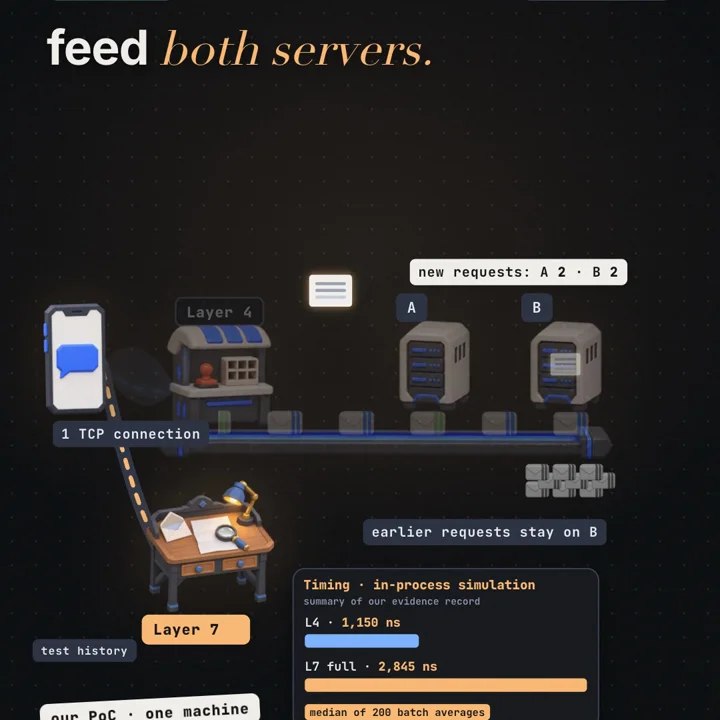
Limits: two backends, GET without bodies, HTTP/1.1 only, no responses or failures, one fixed hash. Another seed could put the single connection on A; the 100% would not change.
Code
First, the lab: one file, Node.js 22 standard library only, no install, no network, a few seconds to run.
# from the repository root
node labs/sd-17/run.mjs
Output of the 2026-11-05 re-run (the final RESULT {...} JSON line left out):
test                         L4 (A/B)      L7 (A/B)
1 kept-open connection       0/1000        500/500
50 new connections           400/600       500/500
mixed /api + /images          660/340      339/661
/images rule followed        32.9%         100%   (322 image requests)
routing decisions (test 1)   1             1000

measured processing time per request, in-process, 200 samples of 2000 requests (median / p90 of samples, ns)
  direct       1056 / 1080
  L4           1097 / 1121
  L7parse      2266 / 2313
  L7full       2722 / 2775
  L4 over direct (copy + lookup)        41 ns
  L7 over L4, total proxy overhead      1625 ns  = parse + route 1169 ns + rebuild 456 ns
What to observe: the routing lines never change, because bytes, segment cuts and hash are seeded. Change manyConnections in CFG and the layer 4 split moves toward even as connections grow. Run twice and the timing block shifts a little. The program's last line says "parse + route" and "rebuild"; read those as L7parse minus L4 and L7full minus L7parse, path differences rather than isolated component costs.
Second, real software. One NGINX instance exposes both layers: port 8081 is a stream (TCP) proxy, port 8082 an http proxy. The stream block sits at the top level of nginx.conf, next to http. Sibling location blocks do not inherit from each other, so the upstream reuse and client IP settings live in the server block (proxy_set_header inheritance, upstream keepalive).
# /etc/nginx/nginx.conf (excerpt)
stream {
    upstream app_tcp {
        hash $remote_addr$remote_port consistent;  # like the lab: one hash per connection
        server 127.0.0.1:9001;                     # server A
        server 127.0.0.1:9002;                     # server B
    }
    server {
        listen 8081;
        proxy_pass app_tcp;                        # bytes copied, HTTP never parsed
    }
}

http {
    upstream app_http {
        server 127.0.0.1:9001;                     # round robin by default
        server 127.0.0.1:9002;
        keepalive 16;                              # idle upstream connections kept per worker
    }
    upstream images {
        server 127.0.0.1:9002;                     # the /images rule: B only
        keepalive 16;
    }
    server {
        listen 8082;
        keepalive_requests 1000;                   # client connection closes after 1,000 requests

        # set once here so both locations inherit them; a location that
        # defines any proxy_set_header of its own inherits none of these
        proxy_http_version 1.1;                    # needed for upstream keepalive
        proxy_set_header Connection "";
        proxy_set_header X-Forwarded-For $proxy_add_x_forwarded_for;

        location /images/ {
            proxy_pass http://images;
        }
        location / {
            proxy_pass http://app_http;            # one decision per request
        }
    }
}
Two tiny backends that keep connections open and report their port, then curl, which reuses one connection for a URL range on the same host:
# backends A on 9001 and B on 9002 (Node's http server keeps connections alive)
node -e 'for (const p of [9001, 9002]) require("http").createServer((q, s) => s.end(`port ${p} ${q.url}\n`)).listen(p)' &

curl -s "http://127.0.0.1:8081/api/[1-10]"        # layer 4: all ten answers from one port
curl -s "http://127.0.0.1:8082/api/[1-10]"        # layer 7: 9001, 9002, 9001, ... alternating
curl -s "http://127.0.0.1:8082/images/p[1-5].jpg" # layer 7 rule: every answer from 9002
What to observe: through 8081 every line shows the same port; a new curl run (new source port) may land on the other one, never mid-run. Through 8082 the ports alternate and /images/ always answers from 9002. With -v, curl prints Re-using existing connection, proving the spread on 8082 happened inside one TCP connection.
Failure modes and edge cases
Hot backend from long-lived connections. Behind layer 4, HTTP/2 or gRPC clients leave some backends queuing while others idle; waiting grows sharply near full load, as in fast for you, slow for a million. Detect it by comparing per-backend request rate, in-flight requests, CPU and p99 latency; connection counts can look even while load is not. Fix with per-request or client-side balancing, or graceful connection rotation.
Idle servers after scale-out. New backends get only new connections. Detect it as a near-zero request rate on new instances while old ones stay hot. Fix with connection lifetime limits at the server or client.
Drains that never finish. Detect it as active connections on a drained backend that stay flat instead of falling. Set a deadline, and send Connection: close or GOAWAY during shutdown.
Connection table or pool exhaustion. A full IPVS table, or an Envoy cluster at its circuit-breaker limits, shows up as new connections dropped or requests answered 503 quickly. Detect it with entry counts against memory at layer 4, and upstream_rq_pending_overflow, upstream_cx_overflow and upstream_cx_connect_fail at layer 7. Size limits with the in-flight arithmetic above.
Lost client IP. Behind any proxy the backend's peer is the proxy, so rate limits and logs see one client. Detect it as one or a few source IPs dominating backend logs. Use the PROXY protocol at layer 4 or X-Forwarded-For at layer 7, trusting only your own proxies.
Request smuggling. If proxy and backend parse the same bytes differently, for example both Content-Length and Transfer-Encoding: chunked, an attacker can hide a second request inside the first. RFC 9112 (sections 6.3 and 11.2) defines how to treat such messages. Patch both sides and reject ambiguous framing at the edge. Detect attempts by logging and alerting on requests rejected for framing errors (400s from the proxy).
The proxy tier as bottleneck. Every request crosses layer 7, so its capacity, TLS cost and uptime are in series with everything behind it; two servers in a row fail more often than one. Detect it as proxy CPU near saturation or proxy-added latency (proxy total time minus upstream time) rising with load. Run several instances.
Duplicate writes from retries. A layer 7 proxy can retry a request on another backend, but a failure after the request was sent is ambiguous: the first backend may have committed the write before its response was lost, so a retry can charge a card twice or create two orders. NGINX guards against this by default: once a POST, LOCK or PATCH request has been sent upstream, it is not passed to the next server unless proxy_next_upstream includes non_idempotent (proxy_next_upstream). To retry writes safely, have clients send an idempotency key and have the backend store it with the result, returning the stored result for a repeat instead of applying it again. Bound retries by count and by the request's deadline (NGINX proxy_next_upstream_tries and proxy_next_upstream_timeout; Envoy num_retries and per_try_timeout under the route timeout), so a slow backend does not turn one request into several that all miss the deadline. Detect trouble by monitoring attempts per original request (Envoy upstream_rq_retry against upstream_rq_total) and repeated idempotency keys at the backend; a rising ratio during an incident means retries are adding load to an already struggling pool.
Upstream connection churn. Without upstream keep-alive, a layer 7 proxy opens a backend connection per request, paying handshakes and burning ephemeral ports. Detect it as a new-upstream-connection rate close to the request rate, a growing TIME_WAIT count (ss -s) and EADDRNOTAVAIL connect errors. Configure pools.
Trade-offs
| Option | Good for | Costs you | Use when |
|---|---|---|---|
| Layer 4, kernel packet forwarding (IPVS NAT or DSR) | Very high packet and connection rates, any TCP or UDP protocol, DSR for large responses | No view of requests; one decision per connection; DSR needs network setup on every backend | A front tier spreading connections over proxies, or non-HTTP traffic |
| Layer 4 TCP proxy (NGINX stream, HAProxy mode tcp, Envoy TCP proxy) | Databases, message brokers, TLS passthrough with SNI routing | Two TCP connections; client IP needs the PROXY protocol; still one decision per connection | Protocols you do not want parsed, or certificates must stay on the backends |
| Layer 7 proxy (NGINX http, HAProxy mode http, Envoy HTTP) | Per-request balancing, path and header routing, retries of idempotent requests, per-route metrics, gentle drains | Parsing and rewriting every request (whole path 1,695 ns per request slower than layer 4 in our lab); more config; a parser to keep patched | HTTP APIs, HTTP/2 and gRPC, frequent deploys |
| Layer 7 with TLS termination | Reading HTTPS, central certificates, HTTP/2 to clients | Handshake and crypto cost on the proxy; private keys on the proxy tier | Public HTTPS traffic that needs content routing |
| Client-side balancing (gRPC) | No proxy hop, per-call spread | Every client needs service discovery and health logic | Internal service-to-service calls you control |
| Layer 4 plus capped connection life | Keeping a cheap layer 4 tier with fresher spreads | More handshakes; imbalance between reconnects | HTTP/1.1 keep-alive traffic when layer 7 is not an option |
Common mistakes
X-Forwarded-For entry. Instead: trust only addresses added by your own proxies.Connection: close or GOAWAY and set a deadline.In an interview
- Clarify: which protocols (HTTP/1.1, HTTP/2, gRPC, raw TCP), whether you need path or header routing, where TLS ends, how long connections live.
- Assumptions: for example, HTTPS clients on HTTP/2, internal gRPC, several deploys a day.
- Structure: a layer 4 tier spreading connections over layer 7 proxies, which terminate TLS and spread requests over service pools.
- Deep dive: connection table (packet forwarders) or paired sockets (TCP proxies) versus per-request parsing; why multiplexing skews per-connection decisions.
- Trade-offs: layer 7 can retry, but only idempotent requests or writes carrying idempotency keys, within the request deadline; it pays parsing and rewriting per request, plus TLS handshakes per connection and crypto per byte when it terminates TLS; layer 4 is cheap but blind. Size the connection table and upstream pools with rate × hold time.
- Wrap up: drains with GOAWAY and deadlines, client IP forwarding, per-backend request rate as the balance metric.
A layer 4 balancer sees only addresses and ports. It picks a backend when a connection opens and sends every later byte the same way: a kernel forwarder such as Linux IPVS keeps a connection table keyed by the 5-tuple and rewrites each packet, while a TCP proxy pairs the accepted client socket with an upstream socket and relays the byte stream. A layer 7 balancer terminates the connection, usually TLS too, parses each HTTP request and picks a backend per request, so it can route by path, add X-Forwarded-For and retry, though only idempotent requests or writes with idempotency keys, since a backend may have committed a write whose response was lost. With persistent connections the difference is large: in a small lab, 1,000 requests on one kept-open connection all went to one server under layer 4 and split 500 and 500 under layer 7. HTTP/2 and gRPC put even more on one connection, so I balance them at layer 7 or in the client, knowing a long-lived stream stays on one backend even then. In that lab the layer 7 path took about 1.7 µs more per request than layer 4, with no TLS or network measured, so I would measure on the real proxy and typically run a layer 4 tier in front of a layer 7 tier.
Practice
BeginnerWhat does a layer 4 balancer use to choose a backend?
The connection's addresses and ports (the 5-tuple), plus its own state such as connection counts. It never parses the HTTP inside.
Intermediate1,000 requests on one kept-open connection all reached server B. Why, and what changes with layer 7?
Layer 4 decided once, from a hash of IP and port, and every later byte followed. Layer 7 decides per request; with round robin that gave 500 and 500.
IntermediateWhy can a layer 4 balancer not find request boundaries without becoming layer 7?
Segments are cut without regard to messages. Finding where a request ends means parsing HTTP framing (headers, then Content-Length or chunked body), which is layer 7 work.
IntermediateWhy did layer 4 put 32.9% of image requests on B?
It never saw paths. Its hash sent 17 of 50 connections to B, and 106 of the 322 image requests rode those connections: 106 / 322 = 32.9%.
AdvancedFour gRPC client pods call twenty server pods through layer 4. What happens, and how do you fix it?
Assuming exactly one backend TCP connection per client pod, four pods can reach at most four backends concurrently. Balance per stream with a layer 7 proxy such as Envoy or with client-side round robin; capping connection life helps only partly. Long-lived streaming RPCs stay pinned even behind layer 7, so partition at the application level or reconnect streams in a coordinated way.
AdvancedHow do you drain a backend holding hour-long keep-alive connections behind layer 4?
Stop new connections (IPVS weight 0, HAProxy drain state), have the application send Connection: close or GOAWAY so clients reconnect elsewhere, and enforce a hard deadline.
AdvancedFull layer 7 took 2,845 ns per request and layer 4 1,150 ns. What does the difference mean, and what does it leave out?
2,845 minus 1,150 = 1,695 ns, a difference between whole simulated paths: chunking, allocation, routing and downstream parsing all change between them, so it is not a pure balancer cost. In-process JavaScript on one machine, no network, TLS or responses; a re-run gave 1,625 ns.
Cheat sheet
| Term or formula | Meaning |
|---|---|
| Layer 4 balancer | Decides per connection from addresses and ports; never parses HTTP |
| Layer 7 balancer | Terminates the connection, parses HTTP, decides per request |
| 5-tuple | Source IP, source port, destination IP, destination port, protocol |
| Connection table | Packet forwarders (IPVS): 5-tuple to backend; miss means decide, hit means follow. TCP proxies pair sockets instead |
| NAT vs DSR | Replies return through the balancer vs straight from the backend |
| TCP proxy | Two TCP connections, bytes copied; PROXY protocol carries the client IP |
| Keep-alive | Many HTTP/1.1 requests per connection, the default |
| HTTP/2 multiplexing | Many concurrent streams on one connection per origin |
| Load on a server at layer 4 | Sum of requests over its connections, not the connection count |
| Share spread over n connections | Standard deviation √(0.25 / n); 50 connections ≈ 7.1 points |
| X-Forwarded-For, Forwarded | Client IP in a header; trust only your own proxies |
| Draining | No new work, finish old; Connection: close or GOAWAY plus a deadline |
| Items held (Little's law) | Rate × hold time; 100,000 req/s × 0.050 s = 5,000 in flight |
| Our lab difference | 2,845 - 1,150 = 1,695 ns per request between whole simulated paths |
Further reading
- NGINX docs, TCP and UDP load balancing: the
streammodule as a layer 4 proxy, its methods and health checks. - NGINX docs, HTTP load balancing: the layer 7 side: per-request methods, weights, session persistence.
- RFC 9112, HTTP/1.1: message framing (section 6), persistent connections and closing (section 9), smuggling notes (section 11).
- RFC 9113, HTTP/2: streams, one connection per origin (section 9.1) and GOAWAY (section 6.8).
- HAProxy configuration manual, mode:
mode tcpvsmode http; follow on tobalance,http-reuseandprefer-last-server. - Envoy docs, HTTP connection management: per-request routing for HTTP/1.1, HTTP/2 and HTTP/3; see also its TCP proxy and connection pooling pages.
- Linux Virtual Server, IPVS: the in-kernel layer 4 balancer, its schedulers, and NAT, tunneling and direct routing.
This article describes general layer 4 and layer 7 load balancing patterns, public documentation for NGINX, HAProxy, Envoy and Linux IPVS, and our own small in-process lab. It does not describe any company's private systems, and the diagrams are conceptual. The routing counts are deterministic for seed 17; the timings are processing time of our JavaScript code on one machine, with no network, TLS or responses, and they vary from run to run.
Frequently asked questions
What is the difference between layer 4 and layer 7 load balancing?
A layer 4 balancer works on TCP or UDP: it sees addresses and ports, picks a server when a connection opens, and forwards that connection's bytes without reading them. A layer 7 balancer ends the client's connection, parses each HTTP request, and picks a server per request using the path, headers or cookies. Layer 4 is cheaper per byte; layer 7 can route by content and spread the requests inside one connection.
Why did one server get all 1,000 requests?
Because all 1,000 requests travelled on one kept-open TCP connection and the balancer was layer 4. It made one decision when the connection opened (server B, from a hash of the client IP and port) and every later byte followed that decision. In our lab a layer 7 balancer on the same connection made 1,000 decisions and sent 500 to each server.
Is layer 7 load balancing slower than layer 4?
It does more work per request: parsing, matching rules and writing a new upstream request. In our in-process JavaScript lab the full layer 7 path took 2,845 ns per request against 1,150 ns for layer 4, 1,695 ns more processing time at the median. That excludes network, TLS and responses, and it is a difference between whole simulated paths, not a measurement of NGINX, HAProxy or Envoy.
Do I need a layer 7 balancer for HTTP/2 or gRPC?
Usually yes, or client-side balancing. HTTP/2 puts many concurrent requests on one connection per origin, and gRPC clients keep that connection open for a long time, so a layer 4 balancer pins all of a client's calls to one server. A layer 7 proxy such as Envoy, NGINX with grpc_pass or HAProxy in mode http balances each stream.
Can a layer 4 load balancer route by URL path?
No. The path is inside the HTTP request, which a layer 4 balancer never parses, and with HTTPS it is also encrypted. A layer 4 balancer can route on addresses, ports and, with TLS passthrough, the server name from the TLS ClientHello (SNI). Path, header and cookie rules need layer 7.
Were these numbers measured on real load balancers?
No. The routing counts come from our own JavaScript code over real HTTP/1.1 bytes with a fixed seed (17), so they repeat exactly. The timings are real measurements of that code on one Apple M2 Pro with Node v22.13.1, in-process, with no network or TLS. They show the shape of the effect, not numbers for NGINX, HAProxy, Envoy or IPVS.
Sources
- NGINX docs: TCP and UDP load balancingdocs.nginx.com
- NGINX docs: HTTP load balancingdocs.nginx.com
- RFC 9112: HTTP/1.1 (message framing and persistent connections)rfc-editor.org
- RFC 9113: HTTP/2 (streams, multiplexing, GOAWAY)rfc-editor.org
- HAProxy configuration manual: modedocs.haproxy.org
- Envoy docs: HTTP connection managementenvoyproxy.io
- Linux Virtual Server: IPVS softwarelinuxvirtualserver.org

Written by a software engineer and system architect with 10+ years of building production web, payment, ticketing and accounting systems in Japan and Nepal. About us