What happens when you type google.com? DNS in depth
What happens when you type google.com? DNS walks root, .com and name server, then caches. Our model: 37 ms cold, 7.1 ms resolver hit, 0.05 ms OS cache.
 Video · 60 secondsWatch the short versionSame diagrams and numbers. Tap to play.
In this lesson you will learn
- How a recursive resolver walks from the root to the authoritative name server using referrals
- Where DNS answers are cached (browser, OS, resolver) and how TTL and negative caching decide how long they live
- How to estimate lookup time from round trips, and why the slowest hop is usually the domain's own name server
Builds on Lesson 12: Replication: primary and read replicas 25 min read + 60 s video Next: Load balancer vs reverse proxy

Drafted with AI assistance, then checked and edited by a human engineer · How we write
Short answer
Before a browser can connect, DNS turns the name into an IP address. With nothing cached, a recursive resolver asks a root server, then the .com server, then the domain's own name server. In our model (assumed delays), that cold walk took a median 37 ms; a far name server pushed it to 142.1 ms. A resolver cache hit took 7.1 ms and the OS cache 0.05 ms, so caches, ruled by TTL, do most of the work.
| Cold lookup in our model | Median 37 ms (p95 47.9) for the modeled google.com: you to resolver 7.9 ms, root 6.3 ms, .com 14.6 ms, authoritative 8.9 ms on average |
|---|---|
| A far name server | The modeled a-small-shop.com, with one name server assumed 110 ms away, took a median 142.1 ms cold; its last hop was 79% of the lookup |
| Resolver cache hit | Median 7.1 ms: one round trip from you to the resolver |
| OS cache hit | Median 0.05 ms: the answer never leaves the machine |
| Answer expired, pointers still cached | Median 16 ms: the resolver skips root and .com and asks the name server once |
| TTL | Every record carries a time to live in seconds; caches may reuse it that long. After expiry, ordinary cache reuse stops and a later query normally triggers resolution, subject to serve-stale settings (RFC 1034 section 3.2.1, RFC 8767) |
| Setup | Our simulation, labs/sd-13: virtual clock, seed 1313, 20 runs per case, assumed round trips resembling a Tokyo fiber line, no packet loss. Not a measurement of real DNS |
A browser cannot connect to a name, only to an IP address. A connection needs an address, obtained from cached data, local configuration, or DNS resolution, and the cost of a resolution is set by how many servers must be asked and how far away they are. Caches at the resolver and on your own machine remove most of that cost, for as long as each record's TTL allows. The classic interview version: what happens when you type google.com and press Enter, before the first byte of the page arrives?
Prerequisites
Round trip time. A round trip (RTT) is the time for a small message to reach a server and for the reply to come back. A question and its answer cost one RTT, so a protocol that needs four questions in a row costs about four RTTs, no matter how fast the servers are. The same idea, that waiting adds up along a path, is behind why a fast server can still feel slow when it is crowded.
Caching. A cache keeps a copy of an answer close to whoever needs it, so the next request skips the slow trip. Every cache needs a rule for when its copy is too old; in DNS that rule is the TTL. Read replicas in one database writes, ten read make the same trade: copies close to readers, a little staleness allowed.
IP addresses. Routers move packets by numeric address (four numbers for IPv4, such as 192.0.2.10, or a longer IPv6 address). Names exist for people. DNS is the distributed phone book that maps one to the other.
Definitions
DNS (Domain Name System): a distributed, hierarchical database that maps domain names to records such as IP addresses (A for IPv4, AAAA for IPv6), mail servers (MX) and aliases (CNAME).
Stub resolver: the small DNS client in your operating system. It does not walk the hierarchy itself; it sends one recursive query to a configured resolver and waits for the final answer. A stub does not necessarily cache: plain glibc on Linux has no cache unless nscd or systemd-resolved is running, while macOS (mDNSResponder) and Windows (DNS Client) cache by default.
Recursive resolver: a server that answers clients by asking other servers on their behalf, following referrals until it reaches an answer, and caching everything it learns. Your ISP's resolver and public resolvers such as 1.1.1.1 or 8.8.8.8 are recursive resolvers.
Authoritative name server: a server that holds the records of a zone (for example google.com) and answers for that zone from its own data. It does not ask anyone else.
Referral: an answer that says "I do not have this, but these name servers are responsible for that part of the name", given as NS records plus, often, their addresses (glue records). In the video we called these pointers.
Root and TLD servers: the root servers know which servers handle each top-level domain; the TLD servers (for .com, .org, .np and so on) know which name servers handle each domain registered under them.
TTL (time to live): a number of seconds attached to every record. A cache may reuse the record until the TTL runs out. After expiry, ordinary cache reuse stops; a subsequent query normally triggers resolution, subject to configured serve-stale behaviour (RFC 8767). Expiry by itself sends nothing.
Negative caching: caching the fact that a name does not exist (NXDOMAIN) or has no record of the asked type, for a time taken from the zone's SOA record (RFC 2308).
What happens when you type google.com: the walk from root to answer
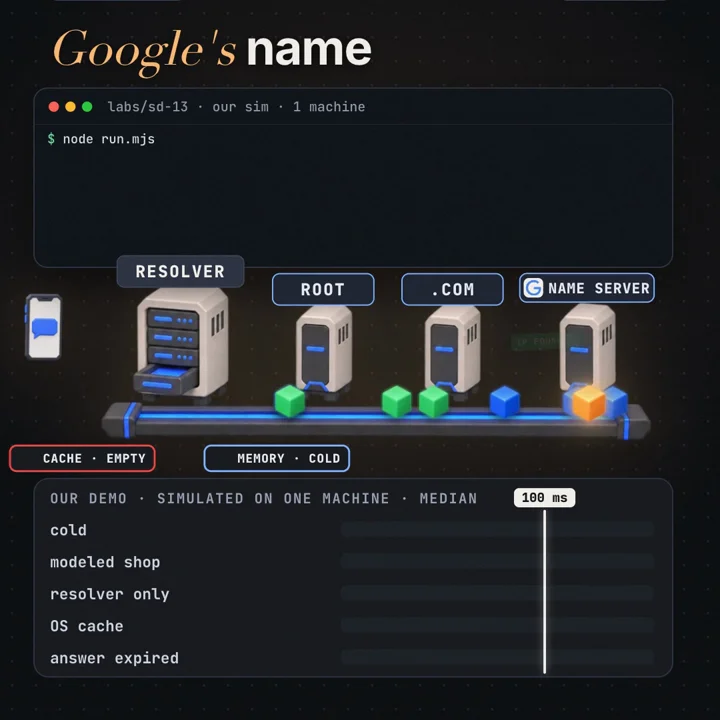
Here is a simplified classic UDP resolution path with OS caching enabled, when nothing is cached anywhere. Other paths exist: a browser with its own DNS client and DNS over HTTPS (DoH) enabled sends the query straight to its chosen resolver over HTTPS and bypasses the OS resolver, and a hosts-file entry or enterprise policy can answer before any DNS packet is sent. Names are read right to left: google.com. really ends in an empty label, the root.
- Browser. The browser checks its own small host cache. Miss.
- Operating system. The browser calls the OS (for example
getaddrinfo). The OS checks its cache and the hosts file. Miss. The stub resolver sends one UDP packet to port 53 of the configured recursive resolver: "A record for google.com, please, and do the recursion for me" (the RD, recursion desired, flag). - Resolver to root. A classic resolver asks a root server for the full name, google.com. A resolver doing QNAME minimisation (RFC 9156, on by default in Unbound) sends only what the root needs:
com. NS. Either way the root does not have the answer, but it knows who runs .com, and replies with a referral: the .com name servers and their addresses. - Resolver to .com. The resolver asks a .com server (a minimising resolver asks for
google.com. NS). It replies with another referral: google.com is served by these name servers (ns1.google.com and others), with glue addresses. - Resolver to the authoritative server. The resolver asks one of Google's name servers. This time the reply is an answer: the A record with an IP address and a TTL.
- Back down. The resolver caches the answer and both referrals, then answers the stub. The OS caches the answer, the browser caches it, and only now can the browser start a connection.
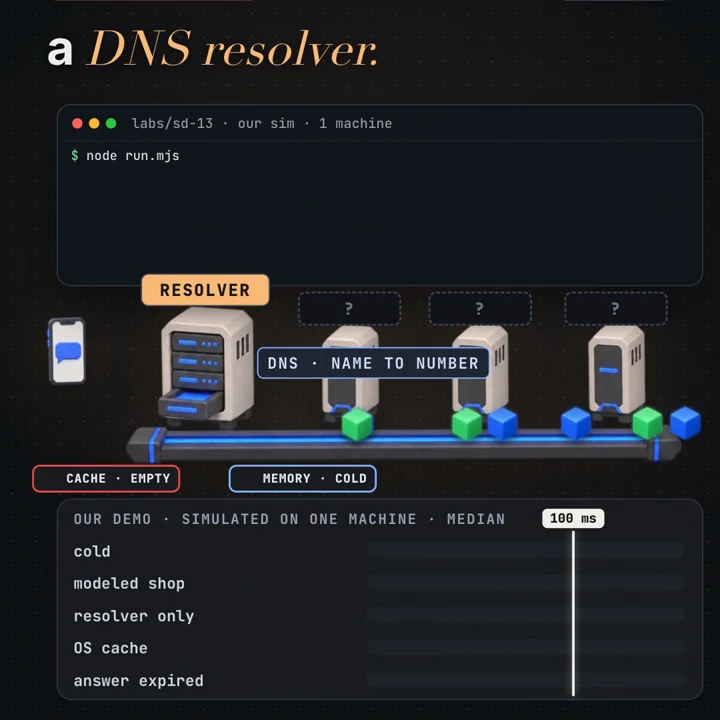
The resolver does all the work. Every arrow in steps 3 to 5 starts at the resolver and every reply returns to it (RFC 1034, section 5.3.3). The root server does not forward the question to .com; it only says where to go next. This is called iterative resolution, and it is why root servers can serve the whole internet: each query to them is tiny and stateless, and resolvers cache their referrals for a long time (the .com delegation has a TTL of two days).
How long does a lookup take?
Because each step waits for the previous reply, the cold lookup time is close to a sum of round trips:
cold lookup ≈ RTT(you → resolver) + RTT(resolver → root)
            + RTT(resolver → TLD) + RTT(resolver → authoritative)
            + resolver processing
The first term is paid by every lookup that leaves your machine. The other three are paid only for what the resolver does not have cached. In practice the root term almost never appears: busy resolvers have the root and TLD referrals cached nearly all the time, and many use a local copy of the root zone (RFC 8806). So the cost usually comes down to whether the answer is cached and, if it is not, how far away the domain's own name server is.
We built a small model to see the shape. Every hop costs an assumed round trip with seeded jitter (plus or minus 15%, with an 8% chance of a slow spike), on a virtual clock, 20 runs per case. The assumed delays resemble a home fiber line in Tokyo: 7 ms to the resolver, 6 ms to root, 14 ms to .com, 9 ms to the modeled google.com name servers. We chose these delays; the model does not measure them.
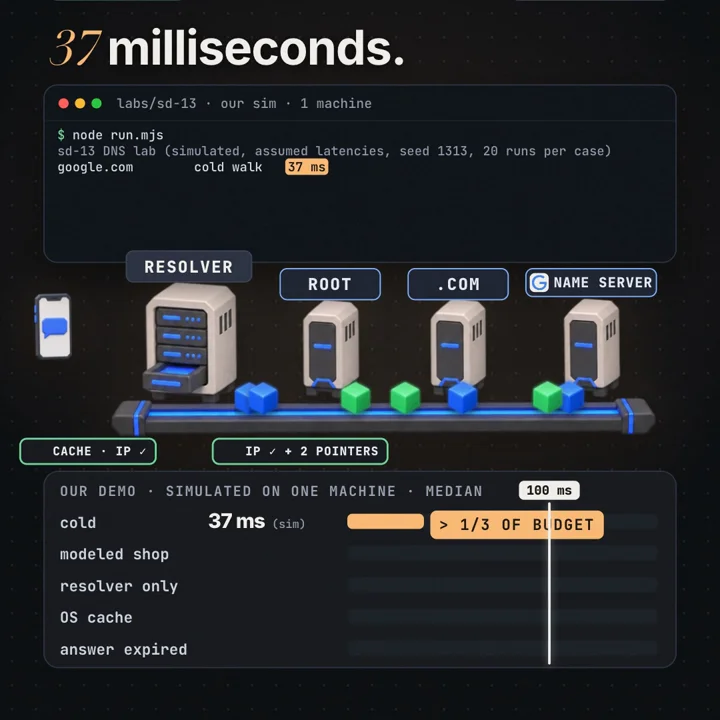
| Hop (cold walk, modeled google.com) | Average time | Share |
|---|---|---|
| you → resolver | 7.9 ms | 21% |
| resolver → root | 6.3 ms | 17% |
| resolver → .com TLD | 14.6 ms | 38% |
| resolver → google.com authoritative | 8.9 ms | 23% |
| median total | 37 ms |
For the modeled google.com the biggest hop is .com, because we assumed Google's name servers are close (9 ms) and the .com server a little further (14 ms). Change the assumption and the winner changes. The modeled wikipedia.org (name servers assumed 35 ms away) took a median 69.4 ms cold, with the authoritative hop at 47%. A made-up a-small-shop.com, with one name server assumed 110 ms away, took 142.1 ms, past our 100 ms budget, and its last hop was 79% of the lookup.
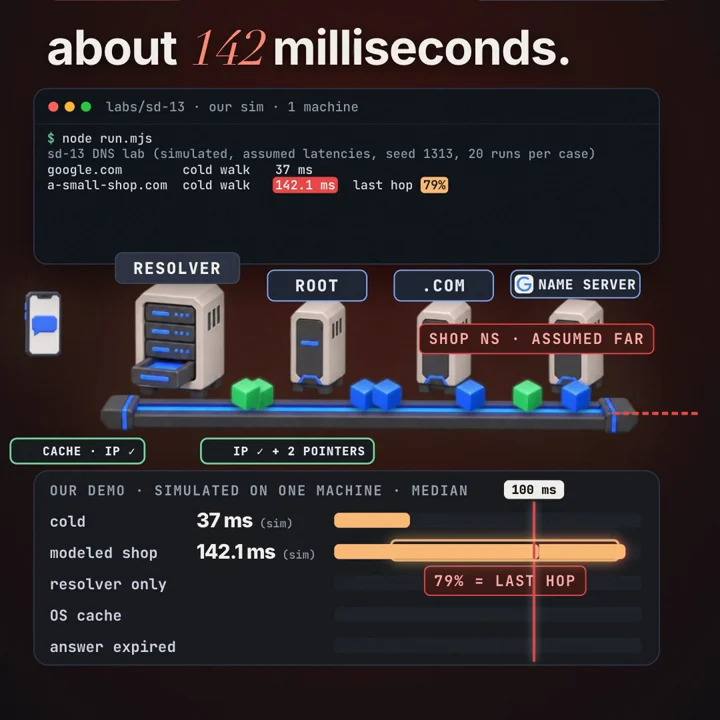
If you run a domain, the last hop is the one you control. Use several name servers in different networks, or an anycast DNS provider, so that the authoritative answer is never far from any resolver. You do not control the root or the TLD, and you do not need to, because resolvers cache them.
Where are answers cached?
There are usually four caches between you and the authoritative server, and each one removes more of the walk.
| Cache | Lives in | Typical behaviour | Cost of a hit in our model |
|---|---|---|---|
| Browser host cache | the browser process | small, short lived (often around a minute), cleared when the browser restarts | not modeled |
| OS cache (if present) | systemd-resolved, mDNSResponder, the Windows DNS Client service; none for plain glibc | shared by all apps, follows TTLs | 0.05 ms |
| Recursive resolver | your router, ISP or a public resolver | shared by thousands of users, so popular names are almost always warm | 7.1 ms |
| Referral cache | inside the resolver | NS records for TLDs and domains, long TTLs | turns a cold walk into one hop |
The resolver cache is the big one because it is shared. If anyone using your ISP's resolver looked up google.com in the last few minutes, your lookup costs one round trip to the resolver: 7.1 ms in our model, against 37 ms cold. The OS cache is even better: the answer never leaves your machine, and the cost is a local call, 0.05 ms in our model (the model charges a small fixed amount; real numbers depend on the OS).
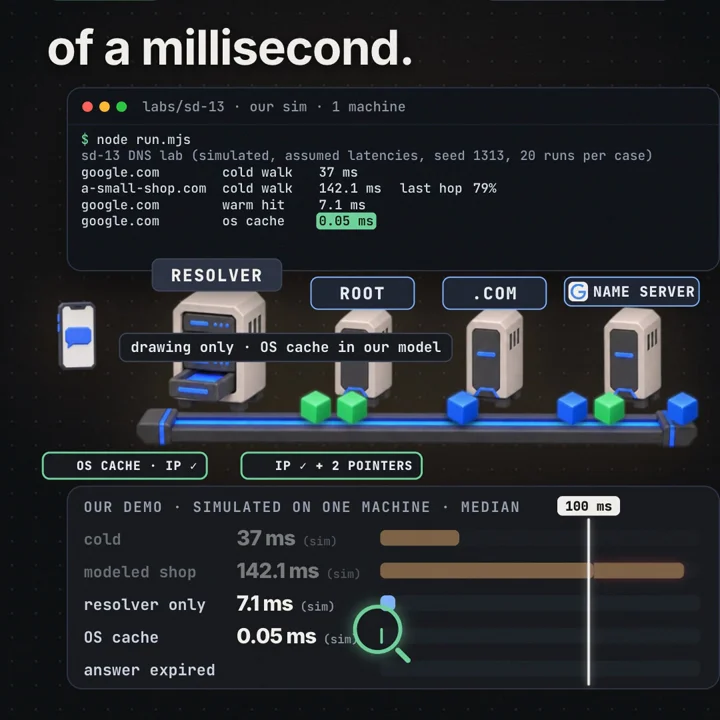
In the model, the resolver cache made the shop lookup 142.1 / 7.1 ≈ 20 times cheaper, and the OS cache cut the resolver hit by another factor of about 140. That is why the first visit to an obscure site can feel slower than every later one.
TTL, expiry and negative caching
Every record has its own TTL, and they expire independently. That gives a middle case the video showed: the answer has expired (in the OS and at the resolver) but the referrals have not. The resolver still knows who serves google.com, so it skips root and .com and asks the authoritative server once. In our model that cost a median 16 ms: you to resolver plus one hop, between the cold 37 ms and the warm 7.1 ms.
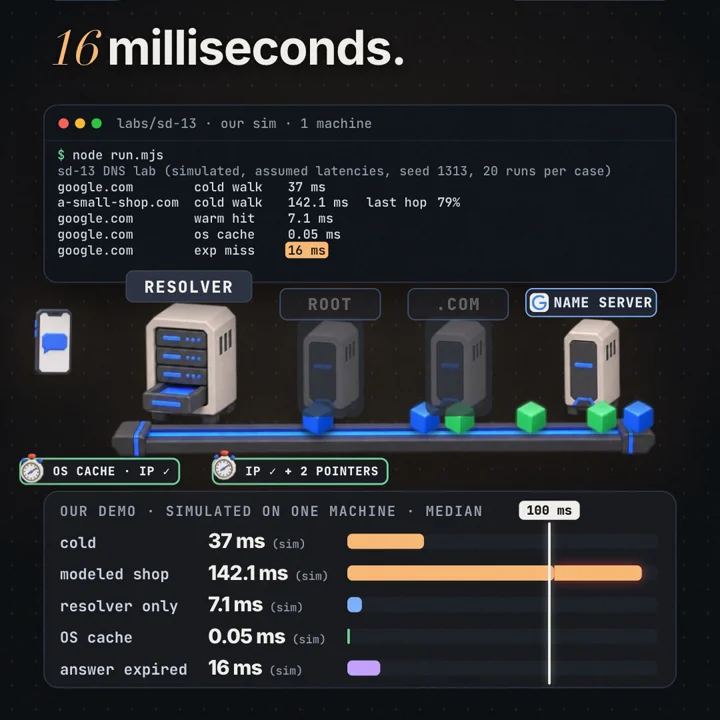
How domain owners pick TTLs:
- Long TTL (hours to a day): fewer queries, faster typical lookups, more resilience if the authoritative servers have trouble. The cost: a change takes up to one TTL to reach everyone.
- Short TTL (30 to 300 seconds): fast changes, used for failover and traffic steering. The cost: more lookups pay the uncached path, and more load on your name servers. Global load balancing by DNS, which steers users to different addresses, depends on short TTLs; the failover article explains why DNS alone is a slow way to move traffic.
- Planned move: lower the TTL a full old TTL before the change, switch, then raise it again.
Some resolvers serve stale answers when the authoritative servers cannot be reached (RFC 8767), and some refresh popular records just before they expire (prefetching), so a busy name is rarely cold.
Negative answers are cached too. If you ask for a name that does not exist, the authoritative server replies NXDOMAIN with the zone's SOA record in the authority section, and the resolver caches the "does not exist" for (RFC 2308, section 5):
negative TTL = min(SOA TTL, SOA.MINIMUM)
example: SOA record TTL 3600, MINIMUM field 300  →  min(3600, 300) = 300 seconds
The two kinds of negative answer are keyed differently (RFC 2308, sections 3 and 5). NXDOMAIN means the name has no records of any type, so it is cached by name and class: after nope.example.com returns NXDOMAIN, a query for its AAAA is also answered from cache. NODATA (NOERROR with an empty answer) means the name exists but not with that type, so it is cached by name, class and type: "no AAAA for example.com" says nothing about its A record.
Our model treated a random subdomain miss like the expired case: one hop, 15.9 ms. A flood of queries for millions of random names (x7f3q.example.com, k2p9a.example.com, ...) bypasses ordinary exact-name negative caching, because every name is new, and those misses land on the authoritative servers; this is called a random subdomain or water torture attack.
DNSSEC changes that. A signed zone proves non-existence with NSEC (or NSEC3) records that say "no names exist between a.example.com and m.example.com". A validating resolver that has such a proof cached can synthesize NXDOMAIN for any name inside the range without asking anyone (aggressive use of the DNSSEC-validated cache, RFC 8198; aggressive-nsec: yes in Unbound). The limits: the zone must be signed and the resolver must validate; NSEC3 hashes names, so a cached range covers hash space, and opt-out ranges cannot prove NXDOMAIN; and zones signed on the fly with minimally covering NSEC records (each proof covers only the queried name) give the resolver nothing to reuse. Queries not covered by cached denial proofs may therefore still require authoritative lookups.
Inside a real resolver: Unbound
The steps above are the protocol view. To see how a production resolver implements them, look at Unbound, the open source validating resolver from NLnet Labs (also the default resolver in FreeBSD and OPNsense). Its design notes describe a small set of parts.
Modules in a chain. A query passes through a list of modules set by module-config: "validator iterator". The iterator does the walk: it picks a server, sends the query, parses referrals and follows them. The validator sits in front of it and does DNSSEC: on the way out it asks the iterator for the DNSKEY and DS records it needs, and on the way back it checks signatures and marks the answer secure, insecure or bogus. A bogus answer becomes SERVFAIL for the client. Keeping them separate means the iterator never trusts or rejects data on cryptographic grounds, and the validator never deals with timeouts or server choice.
Two caches. Unbound keeps an RRset cache and a message cache:
- The RRset cache stores record sets keyed by (owner name, type, class), for example (
google.com., A, IN), with the TTL, the DNSSEC status and a trust level (an authoritative answer outranks glue from a referral, following the ranking in RFC 2181, section 5.4.1). Size:rrset-cache-size. - The message cache stores whole replies keyed by the question (name, type, class plus flags such as CD), but holds references into the RRset cache rather than copies. A cached message is usable only while every RRset it points to is still valid, and its TTL is the smallest of theirs. Size:
msg-cache-size. NLnet Labs suggests making the RRset cache about twice the message cache, because many messages share RRsets (every name under google.com shares the same NS RRset).
This split is why the "answer expired, referral still cached" case in our model is cheap: the message for google.com A is gone, but the RRset for google.com NS and the glue A records of its name servers are still in the RRset cache, so the iterator starts at Google's name servers.
Glue acceptance. Every reply goes through a scrubber before anything is cached. Records outside the bailiwick of the server that sent them (a .com server volunteering an address for a name under .net, say) are dropped, which blocks the classic cache poisoning trick of slipping extra records into a referral. Two options control glue, and they do different things (unbound.conf manual). harden-glue: yes (the default) trusts glue only if it lies within the responding server's authority. harden-unverified-glue (default no) is the stricter check: when enabled, glue outside the delegated zone, including sibling-zone glue, is not trusted as is and is verified by looking the records up. Glue is stored at low trust and replaced when an authoritative answer for the same RRset arrives.
Choosing which name server to ask. Unbound keeps an infrastructure cache per server address and zone with a smoothed RTT, a retransmit timeout and EDNS capability, kept for infra-host-ttl (900 seconds by default). Unbound randomly selects among eligible servers within a 400 ms band using round-trip timeout estimates, which fold in the measured RTT, its variance and any backoff. Unknown addresses start with a 376 ms timeout. Repeated timeouts increase the estimate and eventually trigger probing and blocking (timeout and server selection). The randomness spreads load and makes spoofing harder. The band is wide: a server estimated at 300 ms is still within 400 ms of one at 9 ms, so it stays eligible; only servers whose estimate is more than 400 ms above the best one drop out of rotation.
Reading its statistics. unbound-control stats_noreset prints counters without zeroing them (plain stats resets them). Some numbers need extended-statistics: yes. An illustrative excerpt (made up for this article, not our lab):
$ unbound-control stats_noreset | grep -E 'total\.(num|recursion|requestlist)|answer\.(rcode|secure|bogus)|aggressive'
total.num.queries=1000000
total.num.cachehits=962000
total.num.cachemiss=38000
total.num.prefetch=9500
total.num.expired=0
total.num.recursivereplies=38000
total.requestlist.exceeded=0
total.recursion.time.avg=0.041000
total.recursion.time.median=0.028
num.answer.rcode.NXDOMAIN=21000
num.answer.rcode.SERVFAIL=1200
num.answer.secure=410000
num.answer.bogus=40
num.query.aggressive.NXDOMAIN=3100
How to read it:
- Cache hit ratio = cachehits / queries = 962,000 / 1,000,000 = 96.2%. A drop alone does not prove the cache is too small. Compare
mem.cache.messageandmem.cache.rrset(bytes) with the configuredmsg-cache-sizeandrrset-cache-sizebudgets (the*.cache.countcounters are entry counts, not bytes), look at query name diversity (a flood of unique names lowers the ratio at any size), and test whether a larger cache raises the hit rate under comparable traffic (extended statistics). - Recursion time counts only queries that missed (
cachemiss), so it is the cost of the walk, not the client's experience. Average added latency per client query ≈ miss ratio × recursion avg = 0.038 × 41 ms ≈ 1.6 ms. An average far above the median (41 vs 28 ms here) means a slow tail: distant or timing-out authoritative servers. - Prefetch counts refreshes started when a cached entry was hit in the last 10% of its TTL (
prefetch: yes); those hits were served from cache while the refresh ran in the background. - expired counts stale answers served (
serve-expired: yes); with immediate stale serving, expired entries can be returned while healthy authoritative servers are refreshed. Nonzero values show stale answers were served; correlate withserve-expired-client-timeout, refresh results, and upstream timeout metrics before diagnosing authoritative trouble (serve-expired settings). - SERVFAIL and bogus. SERVFAIL is 0.12% here. If
num.answer.bogusrises with it, the cause is DNSSEC validation (an expired signature or a broken DS at the parent): confirm withdig +cd name, which sets the checking disabled flag; if the answer comes back with+cdand fails without it, validation is the cause. - requestlist.exceeded above zero means the queue of queries waiting on recursion overflowed and queries were dropped: a capacity problem or an attack.
- num.query.aggressive.NXDOMAIN counts NXDOMAIN answers synthesized from cached NSEC proofs, with no upstream query.
After DNS: the rest of the 100 ms
DNS only produces an address. The browser then still needs to connect: a TCP handshake (one round trip), a TLS 1.3 handshake (one more), then the HTTP request and the first byte of the response (one more, plus server time). With QUIC (HTTP/3) the transport and TLS handshakes are combined into one round trip. Two separate things can cut that further. Connection reuse sends new requests on a connection that is already open, with no handshake at all. Resumption is for a new connection: a new QUIC connection may send 0-RTT application data when suitable resumption state exists and early data is permitted; the server can reject it, and replay risk constrains its use to requests that are safe to repeat (RFC 9001, section 4.6).
So for a page on a server 20 ms away, a rough budget is: DNS 0 to 40 ms, then three round trips of 20 ms, plus server time. That is why browsers run DNS lookups early (dns-prefetch), open connections early (preconnect), ask for A and AAAA at the same time, and race IPv6 against IPv4 (Happy Eyeballs, RFC 8305). It is also why a content delivery network shortens every one of those round trips by moving the server close to you, the topic of the next part.
Worked example
The video's scenario: you type google.com on a fresh device, and we pick a budget of 100 ms for the lookup. The budget is ours, for illustration; it is not a browser rule.
Assumed RTTs (inputs): you→resolver 7, root 6, .com 14, google.com NS 9 (ms), jitter ±15%
Lab spike: with probability 0.08 a hop adds base × U(0.5, 1.5), mean +1.0 × base
  → expected hop = base × (1 + 0.08 × 1.0) = 1.08 × base; resolver processing +0.3 ms

                   baseline RTT sum (no spikes, no processing)   expected (lab model)            lab median
cold walk        ≈ 7 + 6 + 14 + 9   = 36 ms                     36 × 1.08 + 0.3  = 39.18 ms     37 ms
                   37 / 100            = 37% of the budget (more than a third)
modeled shop     ≈ 7 + 6 + 14 + 110 = 137 ms                    137 × 1.08 + 0.3 = 148.26 ms    142.1 ms (over budget)
                   last hop share (lab, average hop / average total, unrounded): 79%
answer expired   ≈ 7 + 9            = 16 ms                                                     16 ms
resolver hit     ≈ 7                                                                            7.1 ms
OS cache hit     ≈ 0                                                                            0.05 ms
speedup, shop cold vs resolver hit: 142.1 / 7.1 ≈ 20×
The baseline sums leave out spikes and processing; the expected values include both. The medians fall between the two because spikes are rare (8% per hop) and pull the mean up more than the median. They show up in the tail instead: the lab's p95 (95th percentile) is 47.9 ms for the cold walk and 160.4 ms for the shop, so a slow spike on one hop shows up directly in the total.
Code
Look at a real lookup yourself. These commands need network access and show real, not modeled, numbers:
# real DNS, run on your own machine
dig google.com                  # answer from your resolver; see "Query time" and the TTL column
dig google.com                  # again: usually faster, and the TTL has counted down
dig +trace google.com           # do the walk yourself: root, then .com, then Google's name servers
dig +norecurse @a.root-servers.net google.com   # the root only refers you to the .com servers
dig com. NS                     # the .com name servers, with their (long) TTL
The model below is a different, simpler model than our lab, written in a few lines of Python with no network: a resolver with an answer cache and a referral cache, assumed round trips, and a virtual clock. It shows the same shape, but its numbers will not match the lab's: here a spike multiplies a hop by 2.5 (the lab adds 0.5 to 1.5 times the base), there is no resolver processing time, and Python's random generator gives a different sequence from the lab's seeded generator even with the same seed. Run it and change RTT or the TTLs to see which hop dominates.
# dns_model.py: a tiny model of a recursive resolver with caches (assumed RTTs, virtual clock)
# Simplified: not the lab's model (different spike rule and RNG), so numbers differ from labs/sd-13
import random

RTT = {"client": 7.0, "root": 6.0, "com": 14.0, "google.com": 9.0, "a-small-shop.com": 110.0}
TTL_ANSWER, TTL_REFERRAL = 300, 172800   # seconds; the .com delegation lives two days

rng = random.Random(1313)
def hop(name):
    """One round trip with +-15% jitter and an 8% chance of a slow spike."""
    t = RTT[name] * rng.uniform(0.85, 1.15)
    return t * 2.5 if rng.random() < 0.08 else t

class Resolver:
    def __init__(self):
        self.answers, self.referrals = {}, {}   # name -> expiry time (s)

    def lookup(self, domain, now):
        ms = hop("client")                       # the stub always pays this trip
        if self.answers.get(domain, -1) > now:
            return ms                            # warm resolver hit
        if self.referrals.get("com", -1) <= now:
            ms += hop("root")                    # root refers us to .com
            self.referrals["com"] = now + TTL_REFERRAL
        if self.referrals.get(domain, -1) <= now:
            ms += hop("com")                     # .com refers us to the domain's name server
            self.referrals[domain] = now + TTL_REFERRAL
        ms += hop(domain)                        # the authoritative answer
        self.answers[domain] = now + TTL_ANSWER
        return ms

for domain in ("google.com", "a-small-shop.com"):
    r = Resolver()
    cold = r.lookup(domain, now=0)
    warm = r.lookup(domain, now=10)              # answer still fresh
    expired = r.lookup(domain, now=TTL_ANSWER + 1)  # answer gone, referrals kept
    print(f"{domain:18} cold {cold:6.1f} ms   warm {warm:5.1f} ms   expired {expired:6.1f} ms")
What to observe: the cold lookup is roughly the sum of the four round trips, the warm lookup is one round trip, and the expired lookup is two (client plus authoritative) because the referrals outlive the answer. For the shop, almost all of the cold time is the last hop. Single runs vary with the jitter; the full lab (labs/sd-13/run.mjs) runs every case 20 times and reports medians and p95.
Failure modes and edge cases
- Lost UDP packets. DNS usually runs over UDP, which has no retransmission. If a query or reply is lost, the stub waits for its timeout (often 1 to 5 seconds, depending on the OS) before retrying. One lost packet can cost more than every hop in this article combined. Our model has no loss; real networks do. Detect it: on the client,
for i in $(seq 100); do dig +tries=1 +timeout=1 example.com | grep -c 'Query time'; done | sort | uniq -ccounts how many of 100 single-try queries got any answer; on Linux,resolvectl statisticsshows systemd-resolved's transactions and cache hits; at the resolver, watch SERVFAIL and the recursion time tail. Reduce it with nearby, redundant resolvers. - Truncation and TCP fallback. Large answers (many records, DNSSEC signatures) may not fit in a UDP packet; the server sets the TC flag and the client retries over TCP, adding a handshake. Since DNS Flag Day 2020 the recommended EDNS buffer is 1232 bytes, to avoid IP fragmentation. Detect it with
dig +bufsize=1232 +ignore example.com DNSKEYand look fortcin the flags line. On a resolver, capture upstream traffic and correlate UDP replies carrying TC=1 with subsequent TCP connections to port 53 (total.tcpusagedoes not measure this: it counts buffers held for incoming TCP connections, per the statistics manual). - CNAME chains. If www.example.com is a CNAME to a CDN name, which is a CNAME to another name, each target in a different zone can need its own lookup. Count the hops with
dig +traceor the ANSWER section of a plaindig; keep chains to one or two. - DNSSEC validation failure. An expired signature or a DS record at the parent that no longer matches the zone's key makes every validating resolver return SERVFAIL, while non-validating ones still answer, so the outage looks partial and random. Detect it with
dig +cd(works) against plaindig(SERVFAIL), Unbound'snum.answer.bogus, ordelv, which prints the validation chain. - All name servers in one place. If every authoritative server sits in one network or region, an outage there makes the domain unresolvable once caches expire. Check with
dig NS example.comand then which networks the addresses belong to; spread them across networks, which is why every domain must list at least two. - TTL too short or too long. Very short TTLs multiply cold lookups and load; very long ones turn a bad record into a day-long outage you cannot undo quickly.
- Stale caches after a change. Some clients and middleboxes keep records longer than the TTL. Plan moves so the old address keeps working for a while.
- Resolver overload and random subdomain floods. Unique names bypass ordinary exact-name answer and negative caching; only names covered by cached DNSSEC denial proofs (RFC 8198) are answered locally. Detect it by a jump in
num.answer.rcode.NXDOMAINand a fall in the cache hit ratio, thenrequestlist.exceededabove zero once the resolver saturates. Defences: aggressive NSEC on signed zones, rate limits at the resolver (Unbound'sratelimitper zone andip-ratelimitper client), response policy, and capacity at the authoritative servers.
Trade-offs
| Option | Good for | Costs you | Use when |
|---|---|---|---|
| Long TTL (hours) | Fast typical lookups, low load, resilience to name server trouble | Slow changes, slow failover | Records that rarely change |
| Short TTL (seconds to minutes) | Quick moves, DNS based failover and steering | More cold lookups, more authoritative load | Global load balancing, planned migrations |
| ISP or nearby resolver | Short client hop, cache shared with neighbours | Quality varies; you trust the operator | Default for most users |
| Large public resolver | Huge warm cache, anycast, extra features | Sometimes a farther hop; another party sees your queries | When the local resolver is slow or unreliable |
| Encrypted DNS (DoH, DoT) | Privacy on the path, integrity | A TLS connection to set up and keep alive | Untrusted networks, privacy needs |
| Anycast authoritative DNS | Short last hop everywhere, DDoS absorption | Cost, provider dependence | Any domain with users far apart |
Putting numbers on the TTL trade-off. Take one resolver cache and one name, and assume queries arrive as a Poisson process at rate λ, with no prefetch and no eviction. A miss fetches the record and starts a TTL window of length T; every query inside the window is a hit; after expiry, the next query arrives on average 1/λ later and misses. One upstream query per cycle of T + 1/λ gives:
upstream query rate per cache = 1 / (T + 1/λ) = λ / (1 + λT)
hit ratio                     = λT / (1 + λT)

λ = 10 queries/s, T = 300 s:  10 / 3001 ≈ 0.00333/s ≈ 12 upstream queries/hour   (hit ratio 99.97%)
λ = 10 queries/s, T = 30 s:   10 / 301  ≈ 0.0332/s  ≈ 120 upstream queries/hour  (hit ratio 99.67%)
Cutting the TTL tenfold multiplies upstream load per busy cache by ten, while the hit ratio barely moves. Summed over, say, 10,000 such resolvers, that is about 33 against 333 queries per second at your authoritative servers. For a quiet name (λT much less than 1) the rate is close to λ whatever the TTL, so short TTLs cost little there. The other side of the trade: after a change, a cache can serve the old record for up to T, so with T = 300 s the worst case is 5 minutes, with T = 30 s it is 30 seconds (plus whatever clients and middleboxes add by ignoring TTLs).
Common mistakes
In an interview
- Clarify: first visit or repeat? Desktop browser? Do they want DNS in depth or the whole path to the page?
- Assumptions: state round trips (for example 7 ms to the resolver, tens of ms to name servers) and say they are assumptions.
- Structure: in the simplified classic path, browser cache, OS cache (if any), recursive resolver, root, TLD, authoritative, then connection setup. Mention that browser DoH can bypass the OS resolver.
- Deep dive: referrals, who sends each query, TTLs and which records expire when.
- Trade-offs: TTL length, resolver choice, anycast name servers, encrypted DNS.
- Wrap up: the cold path is a sum of round trips; caches make the common case one round trip or none.
The browser needs an IP address first, from a cache, local configuration or DNS. In the classic path it checks its own cache and then the operating system's cache, if the OS has one; a browser using DNS over HTTPS skips the OS and asks its resolver directly. On a miss, the OS stub resolver sends one query to a recursive resolver. If the resolver has nothing cached, it asks a root server, which refers it to the .com servers; it asks .com, which refers it to Google's name servers; it asks one of those and gets the A record with a TTL. Each step is one round trip, so a cold lookup is roughly the sum of four round trips; in a small model with assumed delays it was about 37 ms, and a domain with one far name server took 142 ms. Every layer caches: a resolver hit cost about 7 ms and an OS hit well under a millisecond in that model. TTLs decide how long each record lives, and referrals usually outlive answers, so most misses only pay the last hop. Then the browser opens TCP and TLS, or QUIC, and sends the HTTP request.
Practice
BeginnerWhat is the difference between a stub resolver and a recursive resolver?
The stub, in your OS, sends one question and waits for a final answer. The recursive resolver does the walk: it asks root, TLD and authoritative servers, follows referrals and caches the results.
BeginnerWho sends the query to the .com server: the root server or the resolver?
The resolver. The root only answers with a referral listing the .com name servers.
IntermediateWith RTTs of 7, 6, 14 and 9 ms, estimate a cold lookup, a lookup with referrals cached, and a resolver hit.
Cold: 7 + 6 + 14 + 9 = 36 ms. Referrals cached: 7 + 9 = 16 ms. Resolver hit: 7 ms. Our model's medians were 37, 16 and 7.1 ms.
IntermediateWhy do referrals usually outlive answers in a resolver's cache?
Delegations change rarely and carry long TTLs (the .com delegation is two days), while many domains give their A records minutes. So after an answer expires, the resolver still knows which name server to ask.
IntermediateYou must move a site to a new IP address and the A record has a TTL of 86,400 s. What do you do?
At least a day before, lower the TTL to something like 60 to 300 s. After the old TTL has passed, switch the record, keep the old server answering for a while, then raise the TTL again.
AdvancedA cold lookup for a small site takes 142 ms while google.com takes 37 ms. Where do you look, and what fixes it?
Run a trace and time each hop; the authoritative hop is the likely culprit (79% in our model). Add name servers in other networks or use an anycast DNS provider so the last hop is short for every resolver.
AdvancedWhy can a lost UDP packet matter more than all the hops?
UDP does not retransmit, so the client waits for its timeout, often a second or more, before trying again. That single wait can exceed the whole cold walk.
AdvancedHow does a random subdomain flood hurt authoritative servers, and why do caches not help?
Every query uses a new name, so it bypasses ordinary exact-name answer and negative caching. Queries not covered by cached denial proofs may require authoritative lookups; a validating resolver with aggressive NSEC (RFC 8198) can answer names inside a cached NSEC range itself, if the zone is signed with ranges it can reuse. Defences are aggressive NSEC, rate limits, response policies at resolvers and enough authoritative capacity.
Cheat sheet
| Term or formula | Meaning |
|---|---|
| Stub resolver | OS client that asks one resolver for a final answer |
| Recursive resolver | Does the walk for clients and caches what it learns |
| Authoritative server | Answers for its own zone only |
| Referral (NS + glue) | "Ask these servers next"; a pointer down the tree |
| A / AAAA | IPv4 / IPv6 address record |
| CNAME | Alias to another name, which needs its own lookup |
| TTL | Seconds a record may be cached |
| NXDOMAIN, negative TTL | Name does not exist; cached for min(SOA TTL, SOA.MINIMUM) (RFC 2308) |
| Upstream rate per cache | λ / (1 + λT), Poisson arrivals, no prefetch or eviction |
| Cold lookup ≈ Σ RTT | client→resolver + root + TLD + authoritative |
| Referrals cached | client→resolver + authoritative |
| Resolver hit | one client→resolver round trip |
| OS cache hit | no network at all |
| Our model (medians) | 37 ms cold, 142.1 ms far NS, 16 ms expired, 7.1 ms resolver, 0.05 ms OS |
Further reading
- RFC 1034: the concepts: zones, delegation, the resolver algorithm (section 5.3.3) and TTLs (section 3.2.1).
- RFC 1035: the message format, record types and UDP/TCP transport.
- RFC 2308: how NXDOMAIN and empty answers are cached and for how long.
- RFC 8767, RFC 8198, RFC 9156: serving stale data, aggressive NSEC caching and QNAME minimisation.
- Unbound documentation: the design requirements, timeout and server selection, the unbound.conf manual and the unbound-control manual with every statistics counter.
- RFC 9499: precise definitions of every DNS term used here.
- RFC 9001: how QUIC uses TLS, for the connection step after DNS.
- Root Server Technical Operations: who runs the 13 root server identities and where their anycast instances are.
- Cloudflare Learning, What is DNS?: a readable overview with diagrams of the lookup path.
This article describes general DNS behaviour and our own small simulation. It does not describe any company's private systems. The simulated numbers come from assumed round trip times and show the shape of the effect, not real measurements of google.com or of any network.
Frequently asked questions
What happens when you type google.com and press Enter?
The browser needs an address, obtained from cached data, local configuration or DNS resolution. In the simplified classic path with OS caching enabled, it checks its own cache, then asks the operating system, which checks its cache and otherwise sends the question over UDP to a recursive resolver. A browser using its own encrypted DNS (DoH) can skip the OS resolver entirely. If the resolver has nothing cached, it asks a root server, then the .com server, then Google's name server, caches the answer and returns it. Only then does the browser open a connection.
How long does a DNS lookup take?
It depends almost entirely on what is cached. In our model with assumed delays, a fully cold lookup took 37 ms, a resolver cache hit 7.1 ms and an OS cache hit 0.05 ms. A domain whose only name server is far away took 142.1 ms cold. Real numbers depend on your network, your resolver and where the name servers are.
What is the difference between a recursive resolver and an authoritative name server?
A recursive resolver does the work for clients: it asks other servers, follows referrals and caches what it learns. An authoritative name server holds the records for a zone and answers only for that zone, never asking anyone else. Public resolvers and your ISP's resolver are recursive; the servers a domain owner configures are authoritative.
What is a DNS TTL?
TTL, time to live, is a number of seconds attached to every DNS record. A cache may reuse the record that long. After expiry, ordinary cache reuse stops; a later query normally triggers a fresh resolution, unless the resolver is configured to serve stale data (RFC 8767). A long TTL means fewer lookups and faster answers; a short TTL means changes, such as moving to a new IP address, reach users sooner.
Why is the first visit to a small website slower?
An infrequently queried name may miss your resolver's cache. If its authoritative servers are distant from that resolver, the additional lookup can dominate DNS latency. These are the assumptions illustrated by our model: in it, a single name server assumed 110 ms away made the cold lookup 142.1 ms, and that last hop was 79% of the time.
Does flushing the DNS cache make the internet faster?
No. Flushing removes cached answers, so the next lookups get slower until the cache fills again. It is useful when a cached answer is wrong or out of date, for example right after a domain moved to a new address.
Sources
- RFC 1034: Domain Names, Concepts and Facilitiesrfc-editor.org
- RFC 1035: Domain Names, Implementation and Specificationrfc-editor.org
- RFC 2308: Negative Caching of DNS Queriesrfc-editor.org
- RFC 8767: Serving Stale Data to Improve DNS Resiliencyrfc-editor.org
- Unbound: timeout and server selectionunbound.docs.nlnetlabs.nl
- Unbound: unbound-control manual (statistics)unbound.docs.nlnetlabs.nl
- Unbound: unbound.conf manualunbound.docs.nlnetlabs.nl

Written by a software engineer and system architect with 10+ years of building production web, payment, ticketing and accounting systems in Japan and Nepal. About us