AI SystemsSystem Design, simply · AI 8
AI agent permissions: would an agent delete my files?
AI agent permissions decide what a careless plan can destroy. Full access vs sandbox vs confirm step in one scripted lab: 7 of 10 key files lost, then 0.
Drafted with AI assistance, then checked and edited by a human engineer · How we write
Short answer
Unrestricted destructive tools can cause unrecoverable loss without retained versions. In our scripted lab a careless 7-step tidy plan with full access lost 7 of 10 important files, 0 recoverable. With a copy, a trash bin and a folder fence, 176 of 176 removed files were found intact and the 1 outside step was blocked. A confirm step kept all 10 safe and still cleaned 162 of 170 junk files.
| Root cause | An agent's tool call runs with whatever permissions the tool has. A plan that matches too much (a loose glob, a ../ path, a duplicate merge) becomes unrecoverable loss when the tool deletes and overwrites in place and no other layer retains the old versions |
|---|---|
| Full access (lab) | One fixed 7-action tidy plan removed 184 files: 7 of 10 important files lost for good, 8 files overwritten, 8 files deleted in the neighbour folder, 0 recoverable |
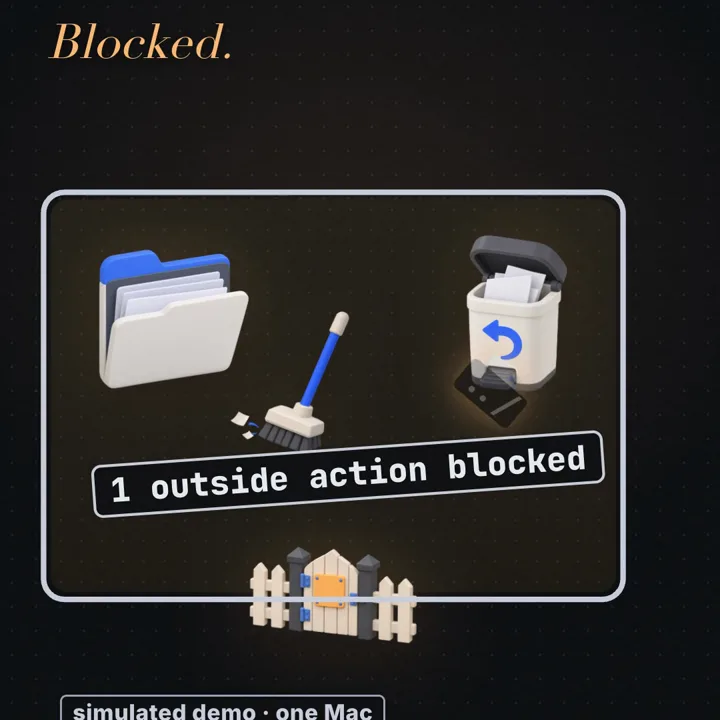
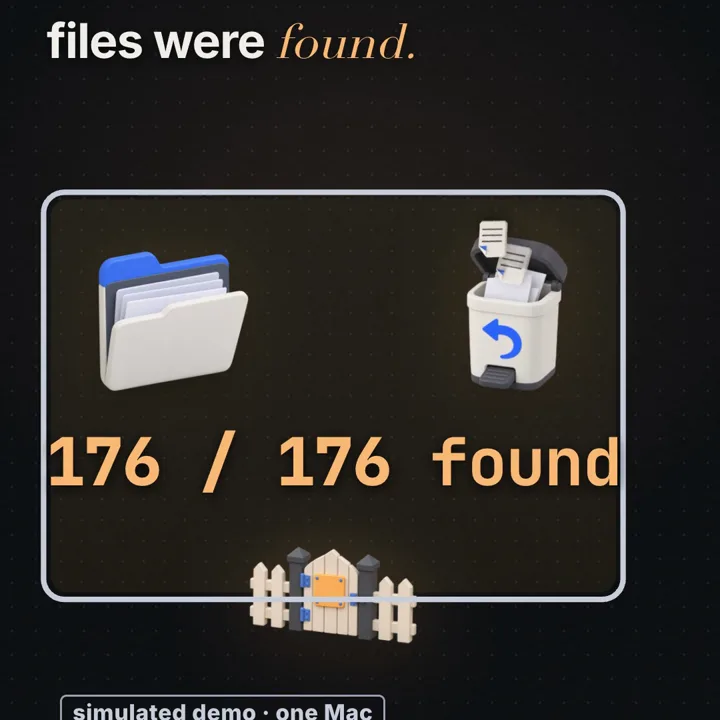
| Sandbox (lab) | Same plan on a copy with a trash bin and a folder fence: 176 files removed, 176 of 176 found with original ID and content, 1 outside action blocked, 0 lost for good |
| Sandbox + confirm (lab) | 5 destructive actions paused for approval, the reviewer unticked 7 rows that touched important files, 0 important files removed, 162 of 170 junk files still cleaned |
| Rubber stamp (lab) | Approving everything unread removed 7 important files from the working copy, but 0 were lost for good because the copy and trash were still underneath |
| Overwrite is the sneaky loss | The duplicate merge let an older budget (1).xlsx replace budget.xlsx. The name survives, the content does not. Only versioned trash, copy-on-write or snapshots bring it back |
| Where the analogy breaks | The lab's fence is a few lines in the same script. The Gatekeeper pattern puts the check in a separate, limited-privilege component the agent cannot change |
AI agent permissions determine which file operations its tools can perform. An agent never touches a file itself: it asks a tool to, and the tool acts with whatever permissions it was given. So the question is not whether the plan is careful but what the permission layer does when the plan is careless, and the answer comes from three separate controls: limited reach, reversible writes and a human check. Interview version: "Your agent has a file tool. Design it so a bad plan cannot destroy anything the user cares about."
Prerequisites
Tool calling. A model cannot open a file. It writes a structured request naming a tool and arguments; your code runs the tool. The tool calling article (AI 5) walks through that loop. Every effect happens in your code, with your code's permissions.
Agents run many calls in a row, often with no person between steps. The agent history article (AI 7) shows how that loop grows; this one asks what each step may do.
Model output is untrusted input. A plan can be wrong because the model misread the task or because text it read steered it, as in prompt injection (AI 6). Either way, the system around the model decides what is allowed.
Definitions
Least privilege: give a component only the permissions its task needs, for only as long as it needs them. For a tidy agent: one folder, move and soft delete, no network.
Excessive agency (OWASP LLM06): the risk that an LLM application takes damaging actions because it has excessive functionality, excessive permissions or excessive autonomy.
Sandbox: an environment whose effects are confined and, ideally, reversible. In the lab: a working copy, a trash bin that keeps every removed or replaced version, and a folder fence.
Path fence: a check that every path an action touches resolves, after removing .. and following symlinks, to a location inside one allowed root.
Soft delete: "destroy" becomes "move to a retained location with metadata", so it can be undone. A versioned trash also keeps the old version on every overwrite.
Copy-on-write snapshot: a read-only, point-in-time view of a file system that shares blocks with the live data and keeps old blocks when they change. APFS, btrfs and ZFS offer them.
Gatekeeper: a dedicated, limited-privilege component that validates requests before passing them to a separate trusted service that holds the real access.
How does a tidy request turn into lost files?
The lab (labs/ai-8) is a scripted demo, not a live model: a pretend Tidy/ folder of 200 dummy files in an in-memory Map, and a neighbour Downloads/ with 40 more. No real disk is touched.
Tidy/ (200 files)                          Downloads/ (40 files, outside the task)
  10 important  passport_scan_old.jpg,       8 backup_N.zip
                tax_return_2025_old.pdf,    32 other files
                wedding_photos_old.zip,
                lease_signed copy.pdf, thesis_autosave.tmp, draft_will.docx,
                family_recipes.txt, id_card.png, client_contract.pdf, budget.xlsx
 170 junk       60 *.tmp, 30 *_old*, 20 "* copy*", 40 draft_*, 20 "* (1).*" duplicates
  20 ordinary   files to keep (19 of them have a "(1)" duplicate)
Told "tidy this folder", the scripted agent replays one fixed plan of seven actions, careless on purpose:
A1 delete     *.tmp
A2 delete     *_old*
A3 delete     * copy*
A4 merge      * (1).*   onto the original name (if contents differ, the (1) file wins)
A5 delete     draft_*
A6 move       *.txt     into Archive/            (harmless)
A7 delete     ../Downloads/*.zip                  (outside the folder it was asked about)
The plan runs under four setups. For every file that disappears the lab looks for the same file ID with its original content in the trash or at its original path: recoverable is measured, not assumed. The table from node labs/ai-8/run.mjs (seed 20261108):
setup                     removed  overwritten  important gone  important lost for good  lost for good  recoverable  outside touched  blocked  confirms  junk cleaned
1 full access             184      8            7               7                        184            0            8                0        0         162/170
2 sandbox                 176      8            7               0                        0              176          0                1        0         162/170
3 sandbox + confirm       169      7            0               0                        0              169          0                1        5         162/170
3b confirm, rubber stamp  176      8            7               0                        0              176          0                1        5         162/170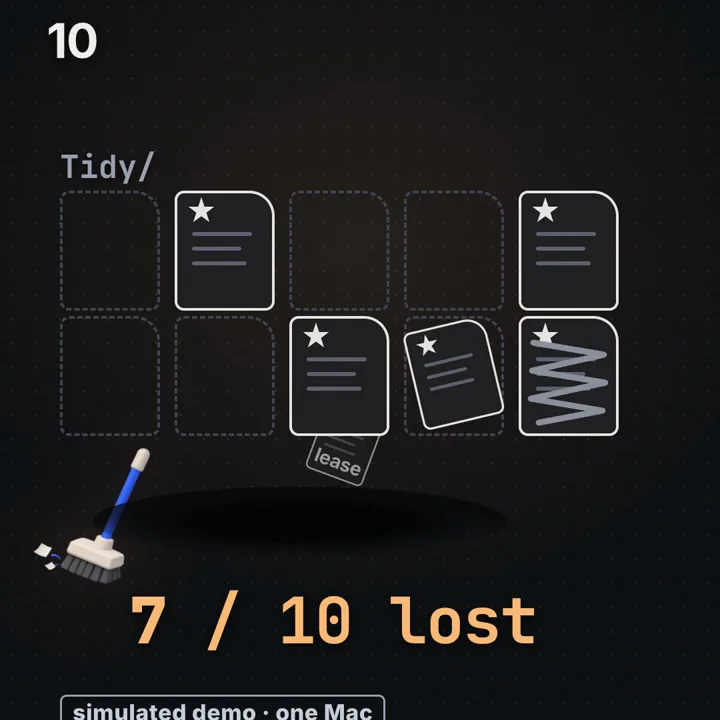
Read row 1 first. Each pattern is reasonable for the junk it was written for and wrong for one important file it also matches. Counting from the plan and the file list in run.mjs:
A1 *.tmp       61 matches = 60 temp files + thesis_autosave.tmp (only copy of the latest edits)
A2 *_old*      33 matches = 30 old files  + passport_scan_old.jpg, tax_return_2025_old.pdf, wedding_photos_old.zip
A3 * copy*     21 matches = 20 copies     + lease_signed copy.pdf
A4 * (1).*     20 duplicates: 12 identical (deleted) + 8 different (the original is overwritten)
A5 draft_*     41 matches = 40 drafts     + draft_will.docx
A7 ../Downloads/*.zip  8 matches, all outside the folder

removed inside Tidy/ = 61 + 33 + 21 + 12 + 8 + 41 = 176
removed in total     = 176 + 8 outside            = 184
important lost       = 1 + 3 + 1 + 1 (budget, overwritten) + 1 = 7 of 10
The other three survive by luck of naming: id_card.png and client_contract.pdf match no pattern, and family_recipes.txt is only moved. No step is malicious; each is a shortcut a person might type. The damage comes from loose patterns plus in-place destructive operations plus no boundary, which is what OWASP calls excessive agency.
Row 2 runs the identical plan in the simulated sandbox. The working copy loses the same 176 files, because a sandbox does not make a plan smarter. But all 176 are found again with their original ID and content, in the trash and in the untouched original, and A7 is refused at the fence. Lost for good drops from 184 to 0.
The three parts protect against different mistakes:
- The copy shields the original from everything. It is the coarsest undo: throw the copy away.
- The trash turns each delete and overwrite into a move, so single steps can be reversed without discarding the good work.
- The fence limits reach. It stopped 8 deletions in
Downloads/and did nothing for the 176 removals inside the folder. A fence is not undo.
What happened to the 8 files it overwrote?
Action A4 is the subtle one. Browsers and file managers name a second download of the same file name (1).ext. That suffix records a name collision, not a version order: the (1) file can be older or newer. The plan's rule was "same content: delete the duplicate; different content: the duplicate takes the original name". Of 20 duplicates, 12 were identical and deleted. The other 8 differed, so 8 originals were replaced, including budget.xlsx, overwritten by an older budget (1).xlsx (in the lab's data, budget-2026-final replaced by budget-2025-old).
Why overwrite is the sneakier loss. A deletion leaves a gap: the name is gone, a listing is shorter, a sync tool reports a removal. An overwrite leaves every name in place, with plausible sizes and fresh timestamps. A before-and-after comparison of names says nothing is missing. It is also why "junk cleaned" is 162 of 170, not 170: the 8 differing duplicates did not disappear, they moved into the originals' names. The only reliable detector is content identity, a hash per file before and after. The lab tracks a file ID and its content, which is how it counts a replaced original as gone although its path still exists.
It is also harder to undo. unlink(2) removes one directory entry. The inode and its blocks are reclaimed only when the link count reaches 0 and no process still holds the file open; until then another hard link or an open descriptor (/proc/<pid>/fd/N on Linux) still reaches the data, and even after reclamation freed blocks may survive until reused (less likely on SSDs with TRIM). An in-place overwrite on an update-in-place file system destroys the old bytes as the write lands. An "atomic save" (write a temp file, rename(2) it over the original) drops the name's reference to the old inode, which is then reclaimed under the same rule: once no other link or open descriptor refers to it. So full access does not make every mistake permanent; it gives no recovery guarantee unless another layer (a link, a snapshot, a backup, a versioned trash) retains the previous data. "Lost for good" in the lab means exactly that: no retained copy with the same ID and content.
How the old version comes back. Something must keep the old bytes before the write:
- Versioned trash (the lab's choice). Overwrite becomes "move the current version to the trash, then write". In the sandbox row all 8 overwritten originals are found in the trash with their original content.
- Copy-on-write plus a snapshot. APFS, btrfs and ZFS write changes to new blocks, but old blocks are freed unless something references them. A snapshot is that reference. On ZFS,
zfs snapshot pool/data@before-agentis close to instant; old files stay readable under.zfs/snapshot/before-agent/andzfs rollbackrestores the dataset (see the zfs-snapshot man page). btrfs has read-only subvolume snapshots; on macOStmutil localsnapshotcreates a local APFS snapshot. Space cost grows only with blocks changed afterwards. - Object versioning or git. Versioned object stores keep every overwritten object; for text, a commit before the run does the same job.
The production rule: a tool that can overwrite must refuse when the target exists or keep the previous version first. The code below does the second, with an exclusive-create write so a file that appears between check and write is not clobbered.
How do AI agent permissions limit file damage?
Permissions limit damage in two ways: by what the tool can reach (the fence and the OS boundary below it) and by what its operations can destroy (the trash and snapshots above). This section is about reach. In the lab the fence is one line, dir === 'Tidy' || dir.startsWith('Tidy/'), applied after a ../ prefix is split off. That works only because the lab's "file system" is a Map of strings. Real paths are instructions for the kernel to walk a tree, and a real fence must defeat four escapes, all forms of the problem OWASP's Path Traversal page describes:
- Dot segments.
../Downloads/backup_0.zip,Archive/../../Downloads. Resolve to an absolute, normalized path before checking. - Absolute paths.
/etc/hostswhere a relative path was expected. Resolving against the root, then checking, catches it. - Symlinks.
Tidy/dllinks to../Downloads, soTidy/dl/backup_0.ziplooks inside and lands outside. Only the file system knows:realpath(3)(Node'sfs.realpathSync, see the Node.js fs docs) follows every link. This is CWE-59, improper link resolution. - Prefix confusion.
real.startsWith('/home/you/Tidy')accepts/home/you/Tidy2/x. Compare path components: take the relative path from the root and reject anything starting with..or absolute.
A fifth problem a path check cannot solve is time of check to time of use (TOCTOU): between canonicalizing a path and using it, a process that can write in the folder can swap a directory for a symlink, and every later call that takes a path string walks the tree again.
On Linux, openat2(2) narrows this, but only for the open it performs. RESOLVE_BENEATH makes the kernel fail that resolution if it would leave the starting directory; RESOLVE_NO_SYMLINKS refuses a symlink in any component. Plain O_NOFOLLOW refuses a symlink only in the final component, so dl/backup_0.zip still walks through dl. Two kinds of operation then need different treatment:
- Content operations through a descriptor. Once openat2 returns a file descriptor,
read,write,fstatandfsyncact on that inode. Renaming or replacing path components afterwards cannot redirect them. Hash and copy through the descriptor, never by reopening the path. - Directory-entry mutations.
rename,unlinkandlinkchange names, so they resolve names again on every call. The safe form opens the parent directory securely (openat2 withO_DIRECTORY,RESOLVE_BENEATH | RESOLVE_NO_SYMLINKS), then callsrenameat2,unlinkatorlinkatrelative to that directory descriptor with a single-component name. That pins the parent, but not the entry inside it: if an untrusted process can write the same directory, it can replacebudget.xlsxbetween yourfstatand yourunlinkat, and you remove whatever is there now. The remaining guarantee has to come from the boundary: no untrusted process can modify the tree at all (an enforced sandbox), or one broker process owns the folder exclusively and serializes every change.
Replacing only fenced() with an openat2 call does not secure the trash example below: its renameSync, readFileSync and writeFileSync each resolve the path string again. Node's fs exposes no *at calls, so a hardened broker is usually written where they exist: C or Rust (the cap-std crate), or Go 1.25+, whose os.Root resolves every name beneath one directory and gained Root.Rename and Root.Link in 1.25 (1.24 had open, create, remove and stat only). os.Root provides traversal-resistant path operations, not a complete OS sandbox: per its docs it still crosses bind mounts and opens device files inside the root, so exclude untrusted mounts and special files.
The stronger fence is the operating system. Make the outside unreachable instead of checking every path:
- Linux mount namespaces. A new mount namespace starts as a copy of its parent's mount list (mount_namespaces(7)), so
unshare -mplus one bind mount of the work folder hides nothing:/,/homeand every other mount are still there. Confinement is a sequence, the one container runtimes andbwrap(bubblewrap) perform: (1) make propagation private,mount --make-rprivate /, so nothing done inside leaks back to the host and host mounts do not appear later; (2) build a minimal tree on a freshtmpfs: the work folder bind-mounted read-write, the tool's binaries and libraries bind-mounted read-only, nothing else; (3)pivot_rootinto that tree andumount2(old_root, MNT_DETACH)so the old root is gone, not merely out of sight (a barechrootleaves it mounted and escapable); (4) close every inherited descriptor and reset the working directory, because a directory fd or cwd that points into the host tree still works withopenatafter the pivot; (5) dropCAP_SYS_ADMINand setno_new_privsso the process cannot mount or remount. User namespaces let an unprivileged user run the whole sequence. Then prove it with a negative test in CI: place a sentinel file outside the allowed folder, and from inside the sandbox try to read it, write to it and create a file beside it, by absolute path, by../and through a planted symlink; each attempt must fail (ENOENTorEACCES) and the sentinel's hash must be unchanged afterwards. - seccomp and Landlock. A seccomp BPF filter allows or denies system calls by number and register arguments. It cannot read path strings (they are pointers into user memory), so it suits "no sockets, no
ptrace, no mount", not "only this folder". Landlock, a Linux security module usable without privileges, does path-hierarchy rules. - macOS sandbox profiles. Seatbelt profiles restrict file reads and writes by path;
sandbox-execapplies one, though its man page marks it deprecated. App Sandbox does the same through entitlements. - Containers and VMs. Read-only root, one writable bind mount, no network, non-root user: a practical agent sandbox. A VM adds a separate kernel.
Allowlists beat denylists. "Block ../, block /etc" lists the escapes you thought of; encodings, links and platform quirks (case-insensitive APFS, Unicode normalization, Windows UNC paths) supply the rest. "This root, these operations" fails closed.
Why is a confirm step not enough on its own?
Row 3 adds a confirm step on top of the sandbox. Every destructive action stops and lists the files it would remove; moves pass. Five actions asked (A6 is a move, A7 was already blocked by the fence). The simulated reviewer knows which files are important and unticks them. What the reviewer faced, from the match counts above:
rows shown across the 5 prompts = 61 + 33 + 21 + 20 + 41 = 176
rows unticked                   = 1 + 3 + 1 + 1 + 1       = 7     (7 / 176 = 4.0% of rows)
removed in the working copy     = 60 + 30 + 20 + 12 + 7 + 40 = 169
                                  (the 7 are ordinary files overwritten by a different (1) copy,
                                   kept in the trash; budget.xlsx was unticked)
important removed               = 0;   junk cleaned = 162 of 170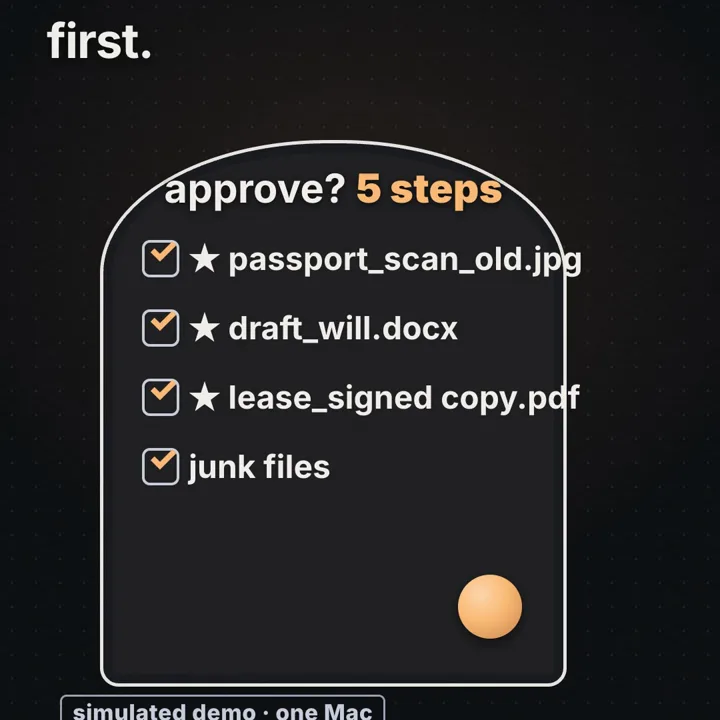
Safety did not mean doing nothing: 162 junk files were cleaned, as in the unsafe run. But the reviewer had to find 7 rows in 176, and the lab's reviewer is perfect by construction. Real people habituate: after a few prompts saying "delete 61 temp files", the next is approved by reflex. Row 3b models a reviewer who clicks yes unread, and the working copy loses the same 7 important files as row 2. It loses 0 for good only because the copy and trash are underneath.
The confirm step catches a bad plan when a person notices it; the sandbox catches it when they do not. A rubber-stamped confirm on the real folder with no copy and no trash (not a lab row; it follows from the plan) would repeat row 1 inside the folder, 7 important files gone. A confirm step without undo moves the blame, not the risk.
Making the confirm step worth reading:
- Show a diff, not a sentence. Show the plan the way
terraform plandoes: every create, change and destroy, grouped, with counts. - Rank by risk. Overwrites first (the hidden loss), then files with no duplicate content elsewhere, recently modified files and documents. Highlight names that merely contain a pattern word (
passport_scan_old.jpgunder_old). - Collapse the boring, expand the odd. 60
notes_N.tmpfiles are one row;thesis_autosave.tmpgets its own. - Default flagged files to excluded. The user ticks to include.
- Bind approval to the plan. A list of files and hashes is not enough: the same files can be moved to a different destination, overwritten under a different policy or replaced with different bytes. Approve a canonical manifest instead, one entry per operation with principal, root, operation type, source, destination, expected version (content hash) of every file it reads or replaces, hash of any replacement content, plus per-run limits and an expiry. Sign or hash the serialized manifest; the approval token is that hash. The file service, not the agent, recomputes it, refuses anything not in it, and checks every expected version while it holds exclusive mutation control of the root, so nothing can change between the check and the effect. If any precondition fails, refuse and re-plan. That binds execution to the reviewed plan, much as
terraform applywith a saved plan file carries out the decisions in that file instead of planning again.
Binding is not idempotency. If the apply times out and is retried, replaying "trash notes_7.tmp" can fail because the source is already gone, and replaying a versioned write can stash a second, different version. Safe retries need their own mechanism: give every operation an ID; check an expected-version precondition before acting (the file's current hash equals the hash in the plan, the same idea as HTTP If-Match or a compare-and-swap); persist the operation ID with its result in the same durable step as the effect; and on a retry with a known ID return the recorded result instead of acting again.
OWASP LLM06 lists human approval as one mitigation among several, next to fewer tools, narrower permissions and downstream authorization. It is one more check, not the check.
Where does the check belong? The Gatekeeper pattern
Here the lab's analogy breaks. Its fence is a few lines inside the same script that runs the plan. In a real system that is the weakest place for it: anything that can change the agent's code, configuration or arguments can skip the check, and an agent with a shell tool can call rm and never meet the fence.
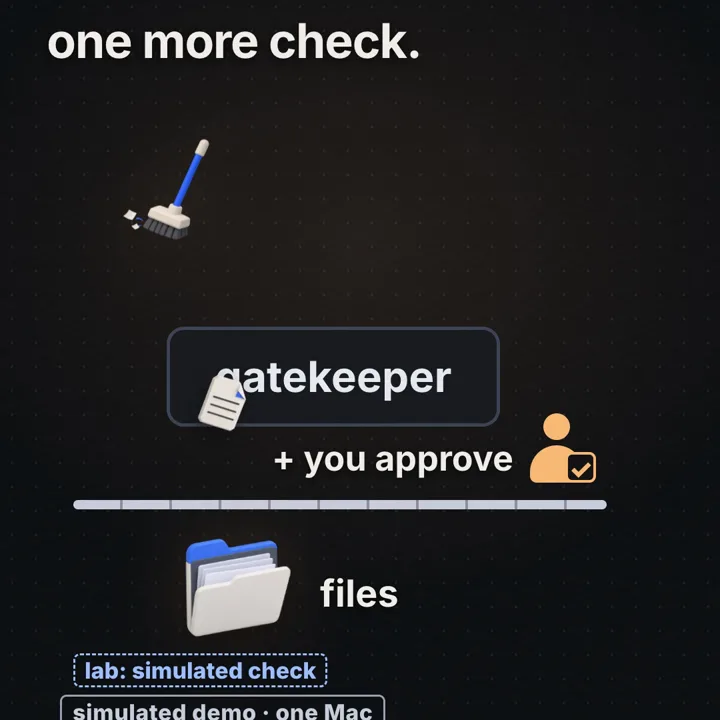
The Gatekeeper pattern in the Azure Architecture Center describes the target: a dedicated component brokers requests, validates and sanitizes them, and runs with limited privilege on a separate compute boundary from the trusted host that holds the storage credentials. A compromised gatekeeper still has no keys to the data. Mapped onto an agent:
model --tool call--> agent runtime --request--> gatekeeper --approved op--> file service --> disk
 (untrusted text)     (no file rights)          (validates:          (holds the only write
                                                 root, op type,       permission; soft delete
                                                 path, budget,        and versioning built in)
                                                 approval token)
Three properties the lab's fence lacks:
- Separation. The check runs in a process the agent cannot modify, behind an OS or network boundary. OWASP LLM06 calls this complete mediation: every request to the downstream system is validated against policy there, not by the model's judgement.
- Privilege split. The agent runtime has no file permission. Only the file service does, and it exposes narrow operations (
list,move,trash,write_new_version), notexec. A tool that can only move to trash cannot destroy, whatever it is asked. - Policy as data. Allowed root, operation types, per-run limits (for example, at most 200 files) and approval rules are configuration the user owns, not text the model can negotiate with.
The human approval sits between gatekeeper and file service: the gatekeeper decides whether a request is allowed at all, the person whether this allowed request is wanted.
Worked example
The video shows one desk with three lanes: full access, sandbox, sandbox plus confirm. The same 7-action plan runs in each. In numbers, all from node labs/ai-8/run.mjs:
Inputs (chosen by us, scripted, seed 20261108)
  Tidy/       200 files = 10 important + 170 junk + 20 ordinary
  Downloads/   40 files (8 zips), outside the task
  plan        7 actions, fixed, deliberately careless; not generated by a model
  storage     in-memory Maps; no real disk, no OS sandbox tested

1 full access
  removed 184 = 176 in Tidy/ + 8 in Downloads/
  overwritten 8 (budget.xlsx + 7 ordinary files)
  important lost for good 7 of 10;  recoverable 0

2 sandbox (copy + trash + fence)
  removed in working copy 176;  found with same ID and content 176 / 176
  outside action blocked 1 (A7);  lost for good 0

3 sandbox + confirm (reviewer knows the important files)
  prompts 5;  rows 176;  unticked 7
  removed 169 = 162 junk + 7 ordinary overwritten (in trash)
  important removed 0;  junk cleaned 162 / 170

3b rubber stamp
  important gone from working copy 7;  lost for good 0  (the sandbox is underneath)
Row 1's important loss is 6 deletions and 1 overwrite, the one a name check misses. Rows 2 and 3b match: an unread confirm adds nothing. The lab does not show how often real models write such plans, whether a real OS boundary holds, or how people review.
Code
A path fence that canonicalizes before comparing (dot segments, absolute paths, symlinks, dangling links, prefix confusion) and a soft-delete trash where delete and overwrite move the old bytes aside with an ID, a SHA-256 hash and an audit line. Node 22, no packages. It creates a throwaway folder in the OS temp directory and removes it at the end.
This is single-process policy demonstration code without crash consistency. It shows which decisions the tool must make, not how to make them durable or race-free; the protocol after the code covers that.
// fence.mjs: a path fence plus a soft-delete trash for an agent's file tool.
// Node 22, no packages. It builds a throwaway folder under the OS temp dir,
// runs the checks, prints what happened and deletes the temp folder at the end.
import fs from 'node:fs';
import path from 'node:path';
import os from 'node:os';
import crypto from 'node:crypto';

// 1. The fence: canonicalize first, compare second.
//    path.resolve removes '.' and '..' and handles absolute input; realpath follows
//    every symlink, so a link inside the folder that points outside is caught.
//    A path that does not exist yet (a file about to be created) is resolved through
//    its nearest existing parent. A dangling symlink is refused outright.
export function fenced(root, requested) {
  const realRoot = fs.realpathSync(root);
  const abs = path.resolve(realRoot, requested);
  let probe = abs;
  const tail = [];
  for (;;) {
    try { fs.lstatSync(probe); break; }               // lstat: the entry itself, link or not
    catch { tail.unshift(path.basename(probe)); probe = path.dirname(probe); }
  }
  let real;
  try { real = path.join(fs.realpathSync(probe), ...tail); }
  catch { throw new Error(`blocked: ${requested} (dangling symlink)`); }
  const rel = path.relative(realRoot, real);
  if (rel === '') throw new Error(`blocked: ${requested} (the fenced folder itself)`);
  if (rel === '..' || rel.startsWith('..' + path.sep) || path.isAbsolute(rel)) {
    throw new Error(`blocked: ${requested} (resolves outside the folder)`);
  }
  return real;
}

// 2. The trash: delete and overwrite never destroy, they move the old bytes aside.
//    The trash lives OUTSIDE the fenced root, so the agent cannot empty it.
//    Every entry gets a random ID, a content hash and one audit line (JSON Lines).
export function makeTrash(root, trashDir) {
  fs.mkdirSync(trashDir, { recursive: true });
  const audit = path.join(trashDir, 'audit.jsonl');
  const realRoot = fs.realpathSync(root);
  const stash = (real, reason) => {
    const sha256 = crypto.createHash('sha256').update(fs.readFileSync(real)).digest('hex');
    const id = crypto.randomUUID();
    fs.renameSync(real, path.join(trashDir, id));      // atomic on one file system (EXDEV across them)
    const rec = { id, reason, from: path.relative(realRoot, real), sha256, at: new Date().toISOString() };
    fs.appendFileSync(audit, JSON.stringify(rec) + '\n');
    return rec;
  };
  return {
    remove: (p) => stash(fenced(root, p), 'delete'),
    write(p, data) {                                     // overwrite keeps the previous version
      const real = fenced(root, p);
      const prev = fs.existsSync(real) ? stash(real, 'overwrite') : null;
      fs.writeFileSync(real, data, { flag: 'wx' });      // wx: fail if something appeared meanwhile
      return prev;
    },
    restore(id) {
      const rec = fs.readFileSync(audit, 'utf8').trim().split('\n').map(JSON.parse).find((r) => r.id === id);
      const dest = fenced(root, rec.from);
      if (fs.existsSync(dest)) stash(dest, 'displaced-by-restore'); // never clobber on the way back
      fs.renameSync(path.join(trashDir, id), dest);
      const ok = crypto.createHash('sha256').update(fs.readFileSync(dest)).digest('hex') === rec.sha256;
      return { restored: rec.from, hashMatches: ok };
    },
  };
}

// 3. Demo in a throwaway folder: Tidy/ is the fence, Downloads/ and Tidy2/ are neighbours.
const base = fs.mkdtempSync(path.join(os.tmpdir(), 'fence-'));
const root = path.join(base, 'Tidy');
for (const d of ['Tidy', 'Downloads', 'Tidy2']) fs.mkdirSync(path.join(base, d));
fs.writeFileSync(path.join(root, 'budget.xlsx'), 'budget-2026-final');
fs.writeFileSync(path.join(root, 'budget (1).xlsx'), 'budget-2025-old');
fs.writeFileSync(path.join(root, 'notes_7.tmp'), 'scratch');
fs.writeFileSync(path.join(base, 'Downloads', 'backup_0.zip'), 'zip');
fs.symlinkSync(path.join(base, 'Downloads'), path.join(root, 'dl'));          // link pointing out
fs.symlinkSync(path.join(base, 'nowhere'), path.join(root, 'ghost'));         // dangling link

const asks = ['notes_7.tmp', 'Archive/new.txt', '../Downloads/backup_0.zip', 'dl/backup_0.zip',
  '../Tidy2/x.txt', '/etc/hosts', 'ghost/x.txt', '.'];
for (const a of asks) {
  try { fenced(root, a); console.log(`allowed: ${a}`); }
  catch (e) { console.log(e.message); }
}

const trash = makeTrash(root, path.join(base, '.trash'));
const del = trash.remove('notes_7.tmp');
console.log('\ndeleted  ', del.from, '-> trash', del.id.slice(0, 8));
// The careless merge: "budget (1).xlsx" is written over "budget.xlsx".
const older = fs.readFileSync(path.join(root, 'budget (1).xlsx'));
const prev = trash.write('budget.xlsx', older);
trash.remove('budget (1).xlsx');
console.log('overwrote', prev.from, 'now reads', JSON.stringify(fs.readFileSync(path.join(root, 'budget.xlsx'), 'utf8')));
const back = trash.restore(prev.id);
console.log('restored ', back.restored, 'reads', JSON.stringify(fs.readFileSync(path.join(root, 'budget.xlsx'), 'utf8')), 'hash ok:', back.hashMatches);
console.log('audit lines:', fs.readFileSync(path.join(base, '.trash', 'audit.jsonl'), 'utf8').trim().split('\n').length);

fs.rmSync(base, { recursive: true, force: true });
node fence.mjs
node labs/ai-8/run.mjs # the full lab, from the repository rootWhat to observe in fence.mjs (the trash ID is random, everything else is the same on every run):
allowed: notes_7.tmp
allowed: Archive/new.txt
blocked: ../Downloads/backup_0.zip (resolves outside the folder)
blocked: dl/backup_0.zip (resolves outside the folder)
blocked: ../Tidy2/x.txt (resolves outside the folder)
blocked: /etc/hosts (resolves outside the folder)
blocked: ghost/x.txt (dangling symlink)
blocked: . (the fenced folder itself)

deleted   notes_7.tmp -> trash 98a8220c
overwrote budget.xlsx now reads "budget-2025-old"
restored  budget.xlsx reads "budget-2026-final" hash ok: true
audit lines: 4- Symlink.
dl/backup_0.ziphas no..and passes any string check; onlyrealpathSyncreveals wheredlgoes. On macOS the temp folder itself sits behind a symlink (/varto/private/var), which is why the root is canonicalized too. - Prefix.
../Tidy2/x.txtresolves to a string starting with the root's;path.relativecompares components and refuses it. - Overwrite. The merge makes
budget.xlsxread the 2025 content, like A4. The write stashed the previous version, sorestorebrings backbudget-2026-final, checked by hash, and stashes the wrong version asdisplaced-by-restore(the fourth audit line).
What it does not do:
- Races. Every
renameSync,readFileSyncandwriteFileSyncresolves its path again afterfenced()returned, so a concurrent writer in the folder can redirect it. As the fence section explains, swappingfenced()for openat2 would not change that; it needs descriptor-relative operations plus a boundary or a broker that owns the folder. - Crashes. Node's synchronous calls return when the kernel has accepted the change, not when it is on disk. A crash after
renameSyncbut beforeappendFileSyncleaves a UUID-named file in the trash with no audit record saying where it came from. Inwrite(), the original is moved aside before the new bytes are written, so a failed write (disk full) leaves the name missing or holding a partial file. - Scale.
readFileSyncbuffers the whole file to hash it, which fails or swaps on multi-gigabyte files; use a streaming hash (fs.createReadStream(p).pipe(crypto.createHash('sha256'))).restore()reads and parses the entire audit log on every call, O(n) in operations ever performed; keep an indexed manifest (for example a SQLite table keyed by operation ID) and use the log as the append-only history. - Trust. It assumes the agent cannot reach the trash or edit this file. That is the gatekeeper's job.
node labs/ai-8/run.mjs prints the table above and a RESULT line in well under a second, same numbers every run.
A crash-safe trash protocol
Each trash or overwrite is a small transaction over a journal, the same write-ahead idea PostgreSQL uses for its WAL: record the intent durably, with everything recovery will need, before touching user data; make the change; record the commit; and let startup recovery finish or undo anything in between by checking content, not by guessing from which names exist.
Two preconditions come first. Exclusive ownership: one broker process holds an exclusive lock on the root (for example flock(LOCK_EX) on a lock file) for the whole run and for recovery, and no other process, the agent included, can write the tree. Without that, every hash check below is a TOCTOU race. Same file system: journal, staging names and trash live on the target's volume, so rename(2) is atomic. Durability has one more rule people miss: per fsync(2), fsync on a file does not make its directory entry durable; that needs an fsync on a descriptor for the directory itself (open(dir, O_RDONLY|O_DIRECTORY), then fsync). A rename between two directories changes two entries, so both directories need it.
overwrite(path, newBytes), operation id = op, all under the broker's exclusive lock
 1 intent   oldSha = hash(path); require oldSha == expected version in the approved manifest
            newSha = hash(newBytes)
            append {op, kind: overwrite, path, tmpName: .op.tmp, trashName: op, oldSha, newSha,
                    state: intent}; fsync(journal)
 2 stage    open dir/.op.tmp with O_CREAT|O_EXCL; write newBytes; fsync(tmp fd)
            fsync(dir fd)                       the tmp entry itself is now durable
            ENOSPC / EDQUOT / EIO here: unlink tmp, fsync(dir), append abort. Original untouched.
 3 retain   write an independent copy of the old bytes to trash/op (or a reflink, see below)
            fsync(trash file); fsync(trash dir); require hash(trash/op) == oldSha
 4 replace  rename(dir/.op.tmp, path)           atomic: the name points to old or new bytes
            fsync(dir fd)                       makes the rename durable
 5 commit   append {op, state: commit}; fsync(journal)

trash(path): 1 intent {op, kind: trash, path, trashName, oldSha}; fsync(journal)
             2 rename(path, trash/op); fsync(trash dir); fsync(source dir)   both entries changed
             3 commit; fsync(journal)

recovery, under the same exclusive lock, before any new request, for each intent with no
commit or abort (h(x) = hash of x, or "missing"):
  overwrite
    h(path) == newSha                    -> 4 happened, and 3 preceded it: require h(trash/op)
                                            == oldSha, unlink tmp if present, fsync dirs, commit
    h(path) == oldSha, h(trash/op) == oldSha, h(tmp) == newSha
                                         -> crash between 3 and 4: redo 4, fsync dir, commit
    h(path) == oldSha, any other state   -> crash in 1 to 3 (tmp or trash copy missing or
       (tmp missing or partial,             partial): unlink tmp and trash/op if present,
        trash/op missing or partial)        fsync both dirs, abort. The original is untouched.
    h(path) is neither, or path missing  -> impossible under exclusive ownership: stop, alert,
                                            keep every file, hand to a person
  trash
    path missing, h(trash/op) == oldSha  -> fsync both dirs, commit
    h(path) == oldSha, trash/op missing  -> rename never happened: abort
    anything else (both, neither, wrong hash)  -> stop, alert, keep everything
  trash files with no journal record     -> orphans: hash, report, never auto-delete
Why step 3 copies instead of hard-linking. link(path, trash/op) looks cheaper: the old inode gets a second name and survives the rename in step 4. But per link(2) both names refer to the same file, so the "retained version" is only as immutable as that inode. Any other hard link to it, or any process that already holds a writable descriptor (opened before the run, even before the agent started), can still change those bytes after the replacement, and moving the trash outside the agent's folder changes nothing. A hard link is a valid retained version only if no other writer can exist: st_nlink == 1 and no writable descriptor open anywhere, which in practice means the broker has owned the tree since it was created. Otherwise retain independent bytes: a full copy, a reflink (FICLONE on btrfs and XFS, clonefile on APFS: shared blocks, copy-on-write on the next change, so near free), or a file system snapshot taken before the run. Persist and verify it (fsync, hash equals oldSha) before step 4.
Three details matter in production. After a writeback I/O error, a successful retry of fsync does not prove that previously failed data was persisted: the kernel may already have discarded the dirty pages. Stop normal processing and recover from a durable retained copy or journal. The PostgreSQL 11.2 release notes explain this buffer-discard problem and why PostgreSQL now PANICs on a failed data-file fsync and replays its WAL instead of retrying. On macOS, fsync does not flush the drive's cache; fcntl(fd, F_FULLFSYNC) does. And detection is part of the design: alert on journal entries older than a minute without commit, on orphan trash files, and on any ENOSPC during staging, which in this order costs a retry, never a file.
Failure modes and edge cases
Globs match more than intended. _old catches passport_scan_old.jpg, *.tmp an autosave holding the only copy of recent work. Detect it in a dry run that expands every pattern and flags signals of value; fix it by deleting an explicit, reviewed file list, never a pattern re-expanded at apply time.
Overwrite counted as success. A merge reports success while replacing newer content with older. Detect it with content hashes, not names; fix it with versioned writes or refusing to overwrite.
Trash inside the fence. Then "empty the trash" is one more tidy step. Keep trash and snapshots out of the agent's reach with their own retention. The lab assumes a trash that is never emptied.
Cross-device moves. rename(2) is atomic only within one file system; across devices it fails with EXDEV, and copy-then-delete can leave half-moved state on a crash. Keep the trash on the same volume, or copy, fsync, verify the hash, then delete.
Hard links, open writers and case. A hard link is one inode under two names: trashing one name leaves the other, overwriting in place changes both. The same holds for any retention scheme built on links: a version kept as a second name to the old inode can still be modified through another alias or through a writable descriptor some process opened earlier. st_nlink reveals extra names but not open descriptors (on Linux only a scan of /proc/*/fd, as lsof does, finds those, and it is racy). So treat link-based retention as safe only when the broker owns the tree exclusively; otherwise copy, reflink or snapshot, then verify the retained hash. On case-insensitive APFS, Budget.xlsx and budget.xlsx are one file, so merges can collide.
Fence on the pattern, not each file. The lab checks the pattern's directory; a real tool must check every expanded path, since a match can be a symlink.
Shell access bypasses everything. Drop the shell tool or run it inside the same OS sandbox.
No audit trail. Without one you cannot tell a careless plan from an injected one, or restore precisely. Log plan ID, approval ID, path, file ID and hash per operation, append-only, outside the agent's reach.
Trade-offs
| Option | Good for | Costs you | Use when |
|---|---|---|---|
| Full access | Zero friction; the plan just runs | No recovery guarantee unless another layer retains the previous data; in the lab 184 removed, 7 of 10 important lost, 0 recoverable | Never for user data; only in a throwaway environment |
| Path fence only | Stops reach outside the folder (1 action, 8 files in the lab) | No undo inside the folder; user-space checks have TOCTOU gaps | As a first layer, always combined with undo |
| Copy or snapshot before the run | Complete undo of everything, including overwrites; CoW snapshots are near instant | Storage for changed blocks; coarse: rolling back discards the good work too | Every agent run on real data; cheap insurance |
| Versioned trash (soft delete) | Per-file undo with reason and hash; 176 of 176 found in the lab | Disk until retention expires; trash must be out of the agent's reach | Any tool that deletes or overwrites |
| Confirm step | A person catches a bad plan; 0 important removed with a careful reviewer, 162 of 170 junk still cleaned | Latency and attention; long lists get rubber-stamped | High-impact, irreversible or external actions; with a ranked diff |
| OS sandbox (namespaces, container, Seatbelt, Landlock) | Kernel-enforced reach; covers shell tools too | Setup per platform; misconfiguration fails silently | Any agent that can run code or a shell |
| Gatekeeper service | Check the agent cannot edit; privilege split; central policy and audit | One more component to build, run and secure | Production agents, shared or multi-user data |
What the undo layers cost, in numbers
The lab has 240 tiny files, so it says nothing about cost. A capacity sketch with assumed inputs (change them to yours):
Assumed: agents change 20 GiB of distinct blocks per day; keep 7 daily snapshots
  retained old blocks  = 20 GiB x 7 days               = 140 GiB
  (before metadata and compression; distinct blocks only)

Assumed: 100 GiB dataset, hashing at a sustained 500 MiB/s (disk-bound)
  one full hash pass   = 100 x 1024 MiB / 500 MiB/s     = 204.8 s
  before-and-after     = 2 x 204.8 s                    = 409.6 s, about 6.8 min

Assumed: restoring the same 100 GiB from a remote backup over a 1 Gbit/s link
  transfer             = 100 x 1024^3 x 8 bit / 10^9 bit/s = about 859 s, about 14.3 min
  versus per-file restore from a same-volume trash: one rename per file, milliseconds
Granularity changes the first number a lot. A copy-on-write snapshot retains whole blocks: on ZFS a record is up to recordsize, 128 KiB by default, so a 1-byte edit pins one old record, not one byte. A versioned trash retains whole files: a 4 KiB edit to a 2 GiB file keeps another 2 GiB. Repeated versions multiply differently too. Daily snapshots keep only the state at snapshot time, so a file rewritten five times in a day costs one old version (and loses the four in between); a versioned trash keeps all five. For hashing, the practical fix is scope: hash only the files the plan touches (176 in the lab, not the whole volume), stream them, and treat an (inode, size, mtime) cache as a hint, since mtime can be set by any writer.
Common mistakes
../. Instead: canonicalize with realpath and compare components, then enforce the boundary in an OS sandbox or a broker that owns the folder; openat2 secures one open, not the renames and deletes that follow.In an interview
- Clarify: what data, which actions are irreversible, is there a shell, who reviews?
- Assumptions: plans can be wrong or injected; tool calls are untrusted requests.
- Structure: runtime with no file rights, gatekeeper, file service with soft delete and versions, snapshot per run, approval for flagged items, audit log.
- Deep dive: canonicalization (realpath, symlinks, TOCTOU,
openat2for opens vs descriptor-relative renames), overwrite vs delete, a crash-safe trash journal, plan-then-apply with hashes, idempotent retries by operation ID. - Trade-offs: confirm friction vs rubber stamping, storage vs undo, sandbox setup vs shell coverage.
- Wrap up: metrics: actions blocked, items flagged, restores, files lost for good (target 0).
The model only proposes tool calls, so safety lives in the tools and below them, in three layers. Reach: the agent runtime has no file permission; a separate gatekeeper checks every request against one root after canonicalizing with realpath, so dot segments and symlinks cannot escape, and an OS sandbox mounts only that folder so even a shell cannot see the rest. Reversibility: delete and overwrite become moves into a versioned trash outside the agent's reach, plus a copy-on-write snapshot before each run, because overwrites keep the name and fool name-based checks. A human check for high-impact steps, as a ranked diff with overwrites and likely-important files first, bound to an exact manifest of operations and expected hashes. The confirm catches bad plans people notice; the sandbox catches the rest. In a scripted test the same careless plan lost 7 of 10 important files with full access and 0 with copy, trash and fence, even with every confirm rubber-stamped.
Practice
BeginnerWho actually deletes the file when an agent "deletes" it?
The tool your code runs, with its own permissions. The model only emits a request, so the permission layer decides the worst case.
IntermediateThe sandbox run removed the same 176 files as full access inside the folder. Why is it safe?
Every removal was a move into a trash, on a copy. The lab found all 176 with original ID and content. The sandbox does not improve the plan; it makes each step reversible.
IntermediateWhy did the lab clean 162 of 170 junk files, not 170?
The 8 "(1)" duplicates whose content differed were not removed: the merge renamed each onto its original's name and overwrote the original. 170 - 8 = 162. Those 8 originals, including budget.xlsx, are the overwritten files.
IntermediateA path check uses resolved.startsWith(root). Name two ways past it.
A sibling with the same prefix (Tidy2 passes a check for Tidy), and a symlink inside the root pointing outside, which string resolution never follows. Use realpath and compare path components.
AdvancedWhy is an overwrite harder to recover than a delete, and what recovers it?
The name stays, so nothing looks missing, and nothing in the folder still points to the old bytes. Only a retained old version recovers it: a versioned trash that stashes before writing, or a copy-on-write snapshot (ZFS, btrfs, APFS) taken before the run.
AdvancedYour fence canonicalizes with realpath and then opens the file. What race remains, and how do you close it?
Time of check to time of use: between the check and each later call that takes a path, a component can be swapped for a symlink. openat2 with RESOLVE_BENEATH | RESOLVE_NO_SYMLINKS makes the open itself safe, and reads, writes and hashes through the returned descriptor stay safe. Renames and deletes resolve names again, so open the parent directory the same way and use renameat2 or unlinkat with a single-component name. Even then a concurrent writer can replace the entry inside that directory, so the final guarantee is a boundary: an OS sandbox where no untrusted process can modify the tree, or one broker that owns the folder exclusively. O_NOFOLLOW alone covers only the last component.
AdvancedWhy should the fence run in a gatekeeper process rather than in the agent's own code?
Anything that can change the agent's code or tools can skip a check that lives there. The Gatekeeper pattern runs validation in a separate, limited-privilege component, and only a trusted back end holds the real access, so a compromised or confused agent still cannot reach the data directly.
Cheat sheet
| Term or formula | Meaning |
|---|---|
| Least privilege | Only the folder, operations and time the task needs |
| OWASP LLM06 Excessive Agency | Too much functionality, permission or autonomy; fix with narrow tools, scoped rights, approvals, downstream authorization |
| Fence = canonicalize, then compare components | resolve, realpath (symlinks), path.relative not startsWith; refuse dangling links |
| TOCTOU | The path can change between check and use; openat2 secures one open, *at calls on a pinned parent dirfd for renames and deletes, a sandbox or owning broker for the rest; O_NOFOLLOW covers the last component only |
| Fence is not undo | Lab: 1 action blocked, 176 removals inside still happened |
| Soft delete, versioned trash | Delete and overwrite become moves with ID, hash and audit line; lab 176 / 176 found |
| Overwrite vs delete | Overwrite keeps the name and loses the content; detect by hash; lab: 8 overwritten |
| CoW snapshot | Point-in-time view sharing blocks; cost grows with changed blocks; ZFS, btrfs, APFS |
| Confirm step | Catches plans a person notices; rows 176, unticked 7 (4.0%) in the lab; rubber stamp adds nothing |
| Plan then apply | Approve a canonical manifest (principal, root, op, source, destination, expected versions, new-content hash, limits, expiry); the file service verifies it under exclusive control, re-plan on change |
| Idempotent retry | Operation ID, expected-hash precondition, result persisted with the effect; a retry returns the recorded result |
| Crash-safe trash | Exclusive broker lock; journal intent with tmp name, oldSha, newSha; stage, fsync file and dir; copy old to trash and verify; rename new in, fsync dir(s); commit; recover by hashes |
| Retention, hashing | 20 GiB/day x 7 days = 140 GiB retained (assumed); 100 GiB at 500 MiB/s = 204.8 s per hash pass |
| Gatekeeper | Separate, limited-privilege validator in front of a trusted service that holds the access |
| Namespaces, seccomp, Landlock, Seatbelt | Kernel-level reach limits: minimal mount tree after private propagation, pivot_root, old root detached, caps dropped; syscall filter; path rules; macOS profiles |
Further reading
- OWASP LLM06 Excessive Agency: the three root causes and the mitigations, including human approval and complete mediation.
- Azure Gatekeeper pattern: validation separated from the trusted host that holds credentials, with limited privilege.
- OWASP Path Traversal: the dot-segment and encoding tricks a fence must survive.
- openat2(2):
RESOLVE_BENEATHandRESOLVE_NO_SYMLINKS, race-free resolution for one open call. - mount_namespaces(7): why a new namespace inherits every mount, and how propagation types work.
- fsync(2) and unlink(2): what is durable when, and when an inode is really freed.
- seccomp(2): what a syscall filter can and cannot see.
- OpenZFS zfs-snapshot(8): snapshots and rollback, the cheapest whole-run undo.
Earlier in the series: why a long chat loses its start in context windows (AI 3). Text the agent reads can steer its plan, as prompt injection (AI 6) shows, one more reason the check belongs outside the model.
This article describes general patterns for agent permissions and sandboxing, illustrated with our own scripted lab in labs/ai-8: a fixed, deliberately careless plan replayed on in-memory files on one Mac, with a simulated sandbox and a simulated reviewer. No real model, file system permission or OS sandbox was tested. The numbers show the shape of the effect, not the behaviour of any company's product or private systems.
Frequently asked questions
Would an AI agent really delete my files?
It can if its file tool can. The model only proposes tool calls; the tool runs them with its own permissions. In our scripted lab a careless 7-step tidy plan with full access lost 7 of 10 important files for good. The same plan inside a simulated sandbox lost 0. The lab measures what permissions do with a risky plan, not how often a real model writes one.
What is excessive agency in an AI agent?
OWASP LLM06 Excessive Agency is the risk that an LLM system can take damaging actions because it has too much functionality, too many permissions or too much autonomy. The fixes are fewer and narrower tools, least-privilege credentials, human approval for high-impact actions and authorization checks in downstream systems instead of in the model.
Is a confirm step enough to keep an agent safe?
No. People approve long lists without reading them. In the lab the five prompts listed 176 rows and only 7 needed unticking. The rubber-stamp run approved all of them and 7 important files left the working copy. They survived only because the sandbox kept a copy and a trash bin.
Why is overwriting worse than deleting?
A deleted file leaves a gap you can notice. An overwritten file keeps its name, so listings and file counts look normal while the content is wrong. In the lab an older budget (1).xlsx replaced budget.xlsx. Recovering it needs the old bytes kept somewhere: a versioned trash, copy-on-write or a file system snapshot.
How do I stop an agent escaping its folder with ../ or a symlink?
Canonicalize before you compare: resolve the path, follow every symlink with realpath, then check the result is inside the real root with a path-aware comparison, not a string prefix. openat2 with RESOLVE_BENEATH makes one open race-free, but later renames and deletes resolve names again, so the robust answer is a kernel-enforced boundary: a sandbox whose mount tree contains only the one folder, or a broker that alone can change it.
Are these numbers from a real AI agent?
No. They come from labs/ai-8, a scripted agent replaying one fixed, deliberately careless plan on 240 in-memory files on one Mac. No real model, file system or OS sandbox was involved. The numbers show the shape of the effect, not any product's behaviour.
Sources
- OWASP Top 10 for LLM Applications 2025: LLM06 Excessive Agencygenai.owasp.org
- Microsoft Azure Architecture Center: Gatekeeper patternlearn.microsoft.com
- Linux man page: openat2(2)man7.org
- Linux man page: mount_namespaces(7)man7.org
- Linux man page: fsync(2)man7.org
- Linux man page: unlink(2)man7.org
- Linux man page: link(2)man7.org
- PostgreSQL 11.2 release notes (fsync failure handling)postgresql.org
- Go standard library: os.Rootpkg.go.dev
- OpenZFS docs: zfs-snapshot(8)openzfs.github.io
Written by a software engineer and system architect with 10+ years of building production web, payment, ticketing and accounting systems in Japan and Nepal. About us