Auto mode is now the default in the Claude apps: what it blocks, how to switch back
Claude apps now start in auto mode on Pro, Max and Team. What the automated check blocks, Anthropic's 89% vs 13.6% test, the limits, and how to go back to manual.
Drafted with AI assistance, then checked and edited by a human engineer · How we write
Short answer
Claude Code has started in auto mode on Pro, Max and Team since August 14, 2026, and on October 22 Anthropic extended the default to most Claude apps. A classifier reviews each action: safe ones go ahead, irreversible or destructive ones are blocked. In Anthropic's test it caught 89% of dangerous commands against 13.6% for humans. It is not a guarantee; you can switch back anytime.
| Announced for the apps | October 22, 2026 by @claudeai (about 2.8M views) |
|---|---|
| Claude Code default since | August 14, 2026 |
| Plans | Pro, Max (and Ultra) and Team; Enterprise and API stay opt-in for now |
| What is blocked | Actions that are irreversible, destructive, or aimed outside your environment |
| Anthropic's test | Auto mode caught 89% of dangerous commands; human review caught 13.6% |
| Fallback | Claude Code returns to manual approvals after 3 blocks in a row or 20 in a session |
| Switch back | Shift+Tab in the CLI, the mode menu in the desktop app; admins can pin a default |
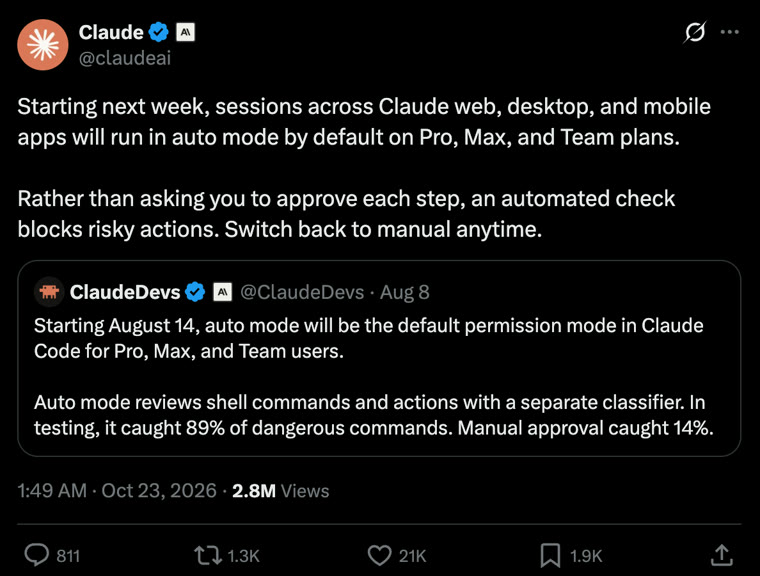
If Claude has stopped asking you "Allow?" before every step, this is why. On October 22, 2026 Anthropic said that sessions in the Claude web, desktop and mobile apps would start in auto mode by default on Pro, Max and Team plans, the same default Claude Code got in August. Instead of you approving each action, a separate automated check does it. This review covers what that check blocks, the numbers Anthropic published, what people said, the honest limits, and how to switch back.
What Anthropic announced
The official post quoted the August announcement for Claude Code and extended it to the apps. It had about 2.8 million views and 21,000 likes as of November 4.
Anthropic added the same news as a dated update on top of its auto mode article:
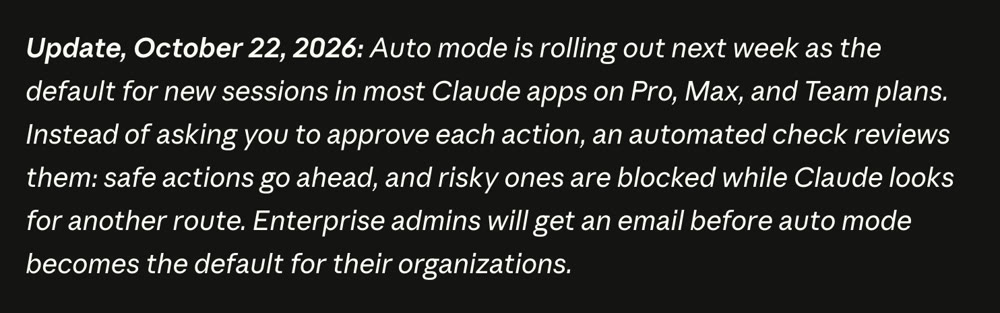
Two details in that update matter: it applies to new sessions, and to "most" Claude apps, not every surface. Enterprise organisations get an email before their default changes; the API and the cloud platforms stay opt-in for now.
How the check works
In manual mode, Claude stops and asks you before each tool action. In auto mode, Anthropic's article says each tool call goes through a classifier "targeted at blocking actions that are irreversible, destructive, or aimed outside your environment".
| Manual mode | Auto mode | |
|---|---|---|
| Who decides each step | You click approve or deny | A separate classifier |
| Safe actions | Wait for your click | Go ahead |
| Risky actions | Wait for your click | Blocked; Claude looks for a safer route or asks you |
| When Claude is stuck | Keeps asking | Claude Code falls back to manual after 3 blocks in a row or 20 in a session |
| Rules you pinned yourself | Apply | Still apply; pinned defaults are not changed |
The point is not that a model is more careful than you. It is that people stop reading prompts once there are many of them. Anthropic's data says users approve 97% of permission prompts, so the approve button had become a habit, not a check.
The numbers behind the change
Anthropic ran a controlled study with 1,053 paid developers who did not know which behaviour was being tested:
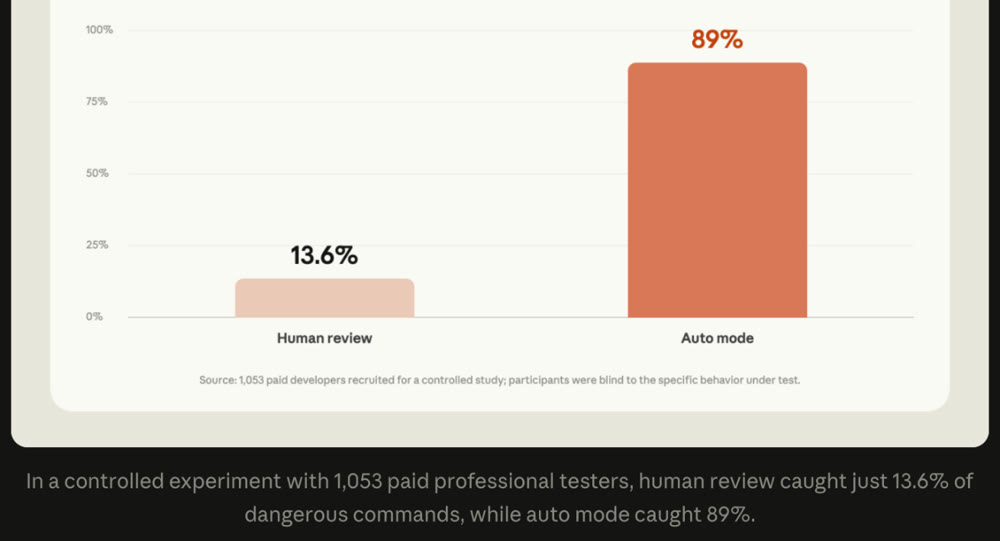
- 89% vs 13.6%: auto mode caught 89% of dangerous commands; human review caught 13.6%.
- 800 vs 6: auto mode blocked 800 commands that humans had approved; humans blocked 6 that auto mode allowed.
- Real sessions: among flagged high-severity cases, 6.3% of manually approved sessions contained an unrequested harmful action, against 2.4% in auto mode.
- Prompt injection: in an independent evaluation of 720 attempts, none succeeded against Claude models in auto mode.
These are Anthropic's own reported figures. We have not reproduced them.
What auto mode does not promise
Anthropic is careful here, and so should you be. Its red-team testing with an outside firm lowered the classifier's miss rate on synthetic attacks from 12% to 7%, and the article says that 7% "should not be taken as the miss rate on real traffic". In other words: fewer mistakes than tired humans, not zero.
The clearest summary came from Addy Osmani, who works on Claude Code at Anthropic, in a long post about prompting (about 352,000 views):
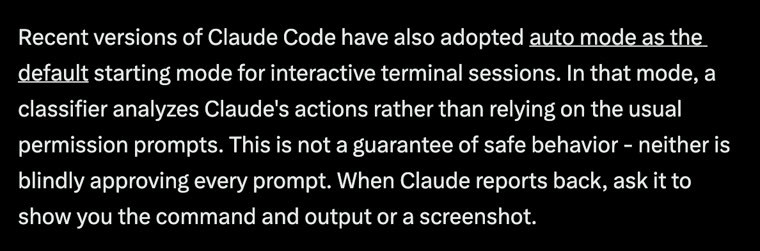
That is the right mental model: neither mode is a guarantee, so the evidence matters. Ask Claude to show the command and its output, or a screenshot, before you accept that something is done.
How people reacted
We looked only at the posts with the most reach (as shown on X on November 4, 2026). We left out replies that were only about rival products.
| Post | Reach | What it said |
|---|---|---|
| @claudeai (official) | 2.84M views 21,036 likes | The announcement |
| @addyosmani (Anthropic) | 353K views 2,833 likes | Auto mode is "not a guarantee of safe behavior", and neither is approving everything; ask for evidence |
| @erdyai (reply) | 56K views 785 likes | Relief: no more clicking "allow" 40 times in one session |
| @testingcatalog | 26K views 510 likes | Explains the change: Claude relies on its safety check instead of asking for every step |
| @0xerik (reply) | 33K views 305 likes | Many developers were already using auto mode before it became the default |
The pattern: the most-liked reactions were relief at fewer clicks. We found no high-reach post reporting a real incident caused by the new default; the strongest caution came from inside Anthropic itself, which is a good sign about how the change is being framed.
How to switch back, or pin a mode
- Per session: the official post says you can "switch back to manual anytime". In the Claude Code CLI, press Shift+Tab to cycle permission modes; in the desktop app, use the mode menu.
- Your own rules still win: deny rules and anything you pinned in your settings are not changed by the new default. If a command must never run, keep a deny rule for it.
- For a team: admins can set an organisation-wide default with
defaultModein managed settings, or turn auto mode off withdisableAutoMode. - For scripts: headless runs choose their mode explicitly with
--permission-mode, so set it on purpose rather than relying on a default.
Our honest review
What is genuinely good. The change matches how people really behave. A prompt you approve 97% of the time is not protecting you; a check that blocks the dangerous 3% consistently is. Keeping your pinned rules untouched, falling back to manual when Claude is stuck, and warning Enterprise admins first are the right details.
What to watch. A default changes what new users never learn. People who start in auto mode may never see what Claude is actually running, so make a habit of asking for the command and output. And "most Claude apps" means the behaviour can differ by surface for a while; check the mode indicator before a session that touches anything important.
What we did. We use Claude Code daily to build this channel's videos. For anything that must never happen we rely on deny rules and hooks, not on the mode, which is the same advice Anthropic gives. We have not measured the classifier ourselves.
Verdict: a sensible default with honest numbers behind it. Keep it on for everyday work, keep your deny rules for the things that must never break, and ask for evidence before you trust a "done".
The full setup we use (permissions, hooks, headless runs) is in How to use Claude like a professional.
Sources: Anthropic's posts on X and its auto mode article (published August 7, 2026, updated October 22, 2026), captured November 4, 2026. Figures are Anthropic's own reported results. Reach figures are as shown on X that day. Public reactions are summarised with links to the original posts; short quotes are the posters' own words. Defaults can change after publication.
Frequently asked questions
What is auto mode in Claude?
A permission mode where a separate classifier reviews each action Claude wants to take, instead of showing you an approve button for every step. Safe actions go ahead; actions that are irreversible, destructive, or aimed outside your environment are blocked, and Claude looks for another way.
Is auto mode safe?
Safer than clicking approve on everything, by Anthropic's numbers: in a controlled study auto mode caught 89% of dangerous commands while human reviewers caught 13.6%. It is not a guarantee. Anthropic's own red-team figures show the classifier still misses some synthetic attacks, and Anthropic says those figures are not the miss rate on real traffic.
How do I turn auto mode off?
You can switch back to manual at any time. In the Claude Code CLI press Shift+Tab to cycle modes; in the desktop app use the mode menu. Organisation admins can set a default with defaultMode in managed settings or turn auto mode off with disableAutoMode.
Which plans get auto mode by default?
Pro, Max, Ultra and Team. Enterprise, the Claude API and the cloud platforms stay opt-in for now, and Enterprise admins get an email before the default changes for their organisation.
What happens when auto mode keeps blocking Claude?
Claude usually tries a safer route or asks you. In Claude Code, after three blocks in a row or twenty in one session, it falls back to manual approvals so you decide.
Sources
- Claude (@claudeai) on X: auto mode by default in the Claude appsx.com
- Auto mode is now the default in Claude Code for Pro, Max, Ultra, and Team plans (Claude by Anthropic, updated October 22, 2026)claude.com
- Addy Osmani (@addyosmani) on X: You're probably overprompting Claudex.com
- TestingCatalog (@testingcatalog) on X: auto mode becomes the defaultx.com
- Configure permissions (Claude Code docs)code.claude.com
- Permission modes (Claude Code docs)code.claude.com

Written by a software engineer and system architect with 10+ years of building production web, payment, ticketing and accounting systems in Japan and Nepal. About us