How a leaked password check works without sending the full password
How Pwned Passwords checks a SHA-1 prefix, what the lookup reveals, and how to reject breached passwords at sign-up.
Drafted with AI assistance, then checked and edited by a human engineer · How we write
Short answer
A leaked password check hashes the password with SHA-1 and sends only the first 5 hex characters (a 20-bit prefix) to the Pwned Passwords range API. The service returns every breached suffix in that bucket with a count, and the match happens locally. The prefix still narrows guesses for common passwords, so check the finished password once, validate the whole response, and never log the prefix.
| What the lookup service receives | 5 hex characters of the SHA-1 hash (20 of 160 bits) |
|---|---|
| Buckets | 16^5 = 1,048,576 possible prefixes |
| Our saved run | 1,927 to 1,972 rows with a count above 0 per bucket (2026-11-06, not yet reproduced) |
| password123 | seen 2,266,543 times (saved run, 2026-11-06) |
| Padding | Add-Padding: true adds count-0 rows to blur the prefix signal in response size |
| Cost | Free, no API key for the range API |
| Storage | SHA-1 is only the lookup key; store with Argon2id, or scrypt as fallback |
You can check whether a password appears in a known breach corpus without sending the full password to the lookup service. The Pwned Passwords range API receives only the first 5 characters of the password's SHA-1 hash and returns every breached hash in that bucket, so the final comparison happens on your side. In a sign-up form this check closes a common weakness: accepting a password that already sits in breach lists because it passes the complexity rules.
This guide is for protecting applications you own or maintain.
To follow the code you need Node 18 or later (for built-in fetch) and a sign-up or password change handler you control. The range API is free and needs no key.
How does the Pwned Passwords range API work?
SHA-1 turns a password into 40 hex characters. The first 5 select one of 16^5 = 1,048,576 buckets. According to the HIBP API documentation, every bucket exists, so a range query answers 200 rather than 404, and each line of the reply is a 35 character suffix, a colon and a count.
Here, k-anonymity groups password hashes by a shared prefix. The request identifies a bucket of candidates; it does not give every candidate equal probability or guarantee that the password cannot be inferred.
A worked example. password123 hashes to CBFDAC6008F9CAB4083784CBD1874F76618D2A97. Your code sends GET /range/CBFDA, keeps C6008F9CAB4083784CBD1874F76618D2A97 to itself, and scans the reply for that suffix. The line it finds carries the count.
Is it safe to check my password on a website?
It depends on what the checker sends. A full SHA-1 of a common password is as good as the password, because it can be looked up.
// Unsafe: the whole secret leaves your server
await fetch(`https://checker.example/check?pw=${encodeURIComponent(password)}`);
await fetch(`https://checker.example/check?sha1=${sha1(password)}`);
The fixed version sends the prefix and matches locally. It also validates the whole response before trusting it. A parser that only looks for its suffix returns 0 when the body is an error page or a truncated download, and 0 means "accept this password".
// pwned.mjs: k-anonymity range check, Node 18+
import { createHash } from 'node:crypto';
const ROW = /^[0-9A-F]{35}:[0-9]+$/;

export async function timesSeen(password, { timeoutMs = 2000 } = {}) {
  const hash = createHash('sha1').update(password, 'utf8').digest('hex').toUpperCase();
  const prefix = hash.slice(0, 5);
  const suffix = hash.slice(5);
  const res = await fetch(`https://api.pwnedpasswords.com/range/${prefix}`, {
    headers: { 'Add-Padding': 'true', 'User-Agent': 'your-app-name' },
    signal: AbortSignal.timeout(timeoutMs),
  });
  if (!res.ok) throw new Error(`range API returned ${res.status}`);
  const body = (await res.text()).trim();
  if (!body) throw new Error('empty range response');
  let seen = 0;
  for (const row of body.split(/\r?\n/)) {
    if (!ROW.test(row)) throw new Error('malformed range row');
    const count = Number(row.slice(36));
    if (!Number.isSafeInteger(count)) throw new Error('count out of range');
    if (row.slice(0, 35) === suffix) seen = count; // padding rows carry 0
  }
  return seen;
}
Every failure throws, so the caller handles a bad body the same way as an outage.
What does the 5 character prefix still reveal?
The request reveals 20 of 160 bits. That narrows guesses, most of all for common passwords: if the bucket holds a suffix seen two million times, anyone who learns the prefix has a strong first guess. Cloudflare's write-up of the design (February 21, 2018) discusses this reduced search space and why 5 characters was chosen as the balance between bucket size and download size.
Response size is a second signal, since it varies by prefix. The Add-Padding: true header adds count-0 rows to obscure it, which reduces the signal rather than removing it. Two habits in your own code matter more:
| Habit | Why |
|---|---|
| Check once, on submit | A lookup per keystroke hands out a prefix for every partial password |
| Never log the prefix next to a user id | The pair turns a bucket into a strong guess about one account |
Why Summer2024! passes complexity rules and still fails
Composition rules (one capital, one digit, one symbol) push people toward the same patterns, and breached passwords satisfy them.
// Unsafe: a rule a breached password satisfies, and a length count in UTF-16 units
const ok = /^(?=.*[A-Z])(?=.*\d)(?=.*\W).{8,}$/.test(pw);
NIST SP 800-63B-4 asks for at least 15 characters when a password is the only factor (8 when it is part of multi-factor login), no composition rules, and a blocklist check when a password is set or changed. NIST counts each Unicode code point as one character, while pw.length counts UTF-16 units, so eight emoji give a length of 16. NIST recommends NFC normalization before hashing Unicode passwords. Apply the same normalization during enrollment and login, and check the resulting password against the blocklist.
// signup-policy.mjs
import { timesSeen } from './pwned.mjs';
import { localBlocklist } from './blocklist.mjs'; // Set: common and service-specific values

export async function checkNewPassword(raw, { mfaOnly = false } = {}) {
  const pw = raw.normalize('NFC');
  const min = mfaOnly ? 8 : 15;
  if ([...pw].length < min) return { ok: false, reason: `Use at least ${min} characters.` };
  if (localBlocklist.has(pw)) return { ok: false, reason: 'This password is too common. Please choose another.' };
  let seen;
  try {
    seen = await timesSeen(pw);
  } catch {
    return { ok: false, reason: 'Password check unavailable. Please try again.' };
  }
  if (seen > 0) return { ok: false, reason: 'This password appears in known data breaches. Please choose another.' };
  return { ok: true };
}
What should sign-up do when the check fails?
The code above fails closed: a timeout, a non-200 status or a malformed body all end in a retry message. The trade-off is availability. If the range API is down, nobody can set a password until it returns.
If that is not acceptable, keep a local copy of the corpus (HIBP documents a downloader for the full hash set) and query it instead. Skipping the check when the API fails is the one option to avoid, because it quietly turns the control off at the moment you cannot see it.
Is SHA-1 okay for storing passwords?
No. In the range check, SHA-1 is only the lookup key the service already uses. Storage needs a slow, salted hash, because a fast one lets anyone holding a copy of your database try guesses at hardware speed. The OWASP Password Storage Cheat Sheet lists Argon2id first, scrypt (built into Node) as the fallback, and bcrypt for legacy systems, with minimum parameters for each.
// Unsafe: fast and unsalted
const stored = createHash('sha1').update(pw).digest('hex');
What our lab showed
We ran labs/security/password-leak-check-lab/password-leak-check-lab.mjs on our Mac on 2026-11-06 with four test passwords: two famous weak ones, one that passes the usual complexity rules, and a random 20 character password generated during the run. These are saved observations from that single run (labs/security/password-leak-check-lab/last-run.txt); we have not independently reproduced them. The script counts only rows with a count above 0.
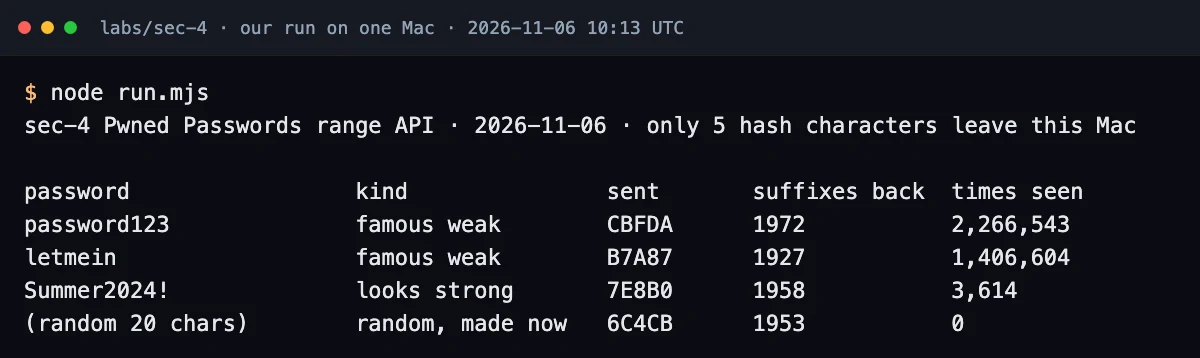
| Password | Prefix sent | Rows with count above 0 | Times seen |
|---|---|---|---|
| password123 | CBFDA | 1,972 | 2,266,543 |
| letmein | B7A87 | 1,927 | 1,406,604 |
| Summer2024! | 7E8B0 | 1,958 | 3,614 |
| random 20 chars | 6C4CB | 1,953 | 0 |
Summer2024! satisfies the regex above and was seen 3,614 times; only the random password was absent. One gap remains open: the HIBP documentation describes padded responses of 800 to 1,000 rows in total, while this run counted 1,927 to 1,972 positive rows alone. That run did not check HTTP status or row format, and did not record total or zero-count rows, so we report the gap without guessing at a cause. The lab script now logs all of these for the next dated run.
Add this check at sign-up and password change in any app that uses passwords. It costs one request on submit and rejects breached passwords that composition rules let through.
Fix checklist
| Check | Fix |
|---|---|
| Password or full hash sent to a checker | Range API with a 5 character prefix |
| Parser trusts any 200 response | Validate every row against ^[0-9A-F]{35}:[0-9]+$, throw otherwise |
| Prefix inferable from response size | Add-Padding: true, ignore count-0 rows |
| Lookup on every keystroke | One lookup on submit |
| Composition regex as the only rule | Code point length, NFC, local blocklist, breach check |
| API outage or bad body accepts the password | Refuse with a retry message, or use a local corpus copy |
| Passwords stored with SHA-1 or MD5 | Argon2id, or scrypt with stored parameters |
| Password or prefix in logs | Log the result only |
Test your own app
Search your code for the patterns this guide replaces:
# from your repo root
rg -n "createHash\(['\"](md5|sha1)['\"]\)" --glob '!**/pwned.*'   # fast hashes outside the lookup module
rg -n "\(\?=\.\*\[A-Z\]\)" src/                                    # composition-only password regex
rg -n "\.length\s*<\s*\d+" src/auth/                               # UTF-16 length checks on passwords
rg -n "log.*(password|passwd|pwd|prefix)" src/                     # secrets near log calls
Then unit tests that mock fetch, so they run offline:
// pwned.test.mjs: node --test
import { test } from 'node:test';
import assert from 'node:assert/strict';
import { timesSeen } from './pwned.mjs';
import { checkNewPassword } from './signup-policy.mjs';

const reply = (body) => async () => new Response(body);

test('URL carries a 5 char prefix and the suffix is matched locally', async () => {
  let url;
  globalThis.fetch = async (u) => {
    url = String(u);
    return new Response('00000000000000000000000000000000000:0\r\nC6008F9CAB4083784CBD1874F76618D2A97:2266543');
  };
  assert.equal(await timesSeen('password123'), 2266543);
  assert.match(url, /\/range\/[0-9A-F]{5}$/);
});

test('malformed or empty 200 responses throw', async () => {
  for (const body of ['unexpected upstream body', '', 'C6008F9CAB4083784CBD1874F76618D2A97:-1', 'ABC:5']) {
    globalThis.fetch = reply(body);
    await assert.rejects(timesSeen('password123'));
  }
});

test('outage and bad body both refuse instead of accepting', async () => {
  for (const f of [async () => { throw new Error('down'); }, reply('<html>error</html>')]) {
    globalThis.fetch = f;
    assert.equal((await checkNewPassword('a long passphrase nobody has used')).ok, false);
  }
});
These tests cover the URL, the parser and the fail-closed path. They do not show what other parts of your app send, so review those separately. To keep fast hashes out of auth code, an ESLint no-restricted-syntax rule on createHash('sha1') in your auth folder, with an exception for pwned.mjs, does the job.
FAQ
Is it safe to type my password into a leak checker?
Use a checker you trust. Browser-side hashing with a prefix-only request limits what the lookup service receives; that request alone cannot establish what the rest of the page does.
If my password shows 0, is it strong?
It was not found in the queried corpus. It can still be short or guessable, so keep the length rule and use a password manager.
Should my app block breached passwords at sign-up?
Yes. NIST SP 800-63B-4 requires a blocklist comparison when a password is set or changed, with a short message saying why a match was refused.
Further reading
- HIBP API v3, Pwned Passwords: the range endpoint, padding, NTLM mode and response format.
- Cloudflare, k-anonymity write-up (2018): why a 5 character prefix, and the privacy trade-off.
- NIST SP 800-63B-4, password verifiers: length, blocklists, no composition rules, Unicode handling.
- OWASP Password Storage: Argon2id, scrypt and bcrypt parameters.
- OWASP Authentication: where the breach check fits in sign-up and password change.
- On this site: PHP security checklist, Node.js security guide, Python security guide, how to prevent SQL injection and checking the PHP RCE advisories.
Facts about the API come from the official Have I Been Pwned documentation and Cloudflare's write-up; numbers come from our saved run on 2026-11-06.
Frequently asked questions
Is it safe to type my password into a leak checker?
Use a checker you trust. Hashing in the browser and sending only the prefix limits what the lookup service receives, but that request alone cannot tell you what the rest of the page does with what you type.
If my password shows 0, is it strong?
It means it was not found in the queried breach corpus. It can still be short or guessable, so keep the length rule and use a password manager.
Should my app block breached passwords at sign-up?
Yes. NIST SP 800-63B-4 requires comparing a new or changed password against a blocklist of compromised, common and expected values, and telling the user why a match was refused.
Sources
- Have I Been Pwned API v3: Pwned Passwordshaveibeenpwned.com
- Cloudflare blog (2018-02-21): Validating leaked passwords with k-anonymityblog.cloudflare.com
- NIST SP 800-63B-4: Password verifierspages.nist.gov
- OWASP Password Storage Cheat Sheetcheatsheetseries.owasp.org
- OWASP Authentication Cheat Sheetcheatsheetseries.owasp.org

Written by a software engineer and system architect with 10+ years of building production web, payment, ticketing and accounting systems in Japan and Nepal. About us