Python security: 4 common vulnerabilities we reproduced and fixed
SQL in an f-string, pickle.loads on client bytes, subprocess with shell=True and open(base / name): reproduced in our Python 3.14.7 lab, then fixed.

Drafted with AI assistance, then checked and edited by a human engineer · How we write
Short answer
Four Python failures: client input changes SQL, supplies pickle instructions, enters a shell command, or escapes a folder. Fixes: ? placeholders, server-side or signed sessions with JSON, argument lists without a shell, and resolve() plus is_relative_to(). In our Python 3.14.7 lab all 4 attacks worked on the unsafe code, the fix blocked 4/4, and 2/2 normal inputs still worked.
| SQL injection | db.execute('... WHERE email = ?', (email,)) |
|---|---|
| Unsafe deserialization | Opaque session ID with server-side state, or a verified signature, and JSON instead of pickle |
| Command injection | subprocess.run(['ls', path]) with a list, no shell=True; add -- only where the program supports it |
| Path traversal | (base / name).resolve().is_relative_to(base), base already resolved |
| Our lab | Python 3.14.7: reproduced 4/4, blocked 4/4, normal inputs unchanged 2/2 |
| Tooling | Bandit and code search for your own code; pip-audit for dependencies; regression tests per fix |
Four Python security failures occur when client input changes SQL, supplies pickle instructions, enters a shell command, or escapes an allowed directory. Use bound SQL values, authenticated sessions with safe serialization, argument lists, and path containment checks backed by filesystem permissions. We reproduced all four in our lab and spend the most time on the pickle case, unsafe deserialization.
This guide is for protecting applications you own or maintain.
Background
The pickle documentation warns that the module is not secure and that crafted data can run arbitrary code during unpickling; it points to hmac for tamper checks and to JSON for untrusted data. The subprocess security section covers shell=True.
Prerequisites
sqlite3, /bin/sh and the pickle loader are all interpreters: each reads text or bytes and acts on them. A bug appears when client data lands where the interpreter expects instructions.
Definitions
Injection: client text is joined into a string that an interpreter (SQL, a shell) parses, so part of the text is read as code.
Unsafe deserialization: loading bytes in a format that can name and call functions, so the bytes decide what runs while the object is rebuilt.
Path traversal: a file name with .. or an absolute path resolves outside the folder you meant to serve.
Why is pickle unsafe? What pickle.loads really does
A pickle is an instruction stream for a stack machine. For this payload, __reduce__ supplies the callable and its argument tuple. Here is the lab's payload, trimmed:
# payload_lab.py (lab only: writes an empty marker file in a temp folder)
import pickle, tempfile
from pathlib import Path

marker = Path(tempfile.mkdtemp()) / "pickle-ran.txt"

class Payload:
    def __reduce__(self):
        return (Path.touch, (marker,))

blob = pickle.dumps(Payload())
pickle.loads(blob)
print(marker.exists())   # True
Running the stream through pickletools shows the order. STACK_GLOBAL resolves Path.touch through Unpickler.find_class. The stream then reconstructs the marker path, and REDUCE invokes the callable with that path. Payload.__reduce__ runs while creating the pickle; the receiving process needs the referenced objects, but it does not need Payload. Real pickling also uses __reduce_ex__ and registered reducers (reduction protocol).
Reproduce: the four mistakes on the unsafe version
Lab python-security-lab is one offline script, run.py, standard library only, driven by labs/security/python-security-lab/python-security-lab.mjs. It builds an in-memory SQLite table of three fake users, a temp folder with public/hello.txt beside a fake secret.env, and a forged "saved session" pickle. We ran it on this Mac on 2026-11-06 at 10:36 UTC with Python 3.14.7.
| Mistake | Input | Unsafe result |
|---|---|---|
| SQL in an f-string | x' OR '1'='1 | 3 rows for one email lookup |
pickle.loads on client bytes | pickle bytes from the client | code ran on load |
subprocess.run(..., shell=True) | hello.txt; touch <tmp>/shell-ran.txt | the extra command ran |
open(base / name) | ../secret.env | the secret file was reachable |
Experiment: attack and normal inputs on both versions
| Test | Input | Unsafe | Fixed |
|---|---|---|---|
| SQL lookup, rows returned (normal) | a@example.test | 1 | 1 |
| SQL lookup, rows returned (attack) | x' OR '1'='1 | 3 | 0 |
| Load a saved session, code ran on load | pickle bytes from the client | true | false |
| ls on a user file name, extra command ran | hello.txt; touch <tmp>/shell-ran.txt | true | false |
| File download, file reachable (normal) | hello.txt | true | true |
| File download, file reachable (attack) | ../secret.env | true | false |
The side effect of the pickle happened inside pickle.loads itself, before our code could inspect the result. A try/except around the call did not stop it.
Fix: SQL injection with sqlite3 placeholders
An f-string pastes the email into the SQL text, so the quote in x' OR '1'='1 closes the string literal and the rest becomes a condition that is always true. With ?, sqlite3 compiles the statement first and binds the value into the slot afterwards, so the quotes stay part of an email address that no user has.
# users.py
import sqlite3

def find_user_unsafe(db: sqlite3.Connection, email: str):
    return db.execute(f"SELECT id FROM users WHERE email = '{email}'").fetchall()

def find_user(db: sqlite3.Connection, email: str):
    return db.execute("SELECT id FROM users WHERE email = ?", (email,)).fetchall()
(email,) is a tuple; (email) is a plain string. More in what SQL injection is and how to prevent it.
What to use instead of pickle for sessions
The JSON parser only builds dicts, lists, strings, numbers, booleans and None; it never calls a function. It does not authenticate anything, though: a client can edit {"role": "user"} into {"role": "admin"}. Use an opaque session ID backed by server-side state, or verify a signed session before trusting its fields. Check whether your framework stores session state server-side or authenticates client-side session data. Minimal storage example (expiry, logout invalidation and cookie settings omitted):
# session.py (minimal storage example)
import json, pickle, secrets

SESSIONS: dict[str, dict] = {}            # use Redis or a database table in production

def load_session_unsafe(cookie: bytes):
    return pickle.loads(cookie)             # the cookie decides what runs

def start_session(user_id: int) -> str:
    sid = secrets.token_urlsafe(32)         # opaque, carries no data
    SESSIONS[sid] = {"user_id": user_id, "role": "user"}
    return sid                              # send this as the cookie

def load_session(sid: str) -> dict | None:
    return SESSIONS.get(sid)                # fields come from the server

def export_settings(data: dict) -> str:
    return json.dumps(data)                 # JSON for any data that crosses the boundary
The pickle docs also show a restricted find_class allowlist and warn that a loose one can still be abused. For untrusted YAML, use yaml.safe_load; avoid loaders that permit Python object construction (PyYAML documentation). shelve is built on pickle and carries its own warning. We did not test YAML or shelve.
Is shell=True dangerous? Command injection in subprocess
With shell=True and a string, Python runs /bin/sh -c "<string>" on macOS and Linux, and ; separates commands.
# listing.py
import subprocess
from pathlib import Path

def list_file_unsafe(pub: Path, name: str):
    return subprocess.run(f"ls {pub / name}", shell=True, capture_output=True)

def list_file(pub: Path, name: str):
    return subprocess.run(["ls", str(pub / name)], capture_output=True)
With a list and shell=False, Python starts ls directly and passes each item as one argument, so shell metacharacters stay literal. In our run ls got the whole name, semicolon included, reported a missing file, and touch never ran. The program still interprets its own arguments: a name starting with - can look like an option, and -- ends option parsing only in programs that support it. On Windows, batch files can involve shell parsing even with shell=False, per the subprocess security notes. Without check=True, a nonzero exit does not raise, so read returncode.
Path traversal in Python: why base / name is not enough
pathlib joins without normalizing, so pub / "../secret.env" keeps the .. and the OS follows it. An absolute name replaces the base: pub / "/etc/hosts" is /etc/hosts, per the pathlib docs.
# download.py
from pathlib import Path

PUBLIC_DIR = Path("public").resolve()            # resolve the base once

def read_public_unsafe(name: str) -> bytes:
    return (PUBLIC_DIR / name).read_bytes()

def safe_path(base: Path, name: str) -> Path:
    target = (base / name).resolve()
    if not target.is_relative_to(base):
        raise FileNotFoundError(name)
    return target

def read_public(name: str) -> bytes:
    return safe_path(PUBLIC_DIR, name).read_bytes()
resolve() removes .. and follows symbolic links; is_relative_to (Python 3.9+) compares path components, so a sibling folder public-old fails where a string startswith would pass.
Report: what our lab showed
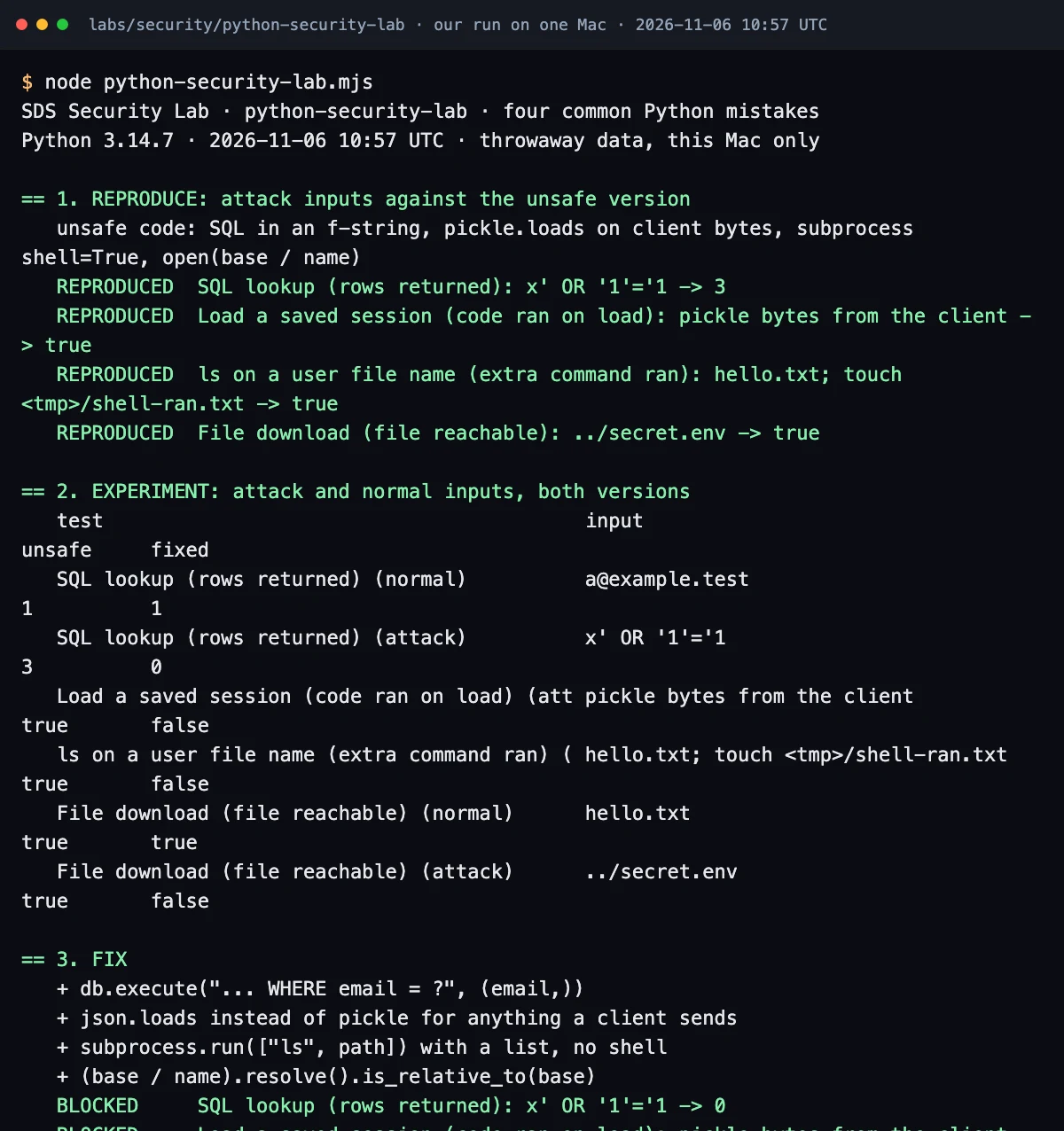
node labs/security/python-security-lab/python-security-lab.mjs (2026-11-06, 10:36 UTC, Python 3.14.7), cropped before the totals. Full output: last-run.txt; script: run.py.| Count | Result |
|---|---|
| Reproduced on the unsafe version | 4/4 |
| Blocked by the fix | 4/4 |
| Normal inputs unchanged | 2/2 |
The lab is narrow: one process on one Mac, in-memory SQLite, no web framework, macOS /bin/sh and one attack input per mistake. The pickle and shell tests had no normal-input row, so "normal inputs unchanged" covers only SQL and file download. The lab's pickle fix was json.loads; the server-side session code above was not run. We did not test symbolic links, a tree that changes mid-request, the restricted unpickler or --.
Failure modes and edge cases
- A path check passes, then the tree changes before the read. Pair the check with file permissions that keep the app away from secrets.
- A symlink inside the public folder points outside it.
resolve()follows it and the check rejects it, which may break content you meant to serve; decide that case explicitly. - A column or table name cannot be a placeholder. Pick it from a fixed dict.
Trade-offs
| Option | Good for | Costs you | Use when |
|---|---|---|---|
? placeholders | every SQL value | dynamic columns need an allowlist | always |
| Server-side session | identity and roles | a session store | users log in |
| Signed client session | stateless servers | key management; data visible to the client | small, non-secret state |
| Argument list, no shell | calling a program | no pipes or globs; check returncode | you must call a program |
resolve() + is_relative_to | serving files by name | symlinked content needs a decision | user picks a file |
Common mistakes
role field. Keep identity on the server or verify a signature first.shlex.quote on part of a shell=True string. Pass a list.str(target).startswith(str(base)). Use target.is_relative_to(base) after resolve().pip-audit to catch these. It checks dependencies against advisories, not your code.Code: test your own app
Search for the four shapes, then run Bandit, which flags pickle, shell=True and string-built SQL. Run pip-audit separately for dependencies.
# from your project root
grep -rnE "execute\(f[\"']|execute\([^)]*%|execute\([^)]*\.format\(" src/   # SQL built from strings
grep -rnE "pickle\.loads?\(|yaml\.load\(|shelve\.open\(" src/               # loaders that can run code
grep -rnE "shell=True|os\.system\(|os\.popen\(" src/                        # shell calls to review
grep -rnE "open\([^)]*request|send_file\(" src/                             # paths from request data
bandit -r src/
These three tests cover SQL binding, path containment and rejection of malformed JSON. Add normal JSON and subprocess tests for your application. They import the functions above from users.py and download.py; pytest test_security.py should report 3 passed.
# test_security.py
import json, sqlite3
import pytest
from users import find_user
from download import safe_path

def test_sql_placeholder():
    db = sqlite3.connect(":memory:")
    db.execute("CREATE TABLE users (id INTEGER, email TEXT)")
    db.execute("INSERT INTO users VALUES (1, 'a@example.test')")
    assert len(find_user(db, "a@example.test")) == 1
    assert len(find_user(db, "x' OR '1'='1")) == 0

def test_paths_stay_inside(tmp_path):
    base = tmp_path.resolve()
    (base / "hello.txt").write_text("hi")
    assert safe_path(base, "hello.txt").exists()
    for name in ["../secret.env", "/etc/hosts"]:
        with pytest.raises(FileNotFoundError):
            safe_path(base, name)

def test_json_rejects_pickle_bytes():
    with pytest.raises(ValueError):
        json.loads(b"\x80\x05not json")
The same reproduce, fix and test method covers Node.js in our Node.js security write-up, PHP in the PHP security checklist, and uploads in checking image uploads in Rails.
In an interview
Clarify which inputs cross a trust boundary, then go interpreter by interpreter.
I treat SQL, the shell, the pickle loader and the filesystem as four interpreters and keep client bytes out of their instruction channel: bound values, an argument list, JSON with server-side or signed sessions, and a resolved path checked against a resolved base, with file permissions behind it.
Practice
BeginnerWhy does x' OR '1'='1 return every row?
The quote closes the SQL literal and OR '1'='1' is true for each row.
IntermediateWhich opcode calls the function in a malicious pickle?
REDUCE, after STACK_GLOBAL has resolved the callable through find_class.
AdvancedWhy is startswith wrong for path checks?
/srv/public-old starts with /srv/public; is_relative_to compares whole components.
Cheat sheet
| Risk | Fix | Lab result (unsafe → fixed) |
|---|---|---|
| SQL injection | ? for every value; allowlist for names | 3 rows → 0 |
| Unsafe deserialization | server-side or signed session; JSON at the boundary; yaml.safe_load | code ran → did not run |
| Command injection | subprocess.run([...]), no shell=True | extra command ran → did not run |
| Path traversal | resolved base, resolve(), is_relative_to, tight permissions | secret reachable → blocked |
Further reading
- pickle: the security warning, the reduction protocol and restricting globals.
- pickletools: disassemble a pickle to see its opcodes.
- sqlite3: placeholder styles.
- subprocess: shell use and the Windows batch file note.
- pathlib: joining,
resolve()andis_relative_to. - Bandit: static checks for these patterns.
- pip-audit: known advisories in your installed packages.
These are general patterns tested on throwaway data in our own lab, for applications you own or maintain. They describe no specific company's system.
Frequently asked questions
Is pickle safe if I sign it with HMAC?
A valid HMAC proves the bytes were made by someone holding your key and not changed since. It stops client tampering, but anyone with the key can still produce a pickle that calls functions, so keep the key on the server and never load pickles from outside.
Is subprocess safe without shell=True?
For direct POSIX executable calls, shell=False keeps shell metacharacters literal. The executable still interprets its arguments; use -- only where supported. Windows batch files can involve shell parsing even with shell=False.
Does pip-audit find these bugs?
No. pip-audit reports installed packages with known advisories. Bugs in your own code need Bandit, code search and unit tests.
Sources
- Python 3.14 docs: pickle (security warning, reduction protocol, Restricting Globals)docs.python.org
- Python 3.14 docs: pickletoolsdocs.python.org
- Python 3.14 docs: sqlite3, placeholdersdocs.python.org
- Python 3.14 docs: subprocess, security considerationsdocs.python.org
- Python 3.14 docs: pathlibdocs.python.org
- Bandit documentationbandit.readthedocs.io
- pip-audit (PyPA repository)github.com

Written by a software engineer and system architect with 10+ years of building production web, payment, ticketing and accounting systems in Japan and Nepal. About us