How apt proves a package is genuine, and how to check and fix CVE-2026-109518
How apt's signed chain from InRelease to .deb works, how CVE-2026-109518 swapped a package after the check, and which apt versions fix it.

Drafted with AI assistance, then checked and edited by a human engineer · How we write
Short answer
CVE-2026-109518 lets an attacker controlling APT's HTTP responses replace a package after verification when retries are enabled. Update apt to your release's fixed version or later, then confirm the installed version with dpkg --compare-versions.
| CVE | CVE-2026-109518, found by Max Justicz, published 2026-11-04 |
|---|---|
| Effect | a package swapped after verification could be installed |
| Precondition | on-path HTTP attacker, redirects and retries, Acquire::Retries above 0 (default 3 since apt 2.3.2) |
| Debian first fixed | trixie 3.0.4 (DSA-6607-1), bookworm 2.6.2 (DLA-4880-1), forky and sid 3.3.6 |
| Ubuntu first fixed | 26.04 3.2.1ubuntu0.1, 24.04 2.8.4ubuntu0.1, 22.04 2.4.15ubuntu0.1 (USN-8996-1) |
| Signatures | the InRelease signature check itself was not broken |
| Our lab | 6 tampered repos: unsafe verifier accepted 6, fixed verifier rejected 6 |
If a Debian or Ubuntu machine runs an apt older than the first fixed package for its release, a party that can change its HTTP traffic could make apt install a package that never passed verification. The flaw is CVE-2026-109518, a vulnerability that enables a man-in-the-middle attack through how apt reuses downloaded files; the fix is to update apt and confirm the installed version is the listed one or later.
This guide is for protecting applications you own or maintain.
Debian published DSA-6607-1 and Ubuntu published USN-8996-1 on 2026-11-04, and The Hacker News covered it the same day. Neither advisory reports exploitation.
How apt checks that a package is genuine
apt does not check a signature on each .deb. It checks one signed metadata file and follows hashes down from it (apt-secure). A hash here is a SHA256 fingerprint of a file's bytes: change one byte and the fingerprint changes. The archive key is the OpenPGP key the repository owner signs that metadata with.
# chain of trust, top to bottom
InRelease      signed Release metadata: SHA256 of every index, Date, optional Valid-Until
               (or Release plus a detached Release.gpg signature)
  └─ Packages  index; lists Filename and SHA256 of every .deb
       └─ hello_1.0.deb   accepted only if its SHA256 matches the Packages entry
With authentication and freshness checks enabled, apt rejects a bad signature, an index whose hash is not in the signed block, a .deb whose hash is not in the index, and metadata past its Valid-Until. Every link vouches for exact bytes. The guarantee covers the file that was hashed, so anything that later changes what sits behind that file name falls outside it.
How CVE-2026-109518 swapped a verified package
The signature and hash checks worked. According to the APT team and DSA-6607-1, a party answering apt's HTTP requests could send redirects so that two different package downloads pointed at the same URI, plus transient errors so apt retried. apt merged the two downloads using existing hard links in its download directory, and a chosen payload could end up behind a file that had already passed its hash check.
The hard link is the detail that matters. A file's bytes live in an inode, and a file name is only a pointer to that inode. Two hard links are two names for one inode. Writing through one name changes the bytes you read through the other, and neither path is replaced or renamed, so a check that only watches paths sees nothing move. A verified name and an unverified name that share an inode are the same file.
APT's upstream patch opens download targets exclusively. When resuming, it retains a read handle to the old file, unlinks that destination, creates a fresh file, and copies the partial contents into it. Later writes then affect the new inode.
Optional: the same gap in an updater you own
Application code that verifies and then installs from a path has the same check-then-use gap. The fragment below is illustrative and is not APT's code:
// install.mjs (unsafe: hashes one read of the path, installs a later read)
import { readFileSync } from 'node:fs';
import { execFileSync } from 'node:child_process';
import { createHash } from 'node:crypto';
const sha256 = (b) => createHash('sha256').update(b).digest('hex');

if (sha256(readFileSync(path)) !== expected) throw new Error('hash mismatch');
execFileSync('dpkg', ['-i', path]); // a write through another hard link, or a swap, lands here
// install.mjs (fixed, illustrative fragment: install exactly the bytes that were verified)
import { readFileSync, writeFileSync, mkdtempSync } from 'node:fs';
import { execFileSync } from 'node:child_process';
import { createHash } from 'node:crypto';
import { tmpdir } from 'node:os';
import { join } from 'node:path';
const sha256 = (b) => createHash('sha256').update(b).digest('hex');
const bytes = readFileSync(path);
if (sha256(bytes) !== expected) throw new Error('hash mismatch');
const dir = mkdtempSync(join(tmpdir(), 'verified-')); // new directory, mode 0700
const safe = join(dir, 'pkg.deb');
writeFileSync(safe, bytes, { flag: 'wx', mode: 0o600 }); // new inode; fails if the name exists
execFileSync('dpkg', ['-i', safe]);This example assumes other processes with the same privileges are trusted. Directory permissions do not isolate those processes from each other.
Which apt versions are affected?
| Release | First fixed apt package | Record |
|---|---|---|
| Debian 13 trixie | 3.0.4 | DSA-6607-1 |
| Debian 12 bookworm | 2.6.2 | DLA-4880-1 |
| Debian forky, sid | 3.3.6 | security tracker |
| Ubuntu 26.10 | 3.3.3ubuntu0.1 | USN-8996-1 |
| Ubuntu 26.04 LTS | 3.2.1ubuntu0.1 | USN-8996-1 |
| Ubuntu 24.04 LTS | 2.8.4ubuntu0.1 | USN-8996-1 |
| Ubuntu 22.04 LTS | 2.4.15ubuntu0.1 | USN-8996-1 |
| Ubuntu 20.04, 18.04 | 2.0.12+esm1, 1.6.19+esm1 | Ubuntu Pro |
You are fixed when the installed version is the listed version or a later version for the same release. The bug also needs apt to retry downloads. According to the APT team announcement, Acquire::Retries has defaulted to 3 since apt 2.3.2, which covers Debian 12 and Ubuntu 22.04 onward. Older releases are exposed only if a config file or a command line turned retries on.
Is my apt repo config safe?
Updating fixes the CVE. Per-repository settings decide how much of the chain is switched on (sources.list):
# /etc/apt/sources.list.d/vendor.list (unsafe)
deb [trusted=yes check-valid-until=no] http://repo.example.com/debian stable main
# and the vendor key dropped into /etc/apt/trusted.gpg.d/
# /etc/apt/sources.list.d/vendor.sources (fixed)
Types: deb
URIs: https://repo.example.com/debian
Suites: stable
Components: main
Signed-By: /etc/apt/keyrings/vendor.asctrusted=yes (deb822: Trusted: yes) accepts an unsigned or badly signed repo. check-valid-until=no (deb822: Check-Valid-Until: no) accepts an old index after it expires, which can hold back security updates. A key in trusted.gpg.d is global: it can authenticate any repository that has no narrower key selection. Signed-By limits a source to the key or keys it names.
How to update apt
# Debian / Ubuntu
sudo apt update && sudo apt install --only-upgrade apt
# Ubuntu 24.04 threshold shown; use the first fixed version for your release from the table
installed=$(dpkg-query -W -f='${Version}' apt) || exit 1
dpkg --compare-versions "$installed" ge '2.8.4ubuntu0.1' || {
  echo "not fixed: $installed" >&2
  exit 1
}
apt changelog apt | grep CVE-2026-109518   # supporting detail only
apt-cache policy apt shows versions but does not compare them; dpkg --compare-versions applies Debian's version ordering. A changelog entry alone does not prove which package is installed.
The update itself travels over apt. Our own suggestion, not from the advisories: run it from a network you trust, against an HTTPS mirror if your release offers one. If you must delay, Acquire::Retries "0"; in /etc/apt/apt.conf.d/ temporarily removes one precondition the tracker documents. It only holds if the real invocation keeps that value, so check scripts for -o Acquire::Retries=..., and remove it after updating, since flaky mirrors will fail more often.
What our lab showed
Our lab builds a throwaway signed repo with the same three layers (a signed InRelease, a Packages index and two package stand-in files that contain plain text), tampers with it six ways, and runs one verifier twice: every check on, then exactly one check off. It uses Ed25519 in a custom signature envelope in place of OpenPGP, installs nothing and runs offline. Run it with node labs/security/apt-signature-lab/apt-signature-lab.mjs. We ran it on this Mac on 2026-11-06 with Node.js v22.13.1.
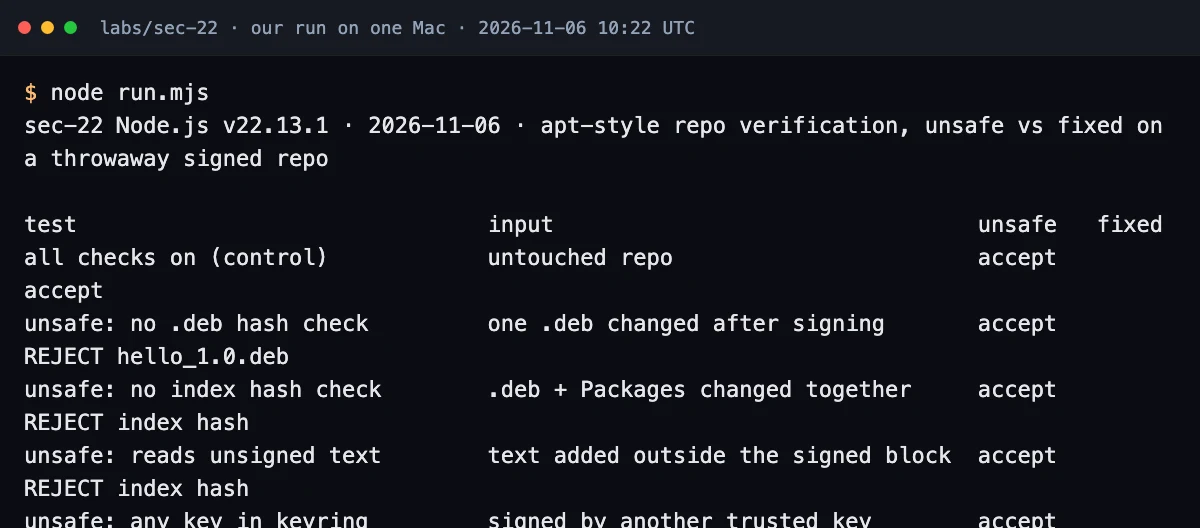
node labs/security/apt-signature-lab/apt-signature-lab.mjs, placed in a terminal-style page and captured in Chrome.Both verifiers accepted the untouched repo. Of the six tampered repos, the unsafe verifier accepted all six and the fixed one rejected all six: a .deb changed after signing (REJECT hello_1.0.deb), a .deb and Packages changed together (REJECT index hash), text added outside the signed block (REJECT index hash), a repo signed by another trusted key (REJECT wrong key), an expired index replayed (REJECT expired) and a removed signature (REJECT unsigned). The read-only version check found apt not installed on this Mac.
These six cases demonstrate signature scope, hash validation, key selection and expiry checks. They do not test the handoff from verification to installation, so they do not reproduce CVE-2026-109518.
Our take: update apt first. Repository hardening remains useful because it controls which keys and metadata your machine accepts.
Fix checklist
| Step | Done when |
|---|---|
| Update apt | installed is the listed version or a later version for the same release (dpkg --compare-versions ... ge) |
| Old releases | Ubuntu 20.04 and older on Ubuntu Pro packages, or an upgrade planned |
| Until updated | Acquire::Retries "0" in config and no -o Acquire::Retries= override in scripts |
| Unsigned repos | no trusted=yes, Trusted: yes or allow-insecure anywhere |
| Key pinning | every third-party source has Signed-By; trusted.gpg.d holds no vendor keys |
| Freshness | expiry checks enabled for active repositories; documented exceptions for historical archives; consider Valid-Until-Max where metadata omits expiry |
| Your own updaters | install from the verified bytes in a private file, never by re-reading the path |
Test your own app
Search your hosts and images for settings that switch a link off, in both .list and deb822 .sources syntax:
grep -rniE "trusted=yes|Trusted: *yes|allow-insecure|check-valid-until=no|Check-Valid-Until: *no|AllowUnauthenticated" /etc/apt/ Dockerfile* 2>/dev/null
grep -rnE "Acquire::(Retries|Check-Valid-Until)" /etc/apt/apt.conf.d/
grep -rnE "Acquire::Retries=" scripts/ .github/ Dockerfile* 2>/dev/null   # per-invocation overrides
ls /etc/apt/trusted.gpg.d/
apt-config dump | grep -iE "retries|check-valid-until"
In your own code, search for a hash check followed by a second read of the same path, for example sha256(readFileSync(path)) and then exec(..., path). A unit test can prove the fixed shape: verify a file, create a hard link to it, write new bytes through the link before install, and assert that the installed bytes are the verified ones. In CI, run the version check above inside your base image; it exits non-zero when apt is older than the threshold, so the build fails. Our PHP security checklist, Node.js security guide and Python security guide use the same search, test and fix approach for application code.
Frequently asked questions
Does HTTPS protect me from CVE-2026-109518?
The advisories describe an attacker who can change HTTP traffic and do not name HTTPS as a mitigation. HTTPS to a mirror you trust makes on-path changes much harder, but a hostile mirror or proxy is still in scope. Update apt.
My Ubuntu 24.04 shows apt 2.8.4ubuntu0.2. Is that fixed?
Yes. Any version equal to or later than 2.8.4ubuntu0.1 on 24.04 contains the fix. Check with dpkg --compare-versions against the USN entry for your release, not against Debian's numbers.
Was this exploited in the wild?
Neither the Debian nor the Ubuntu advisory reports exploitation, as of 2026-11-06. Installing packages normally requires root privileges, so update anyway.
Sources
- Debian Security Advisory DSA-6607-1 apt, 2026-11-04lists.debian.org
- Debian security tracker: CVE-2026-109518security-tracker.debian.org
- APT team announcement on the deity list, 2026-11lists.debian.org
- Ubuntu Security Notice USN-8996-1: APT vulnerability, 2026-11-04ubuntu.com
- apt-secure(8) manual: archive authenticationmanpages.debian.org
- sources.list(5) manual: Signed-By, Check-Valid-Until, trustedmanpages.debian.org
- The Hacker News, 2026-11-04: Debian and Ubuntu APT flawthehackernews.com

Written by a software engineer and system architect with 10+ years of building production web, payment, ticketing and accounting systems in Japan and Nepal. About us