How to check Rails image uploads and lock down ImageMagick (GHSA-f3w6-w445-fwh9)
Rails Active Storage with ImageMagick: how uploads reach ImageMagick coders, which versions fix it, and how to lock down policy.xml. Our lab checked 9 files.

Drafted with AI assistance, then checked and edited by a human engineer · How we write
Short answer
Per Rails advisory GHSA-f3w6-w445-fwh9, Active Storage apps that analyze untrusted uploads with ImageMagick can allow server file writes. Upgrade activestorage to 8.1.4.1 or 8.0.5.2, verify the policy.xml MiniMagick loads, and decide file type from bytes. Our lab checked 9 files and 12 policy rules.
| Fixed releases | activestorage 8.1.4.1 and 8.0.5.2 (advisory published 2026-11-04) |
|---|---|
| Severity | Critical, CVSS 3.0 9.8; the advisory lists no CVE |
| Affected setup | variant_processor :mini_magick, a policy.xml that does not deny the coders involved, uploads from untrusted users |
| When it runs | the ImageMagick analyzer runs on attach; no variant or preview call needed |
| Extra step on Disk service | rotate secret_key_base and every secret the app process can read |
| Our lab | Node model only: 9 upload files and 12 policy rules, 21/21 flagged on the unsafe model, 21/21 passed the fixed model's check |
According to the Rails advisory, affected Active Storage configurations can permit arbitrary server file writes; Disk storage also exposes files readable by the application process. Upgrade activestorage to 8.1.4.1 or 8.0.5.2 and verify the ImageMagick policy used by MiniMagick. According to the Rails write-up, attachment analysis could reach any ImageMagick coder permitted by the host policy, including coders that act on other files. The official record is GitHub advisory GHSA-f3w6-w445-fwh9, an arbitrary file write vulnerability in Active Storage image analysis.
This guide is for protecting applications you own or maintain.
How does an upload reach ImageMagick in Rails?
Two things help before the path: Active Storage stores a file first and inspects it afterwards, and ImageMagick is a family of format readers behind one command.
The path in words: browser → controller → attach → blob written to the storage service → analyzer → MiniMagick → magick identify on the stored bytes. The Active Storage guide describes analysis as the step that extracts width and height. The advisory adds that the ImageMagick analyzer runs on attach, so the file reaches ImageMagick without any variant, preview or analyze call.
Coder: ImageMagick's name for the reader or writer of one format. ImageMagick picks it from the file's bytes, from an explicit prefix such as PNG:, or from the extension as a fallback.
Delegate: an outside program ImageMagick runs for a format it cannot handle itself, such as Ghostscript (gs) for PS, EPS and PDF.
policy.xml: ImageMagick's security policy, which decides which coders, paths and delegates may run and which resource limits apply.
Most coders only decode pixels. A few act on other files: MSL is a small scripting language that reads and writes the files its script names, MVG and SVG are drawing descriptions that can reference files, TEXT and the @file syntax read files by name, and URL and HTTPS fetch remote resources. The Rails patch states that an uploaded SVG reached the MSL coder through the analyzer at attach time.
Which Rails versions are affected?
These facts come from the Rails advisory GHSA-f3w6-w445-fwh9, published 2026-11-04, because our lab did not run Rails.
| activestorage | Status |
|---|---|
| 8.1.0 to 8.1.4 | affected, fixed in 8.1.4.1 |
| before 8.0.5.2 (includes 7.x and older) | affected, fixed in 8.0.5.2 |
Three conditions must all hold: config.active_storage.variant_processor = :mini_magick (the default under load_defaults 6.1 or earlier), an ImageMagick policy that does not deny the coders involved (the advisory says the Debian and Ubuntu defaults do not), and uploads from untrusted users. The advisory rates it CVSS 3.0 9.8, lists no CVE and does not report exploitation. The same release fixes a separate issue, GHSA-v924-7rp8-4mxh, where the uploaded filename chose the tempfile extension handed to external tools. The Hacker News carried the news.
Reproduce: why a .png name proves nothing
labs/security/rails-upload-lab/rails-upload-lab.mjs is a Node 22 model that runs offline on throwaway files carrying only format headers and comments. It checked nine upload fixtures and 12 policy assertions. It did not reproduce the Rails vulnerability or verify the Rails patch. A small sniffer stands in for ImageMagick's byte-based format detection, and a parser reads two lab policy files. Filename trust is our teaching example for the upload check; it is closer to the separate filename advisory than to the coder issue.
The unsafe model accepts a file when the name contains .png, .jpg or .gif or the Content-Type starts with image/, then passes the original bytes on. Its policy.xml has no rules. In Rails it looks like this:
# app/controllers/avatars_controller.rb (unsafe: trusts the name and the client's Content-Type)
def update
  file = params.require(:avatar)
  ok = file.original_filename.match?(/\.(png|jpe?g|gif)/i) ||   # no end anchor: cat.png.svg passes
       file.content_type.to_s.start_with?("image/")             # the client chose this header
  return head(:unprocessable_entity) unless ok

  current_user.avatar.attach(file)   # analysis starts here, on the original bytes
  head :no_content
end
All nine upload fixtures were accepted. An 83 byte SVG named avatar.png was accepted and our sniffer read it as SVG. notes.txt sent as image/png was read as TEXT. A 69 byte PNG whose header claims 50000x50000 was accepted. The "10 GB" in the capture is a calculation, assuming an RGBA buffer at four bytes per pixel (50,000 × 50,000 × 4 = 10,000,000,000 bytes); we measured no allocation. Two real PNGs kept extra bytes: 49 B after the end marker in one, a 51 B metadata text chunk in the other. All 12 policy assertions came back open, including MSL, MVG, SVG, the @file path and delegates, with no area setting.
Experiment: attack and normal files in both models
| Input | Kind | Unsafe model | Fixed model |
|---|---|---|---|
| avatar.png, SVG inside (83 B) | attack | accept, read as SVG | reject: content is SVG |
| photo.jpg, MVG inside (42 B) | attack | accept, read as MVG | reject: content is MVG |
| anim.gif, PostScript header (41 B) | attack | accept, read as PS | reject: content is PS |
| logo.png, MSL inside (53 B) | attack | accept, read as MSL | reject: content is MSL |
| cat.png.svg (41 B) | attack | accept, read as SVG | reject: content is SVG |
| notes.txt sent as image/png (37 B) | attack | accept, read as TEXT | reject: content is TEXT |
| icon.png + data after IEND (121 B) | attack | accept, extras 49 B | accept, extras 0 B |
| me.png + text chunk (9131 B) | attack | accept, extras 51 B | accept, extras 0 B |
| big.png claims 50000x50000 (69 B) | attack | accept | reject: over 40 MP |
| 12 policy.xml rules (9 coders, @file, delegates, area) | attack | allowed / no setting | denied / 40MP |
| avatar 64x64, Banner.PNG 1200x300, "my photo (1).png" as octet-stream | normal | accept PNG | accept PNG |
| PNG, JPEG, GIF, WEBP coders | normal | allowed | allowed |
The fixed model accepted the screenshot named my photo (1).png and sent as application/octet-stream, because it reads neither the name nor the header. It also accepted the two real PNGs with extras. Re-encoding left 0 B of extras, so the run counts them as passing, but they were not rejected.
Fix 1: upgrade activestorage and mini_magick
The fixed releases ship an ImageMagick policy and prepend its directory to MAGICK_CONFIGURE_PATH through MiniMagick.cli_env. With :mini_magick they need mini_magick 5.1 or newer, and older versions raise at boot.
# Gemfile (fixed)
gem "rails", "~> 8.1.4", ">= 8.1.4.1"   # 8.0 apps: "~> 8.0.5", ">= 8.0.5.2"
gem "mini_magick", ">= 5.1"
The fixes target the 8.0 and 8.1 series. An app on 7.2 or older has no patched release and needs to move to one of those, with the system policy below in place until it does.
Fix 2: check the bytes before attach
PNG has an eight-byte signature. A matching signature selects the permitted decoder; successful decoding is still required to validate the image. The fixed model checks the signature, reads dimensions from the header, and re-encodes before storage. The Ruby below is an untested integration example: our lab tested a PNG-only Node version, not this code with Rails, ruby-vips and libvips.
# app/controllers/avatars_controller.rb (untested integration example: PNG and JPEG only)
PNG_SIG    = "\x89PNG\r\n\x1a\n".b
JPEG_SIG   = "\xFF\xD8\xFF".b
MAX_BYTES  = 10 * 1024 * 1024
MAX_PIXELS = 40_000_000

def update
  file = params.require(:avatar)               # name and Content-Type are never consulted
  return head(:unprocessable_entity) if file.size > MAX_BYTES

  magic  = File.binread(file.path, 8).to_s
  loader = if magic.start_with?(PNG_SIG) then :pngload
           elsif magic.start_with?(JPEG_SIG) then :jpegload
           end
  return head(:unprocessable_entity) unless loader

  img = Vips::Image.public_send(loader, file.path, access: :sequential)   # reads the header
  return head(:unprocessable_entity) if img.width * img.height > MAX_PIXELS

  png = img.pngsave_buffer(keep: :none)   # pixels only (libvips 8.15+; older: strip: true)
  current_user.avatar.attach(io: StringIO.new(png), filename: "#{SecureRandom.uuid}.png",
                             content_type: "image/png")
  head :no_content
rescue Vips::Error
  head :unprocessable_entity                   # malformed or truncated image
end
Calling pngload or jpegload by name keeps libvips from choosing a loader on its own. libvips evaluates lazily, so the dimension check runs before pngsave_buffer asks for every pixel.
Fix 3: lock down policy.xml
The unsafe file is an empty <policymap>. Our lab's fixed file denies every coder and then allows four:
<!-- /etc/ImageMagick-7/policy.xml (fixed, for a service that only accepts photos)
     resource values are deployment choices; size them for your images and servers -->
<policymap>
  <policy domain="resource" name="width" value="8KP"/>
  <policy domain="resource" name="height" value="8KP"/>
  <policy domain="resource" name="area" value="40MP"/>
  <policy domain="resource" name="memory" value="256MiB"/>
  <policy domain="resource" name="map" value="512MiB"/>
  <policy domain="resource" name="disk" value="1GiB"/>
  <policy domain="resource" name="time" value="30"/>
  <policy domain="delegate" rights="none" pattern="*"/>
  <policy domain="filter" rights="none" pattern="*"/>
  <policy domain="path" rights="none" pattern="@*"/>
  <policy domain="coder" rights="none" pattern="*"/>
  <policy domain="coder" rights="read|write" pattern="{PNG,JPEG,GIF,WEBP}"/>
</policymap>
For a given coder the last matching rule decides, so the allow line comes after the deny-all line. The application rejects images above 40 million pixels. ImageMagick's area setting is a cache-placement threshold: past it, the pixel cache moves to disk, which is why disk, map and time need their own caps.
| Option | Good for | Costs you | Use when |
|---|---|---|---|
| Policy Rails ships | apps that still need many formats | a denylist; formats it does not name stay open, and it sets no resource limits | you handle varied documents and add your own limits |
| Avatar allowlist above | photo-only uploads | every new format must be allowed by hand | uploads are profile pictures or photos |
I prefer the allowlist for an avatar service because a format added in a later ImageMagick build stays off. If you render PDFs, re-allow those coders and gs deliberately.
Report: what our lab showed
We ran node labs/security/rails-upload-lab/rails-upload-lab.mjs on this Mac on 2026-11-06 at 10:34 UTC, with Node 22.13.1.
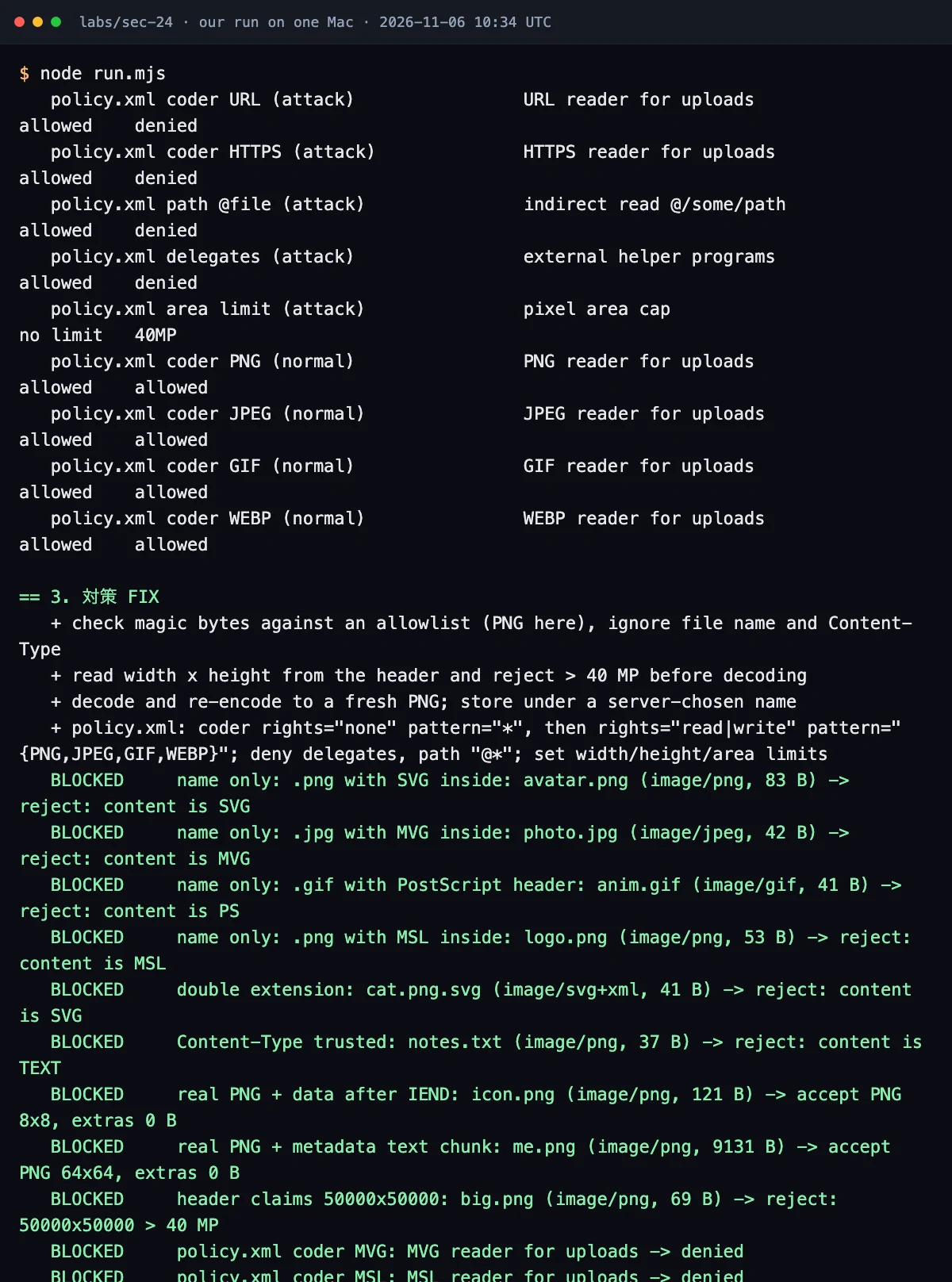
| Count (Node model) | Result |
|---|---|
| attack cases flagged on the unsafe model (9 upload files + 12 policy assertions) | 21/21 |
| attack cases that passed the fixed model's check (19 rejected or denied, 2 accepted with extras stripped) | 21/21 |
| normal cases unchanged (3 upload files + 4 coder permissions) | 7/7 |
Read the capture's labels narrowly. "BLOCKED" means the model's check passed, which for two PNGs was acceptance after re-encoding. "pixel area cap" names the area setting, which is the cache threshold described above. ImageMagick was not installed on this Mac, so no real binary or system policy was checked, and the model verifies neither the Rails issue nor the Rails patch.
Fix checklist
| Step | Done when |
|---|---|
| Update | bundle info activestorage shows 8.1.4.1 or 8.0.5.2 in your series; mini_magick 5.1 or newer |
| 7.2 and older | moved to 8.0 or 8.1; system policy rules in place meanwhile |
| System policy | magick -list policy on each server shows MSL and Ghostscript coders and the gs delegate denied, plus width, height, disk, map and time limits |
| Policy Rails loads | the bin/rails runner check below lists the Rails policy, and no later allow rule (including pattern="*") overrides a required deny |
| MiniMagick setup | no code replaces MiniMagick.cli_env, sets a cli_prefix that clears the environment, or installs a custom MiniMagick::Shell |
| Upload check | byte limit, type from the signature, dimensions from the header, re-encode, server-chosen file name |
| Disk service | secret_key_base, master key and every credential the process can read rotated, no old secrets kept as fallbacks |
Test your own app
# find the processor and every place that trusts a name or a client header
grep -rn "variant_processor" config/
grep -rnE "original_filename|content_type" app/ | grep -iE "png|jpe?g|gif|image/"
grep -rnE "cli_env|cli_prefix|MiniMagick::Shell" app/ config/ lib/
bundle info activestorage && bundle info mini_magick
bundle exec bundle-audit check --update   # ruby-advisory-db tracks Rails advisories
bundle exec brakeman --quiet              # static checks for the rest of the app
magick -list policy                       # on the server: the policy a shell sees
bin/rails runner 'puts MiniMagick.identify { |i| i.list "policy" }'   # the policy the app loads
The shell check and the app check can differ, because only the second goes through MiniMagick.cli_env, as the Rails guide explains. Inspect the application's loaded policies for later allow rules that override required denies, including wildcard allows.
Then pin the behaviour with a test that sends one of our lab's harmless files:
# test/controllers/avatars_controller_test.rb
test "a .png name with SVG inside is rejected" do
  sign_in users(:one)   # your app's test sign-in helper
  svg = Rack::Test::UploadedFile.new(StringIO.new('<svg xmlns="http://www.w3.org/2000/svg"/>'),
                                     "image/png", original_filename: "avatar.png")
  patch avatar_url, params: { avatar: svg }
  assert_response :unprocessable_entity
  assert_not users(:one).reload.avatar.attached?
end
Add a twin with a real PNG under an odd name and application/octet-stream, and assert it is accepted. These tests cover one disguised SVG and one valid PNG with misleading metadata. Add malformed PNG and JPEG cases and dimension-limit boundaries. The same upload rule for other stacks is in our PHP security checklist and Node.js security checklist.
This article describes the documented Rails behavior and our local Node model. The Ruby integration example has not been tested.
Frequently asked questions
My app uses libvips. Am I affected by GHSA-f3w6-w445-fwh9?
The advisory lists variant_processor :mini_magick as a condition, so a libvips setup does not meet it. Still update activestorage, and check whether your libvips build loads some formats through ImageMagick.
Is a content_type validation on the model enough?
No. Analysis starts when the file is attached, and a client-sent name or Content-Type says nothing about the bytes ImageMagick will read. Check the bytes before you attach, and keep the policy.xml rules as a second layer.
Does the fixed Rails release change my server's policy.xml?
No. It ships its own policy and prepends its directory to MAGICK_CONFIGURE_PATH for commands MiniMagick runs. ImageMagick called any other way does not get it, and an allow rule in your own policy can override its denies.
Sources
- GHSA-f3w6-w445-fwh9: Possible arbitrary file write and read in Active Storage image analysis (rails/rails)github.com
- Rails v8.1.4.1 release notesgithub.com
- Rails commit 468aa9a: ship an ImageMagick security policy for MiniMagickgithub.com
- Rails Guides: Active Storage overview, ImageMagick security policyguides.rubyonrails.org
- ImageMagick: security policyimagemagick.org
- ImageMagick: command-line options (format selection and resource limits)imagemagick.org
- The Hacker News, 2026-11-04: Critical Rails flaw lets attackers write server files via crafted ImageMagick uploadsthehackernews.com
Written by a software engineer and system architect with 10+ years of building production web, payment, ticketing and accounting systems in Japan and Nepal. About us