How to check WordPress for CVE-2026-119977: the version, the auto-update blockers and the upgrade folder
Check if your WordPress core is below 7.1.4 or its branch fix for CVE-2026-119977, and find the setting, plugin or deploy that stops security releases installing.
Drafted with AI assistance, then checked and edited by a human engineer · How we write
Short answer
CVE-2026-119977 is a race in WordPress full-package core upgrades. Affected branches start at 4.7; releases below each branch's listed fix are affected (7.1.4, 6.8.12 and so on down to 4.7.39). Check the core version against your branch's fix, then look for wp-config lines, plugin filters or a git checkout that stop security releases installing themselves, and block HTTP to the upgrade folder.
| CVE | CVE-2026-119977, CWE-367 TOCTOU race, CVSS 3.1 8.1 (High) |
|---|---|
| Affected | Affected branches start at 4.7; releases below each branch's listed fix are affected |
| Fixed | 7.1.4 (2026-10-28), 7.0.8, 6.9.11, 6.8.12 and backports down to 4.7.39 |
| Exploitation | listed in the CISA KEV catalog, added 2026-11-03 (CISA entry in the CVE record) |
| How fixes arrive | eligible minor releases can install automatically; settings, filters, a VCS checkout, file access or compatibility checks can stop them |
| Our lab | static checker on 19 fixtures: 11/11 problem fixtures flagged, 11/11 passed after edits, 8/8 controls still passed |
Check your installed WordPress version against the fixed release for its branch, such as 7.1.4 or 6.8.12, because releases below it carry CVE-2026-119977, a race condition in full-package core upgrades. If it is below that release, install the update and check what prevented automatic installation.
This guide is for protecting applications you own or maintain.
What you need
Shell access to the site, WP-CLI, and a rough idea of what wp-config.php and wp-content/mu-plugins do.
Background: which WordPress versions are affected?
WordPress shipped 7.1.4 on 2026-10-28. The CVE record lists CVE-2026-119977 as CWE-367, CVSS 3.1 score 8.1, with one affected range per branch: 7.1.0 to 7.1.3, 6.8.0 to 6.8.11, 4.7.0 to 4.7.38 and so on, so a patched 6.8.12 is not affected. The Wordfence advisory gives the same branch ranges. The CISA entry in that CVE record says it was added to the Known Exploited Vulnerabilities catalog on 2026-11-03, which is the official record that exploitation was observed. The Hacker News reported that entry on 2026-11-04.
| Branch | Fixed in | Branch | Fixed in |
|---|---|---|---|
| 7.1 | 7.1.4 | 6.4 | 6.4.14 |
| 7.0 | 7.0.8 | 6.0 | 6.0.18 |
| 6.9 | 6.9.11 | 5.9 | 5.9.20 |
| 6.8 | 6.8.12 | 5.0 | 5.0.31 |
| 6.7 | 6.7.11 | 4.7 | 4.7.39 |
The version page lists every branch. Only the newest release is actively supported, so an old branch is a reason to plan a move.
How a WordPress core upgrade works
Three terms first. A full-package update downloads the whole release instead of a partial diff. The staging directory is the folder under wp-content/upgrade where that package is unpacked. The background updater is the WP-Cron task that installs eligible minor releases without anyone clicking.
A core upgrade is a small deployment pipeline that runs inside the site it replaces:
installed WordPress (old code)
  1. download   release zip                -> temp file
  2. unpack     zip                        -> wp-content/upgrade/<staging folder>/wordpress/
  3. hand over  copy incoming update-core.php into the live tree, then load it
  4. copy       staged files               -> live wp-admin/, wp-includes/, root files
  5. clean up   delete the staging folder
During an affected full-package upgrade, step 2 puts a second, complete WordPress tree under the public content directory. If the web server runs PHP from that folder, the copy's own setup script answers HTTP requests for as long as the upgrade is running. A request arriving in that window can change the staged tree before the updater finishes reading from it in steps 3 and 4.
The 7.1.4 staging code closes this from three sides. An index file in the working folder stops the server from listing what is inside. A random folder name means a request cannot guess where the staged tree lives. And the updated copy routine skips any wp-config.php found in the staged tree, so a configuration file written there never reaches the live site. According to Wordfence's write-up, the window lasted seconds in their tests.
The existing upgrader performs extraction, so the transition upgrade can still expose a predictable staging path before the incoming update logic runs. A server rule that refuses HTTP to wp-content/upgrade covers that one upgrade. It blocks web requests while leaving filesystem operations alone; verify it against your site's routing and content path.
Reproduce
The fix only helps once it is installed, so our lab looks at what decides that. labs/security/wordpress-upgrade-check-lab/wordpress-upgrade-check-lab.mjs builds 19 throwaway WordPress-shaped fixtures in a temp folder: a wp-includes/version.php, a wp-config.php with dummy database values, a few plugin files and sometimes a .git folder. A PHP 8.5.2 tokenizer reads them without executing anything, and a judge applies simplified versions of the rules in WP_Automatic_Updater::should_update() and is_vcs_checkout().
It is a static heuristic. It never runs WordPress and never installs an update. The lab advisory uses example numbers, 9.1.7 and 9.2.3, on a 9.x branch that does not exist, so nobody mistakes them for real fixed versions. Our static checker flagged all 11 deliberately problematic fixtures: three below their branch fix or on a branch with no fix (OLD, NOFIX), seven with background updates switched off by config, a filter or a .git folder (OFF, MINOR-OFF, VCS-OFF), and one with both.
Experiment
| Fixture | Before edits | After edits |
|---|---|---|
$wp_version 9.2.1, fix is 9.2.3 | OLD | ok |
$wp_version 8.9.9, branch not listed | NOFIX | ok |
AUTOMATIC_UPDATER_DISABLED true | OFF | ok |
WP_AUTO_UPDATE_CORE false | OFF | ok |
DISALLOW_FILE_MODS true | OFF | ok |
mu-plugin auto_update_core returns false | OFF | ok |
plugin allow_minor_auto_core_updates returns false | MINOR-OFF | ok |
.git in the install root | VCS-OFF | ok |
control: DISALLOW_FILE_EDIT true, WP_DEBUG false | ok | ok |
control: disable line inside // and /* */ | ok | ok |
control: allow_major_auto_core_updates false | ok | ok |
control: .git inside one plugin folder | ok | ok |
This is 12 of the 19 rows; the complete output, totals included, is in the lab's last-run.txt. DISALLOW_FILE_MODS reads like an editor lock, yet it turns off every update, core security releases included; the editor lock is DISALLOW_FILE_EDIT. A .git folder at the install root makes WordPress skip core auto-updates with no setting at all, while one inside a plugin does not. The commented-out row is why we used a tokenizer: a plain grep matches it.
Fix
Is my WordPress version affected?
<?php
// wp-includes/version.php (unsafe: below the fix for branch 7.1)
$wp_version = '7.1.3';
<?php
// wp-includes/version.php (fixed: after Dashboard > Updates or `wp core update --minor`)
$wp_version = '7.1.4';Compare with the fix for your branch: 6.8.12 is fixed, 6.8.11 is not. If your branch has no entry, move to a supported one.
Why didn't WordPress update itself?
<?php
// wp-config.php (unsafe: each line stops security releases installing themselves)
define( 'AUTOMATIC_UPDATER_DISABLED', true );
define( 'WP_AUTO_UPDATE_CORE', false );
define( 'DISALLOW_FILE_MODS', true );
<?php
// wp-config.php (fixed: an explicit policy that lets eligible minor and security releases install)
define( 'WP_AUTO_UPDATE_CORE', 'minor' );
define( 'DISALLOW_FILE_EDIT', true ); // fine: locks the editor, leaves updates onThe updater checks for disabling constants first. With the first or third line it stops before looking at any release; with the second, should_update() declines minor releases. These settings normally prevent automatic installation; filters can alter some decisions. Setting 'minor' pins the policy to minor releases, which matters because fresh installs can also have major updates on by default. Even with a clean config, should_update() still checks file access, PHP and database compatibility and cron before anything installs.
Can a plugin block WordPress security updates?
<?php
// wp-content/mu-plugins/site-tweaks.php (unsafe)
add_filter( 'automatic_updater_disabled', '__return_true' );
add_filter( 'auto_update_core', '__return_false' );
add_filter( 'allow_minor_auto_core_updates', '__return_false' );
<?php
// wp-content/mu-plugins/site-tweaks.php (fixed: hold back major releases only, if you must)
add_filter( 'allow_major_auto_core_updates', '__return_false' );Filters run after wp-config, so a plugin can override a clean config. auto_update_core is applied last and can reverse the earlier minor and major decisions in either direction.
Does deploying WordPress from git stop updates?
# unsafe: the repository metadata sits in the install folder (or any parent)
/var/www/html/.git
/var/www/html/wp-config.php

# fixed: metadata lives outside the install and its ancestors
/srv/site-repo/.git
/var/www/html/wp-config.php
is_vcs_checkout() walks from the install folder up to the filesystem root looking for .git, .svn, .hg or .bzr, and the automatic_updates_is_vcs_checkout filter can override the answer. Keep repository metadata outside the deployed installation and its ancestor directories, or make the deployment pipeline responsible for updates.
Should the upgrade folder be reachable from the web?
# unsafe: no rule, PHP under wp-content/upgrade is executed like any other
location ~ \.php$ { include fastcgi_params; fastcgi_pass php; }
# fixed: before the PHP block; assumes /wp-content at the domain root, also covers upgrade-temp-backup
location ^~ /wp-content/upgrade { deny all; }
location ~ \.php$ { include fastcgi_params; fastcgi_pass php; }^~ makes nginx stop at this prefix and skip the regex blocks, so no file under it reaches PHP. On Apache, put Require all denied in a <Directory> block for that path in the server config, where an upgrade cannot delete it.
| Choice | You gain | You take on |
|---|---|---|
| Minor auto-updates on (default) | eligible security releases can install automatically | core changes without a deploy |
Pipeline owns updates (git, DISALLOW_FILE_MODS) | every change goes through review | someone must ship each security release promptly |
I would leave minor auto-updates enabled unless a deployment pipeline installs security releases promptly.
Report: what our lab showed
We ran node labs/security/wordpress-upgrade-check-lab/wordpress-upgrade-check-lab.mjs on this Mac on 2026-11-06 at 10:50 UTC (Node 22.13.1, PHP 8.5.2 tokenizer). The run's own labels say "attack", "reproduced" and "blocked"; read them as problem fixture, flagged and passed.
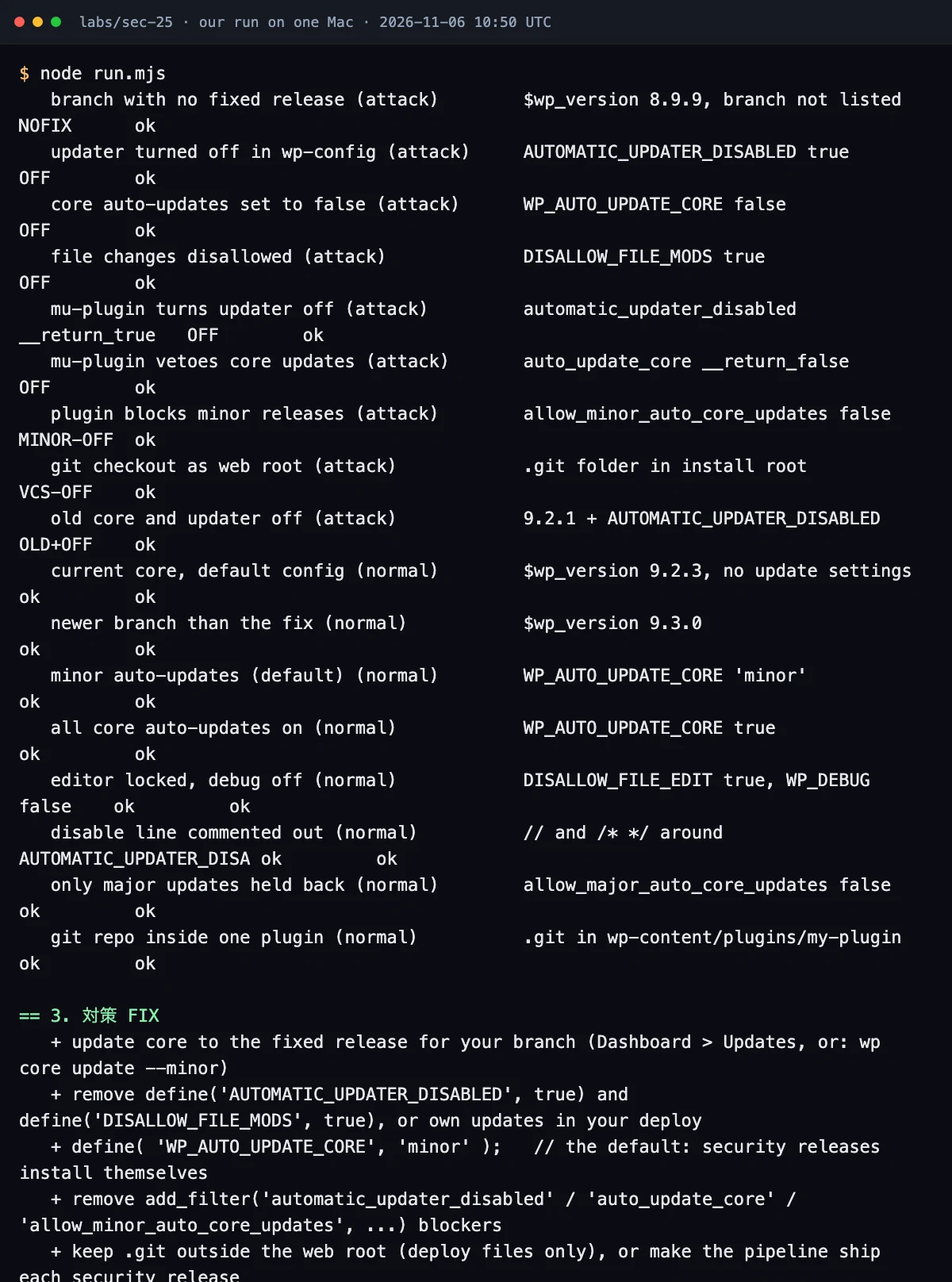
| Count | Result |
|---|---|
| flagged before edits | 11/11 |
| passed after edits | 11/11 |
| control fixtures still passed | 8/8 |
The "after edits" column comes from the lab changing fixture files, including rewriting $wp_version, and scanning them again. It shows the checker tells the problem fixtures from the controls, and nothing more.
What the lab does not prove: it does not reproduce CVE-2026-119977, test the race, or show that 7.1.4 closes it; that rests on the project's release and the CVE record. It does not show that updates install. It scans inactive plugins and themes too, ignores conditions and filter priority, treats unknown named callbacks as harmless, and stops at allow_minor_auto_core_updates even though a later auto_update_core filter can change that decision. WordPress also checks filesystem access and compatibility before it updates. Confirming real update behavior needs a run against an actual WordPress install, which is our next step for this lab.
Fix checklist
| Step | Done when |
|---|---|
| Core version | wp core version shows 7.1.4 or the fixed release for your branch |
| Old branch | unsupported branch: upgrade planned |
| wp-config | no AUTOMATIC_UPDATER_DISABLED true, no DISALLOW_FILE_MODS true, WP_AUTO_UPDATE_CORE unset, 'minor' or true |
| Filters | no active automatic_updater_disabled, auto_update_core or allow_minor_auto_core_updates blockers |
| Git deploys | no repository metadata in the install or any parent, or the pipeline ships each security release |
| Upgrade folder | a test PHP file inside a child of /wp-content/upgrade returns 403 |
| Cron | wp_version_check scheduled; a system cron calls wp-cron.php if DISABLE_WP_CRON is set |
| Site Health | no "Background updates are not working as expected" |
Test your own app
Run these on sites you own:
# version and pending minor updates
wp core version
wp core check-update --minor

# settings to review (a match alone does not mean updates are off)
grep -nE "AUTOMATIC_UPDATER_DISABLED|WP_AUTO_UPDATE_CORE|DISALLOW_FILE_MODS" wp-config.php
grep -rnE "automatic_updater_disabled|auto_update_core|allow_minor_auto_core_updates" wp-content/

# repository metadata in the install folder or any ancestor
d=$(cd /var/www/html && pwd)
while :; do
  for v in .git .svn .hg .bzr; do [ -e "$d/$v" ] && echo "found $d/$v"; done
  [ "$d" = / ] && break; d=$(dirname "$d")
done

# update check scheduled
wp cron event list | grep wp_version_check

# staged PHP refused over HTTP: harmless probe in a staging-shaped child folder, expect 403, then delete it
mkdir -p wp-content/upgrade/sds-probe
echo '<?php echo "reachable";' > wp-content/upgrade/sds-probe/probe.php
curl -s -o /dev/null -w '%{http_code}\n' https://your-site.example/wp-content/upgrade/sds-probe/probe.php
rm -r wp-content/upgrade/sds-probe
Use the grep searches to locate settings for review. A match alone does not establish that updates are disabled, so do not fail a build on raw matches; a version check against your branch fix is a safe build gate.
You can also point our read-only reader at an install, with the real fixed versions from the release page:
WP_PATH=/var/www/html WP_FIXED=7.1.4,7.0.8,6.9.11,6.8.12 NODE_NO_WARNINGS=1 node labs/security/wordpress-upgrade-check-lab/wordpress-upgrade-check-lab.mjsok means this static scan found no recognized blocker. Confirm update behavior in WordPress and inspect its update results.
Further reading
- WordPress: configuring automatic background updates
- Our PHP security checklist and the PHP runtime CVE check, for the layer under WordPress
- The Rails upload lab and the APT signature check, which use the same version-then-setting habit
- The Node.js Brotli check, the same branch-by-branch fixed-version lookup for a runtime
Frequently asked questions
My site updates itself. Do I need to do anything?
Confirm the installed version. If it is behind your branch's fixed release, inspect Site Health and the update results, then install the release. An older version alone does not identify the cause.
Is DISALLOW_FILE_EDIT as risky as DISALLOW_FILE_MODS?
No. DISALLOW_FILE_EDIT only removes the theme and plugin editor and is good hardening. DISALLOW_FILE_MODS turns off every install and update, including core security releases.
I deploy WordPress from git. What should I change?
By default WordPress skips core auto-updates when it finds repository metadata in the install folder or any parent folder, so your pipeline owns security releases. Ship each one promptly, or keep the metadata outside the installation and its ancestors.
Sources
- WordPress News, 2026-10-28: WordPress 7.1.4 security releasewordpress.org
- WordPress.org: Version 7.1.4 (fixed versions for every branch)wordpress.org
- CVE-2026-119977, CVE record (CNA: Wordfence)cve.org
- Wordfence: WordPress 7.1.4 security release, upgrade window remote code execution (technical write-up)wordfence.com
- CISA Known Exploited Vulnerabilities catalog: CVE-2026-119977cisa.gov
- WordPress Advanced Administration: Upgrading WordPress (configuring automatic background updates)developer.wordpress.org
- The Hacker News, 2026-11-04: CISA confirms hackers exploiting WordPress core flaw during software upgradesthehackernews.com

Written by a software engineer and system architect with 10+ years of building production web, payment, ticketing and accounting systems in Japan and Nepal. About us