
AI SystemsSystem Design, simply · AI 35
MCP tool discovery: how agents find new tools
MCP tool discovery: the client sends tools/list and gets one entry per tool. Each entry needs a name and an inputSchema; a description is optional.

Drafted with AI assistance, then checked and edited by a human engineer · How we write
In MCP tool discovery, the agent's MCP client sends tools/list and the server replies with one entry per tool. Each entry requires name and inputSchema; an optional description explains its purpose.
This article covers MCP specification 2025-06-18.
How does MCP tool discovery work?
MCP uses a client-host-server architecture (Architecture). The host is the AI app you use. It creates one client per server, and each client keeps one stateful session with its server. The server is the program that offers tools and runs them.
Once the session is set up, the client asks the server what it offers. The Tools page says clients send a tools/list request to discover tools, and that this operation supports pagination (Tools). A reply may carry a nextCursor; if it does, there may be more tools, and the client can send tools/list again with that cursor.
We walked through the full handshake (initialize, the initialized notice, then tools/list) in MCP tool discovery: 3 new apps, 0 changes to the client code.
What fields does an MCP tool need?
The schema defines a Tool as a TypeScript interface. Members without a ? are required. There are two: name and inputSchema (Schema: Tool).
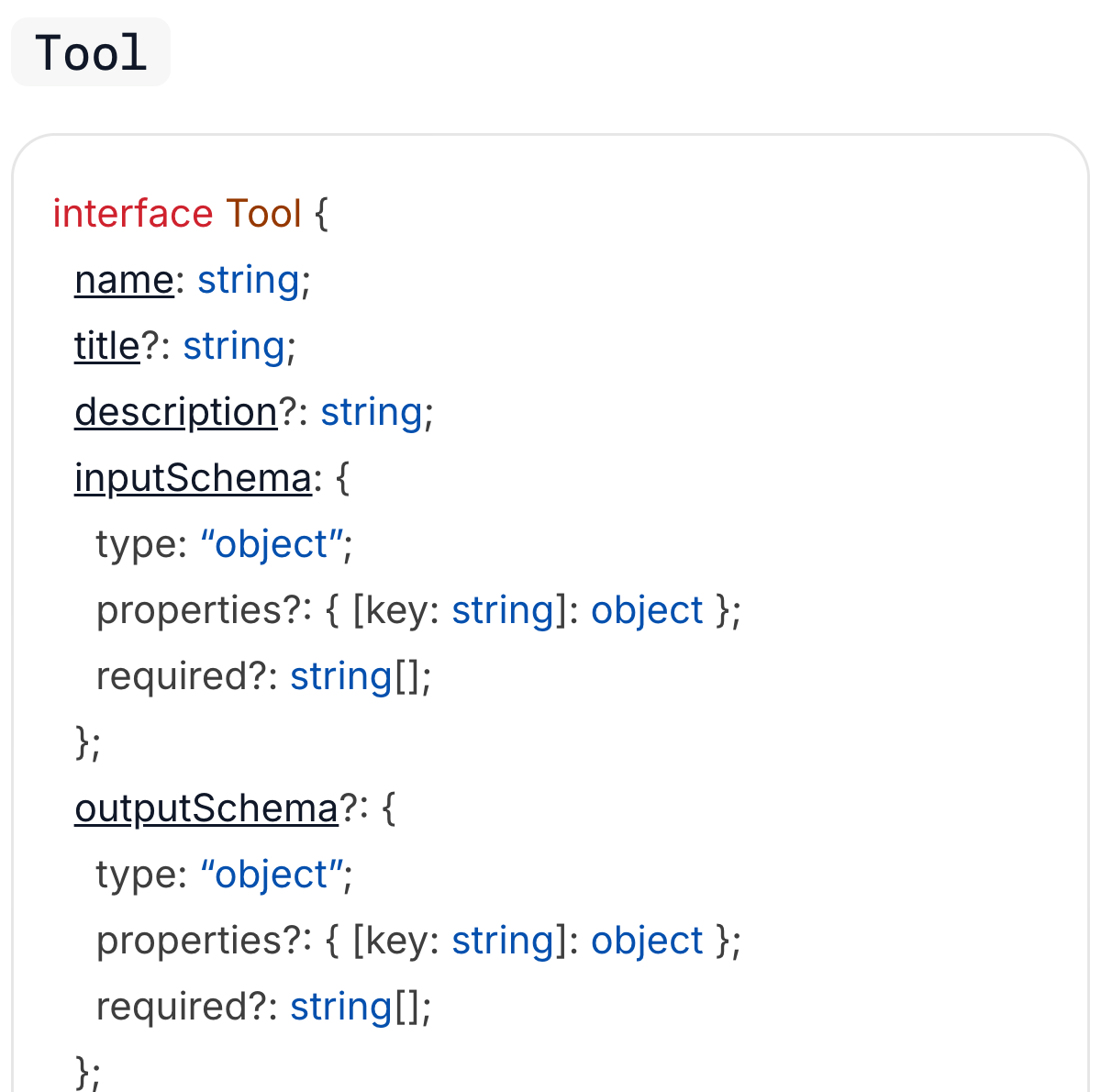
| Member | Required? | What it carries |
|---|---|---|
name | Yes | The identifier the client uses to call the tool |
inputSchema | Yes | A JSON Schema object (type: "object") for the arguments |
title | No | A display name for people |
description | No | Human-readable text about the tool |
outputSchema | No | A JSON Schema for structured results |
annotations | No | Optional properties describing how the tool behaves |
_meta | No | Extra metadata (see the spec's General fields) |
The entry only describes the tool. The code that does the work stays on the server, and the client calls it later with tools/call, passing the name and arguments.
The Tools page adds one trust rule: clients MUST treat annotations as untrusted unless they come from trusted servers (Tools). Every field in the entry is text the server chose to send.
What does the description add?
On description, the schema says clients can use it to improve the model's understanding of the available tools: "It can be thought of like a 'hint' to the model." (Schema: Tool).
Here is a concept example, not taken from any real server. A server sends an entry with only the required top-level fields:
{
  "tools": [
    {
      "name": "get_wx",
      "inputSchema": {
        "type": "object",
        "properties": { "city": { "type": "string" } },
        "required": ["city"]
      }
    }
  ]
}
That entry is valid, but the model gets only a short name and one string called city, and wx could mean weather or something else that takes a city. A clear name and schema descriptions already carry meaning; the optional title and description add a sentence on top:
{
  "tools": [
    {
      "name": "get_wx",
      "title": "Weather today",
      "description": "Gets today's weather for one city. Use when the user asks about weather.",
      "inputSchema": {
        "type": "object",
        "properties": {
          "city": { "type": "string", "description": "City name, for example Kathmandu" }
        },
        "required": ["city"]
      }
    }
  ]
}
Write the description the way you would brief a new teammate: what the tool does, when to use it, and what each input means. In our AI 13 simulation, replacing one app's descriptions with vague text cut a keyword matcher's correct picks from 17 of 20 to 8 of 20; that matcher was not a language model, so it says nothing about how much a real model relies on each field (AI 13). Descriptions are also text the model reads and may follow, which is why a hidden line can steer an AI when it comes from an untrusted source.
Who decides when a tool is called?
The Tools page says tools are "designed to be model-controlled": the model can discover and call them based on context and the user's prompt (Tools). The same paragraph says implementations may expose tools through any interface they like, and the protocol does not require a particular user interaction model.
So the host can hand the tool list to the model, and the model can pick one to call. The host decides how. For safety the spec says there SHOULD always be a human in the loop who can deny a tool call, with clear signs of which tools are exposed and when one runs. Our article on AI agent permissions shows why that confirmation step matters.
Resources and prompts have their own lists
Tools are one of three things an MCP server can offer. The other two have their own list calls, and both support pagination too.
| Feature | Discovery request | Who is meant to control it |
|---|---|---|
| Tools | tools/list | The model (model-controlled) |
| Resources | resources/list | The application (application-driven) |
| Prompts | prompts/list | The user (user-controlled) |
A resource is context such as a file or a database schema, identified by a URI; the host app decides how to use it (Resources). A prompt is a template the user picks on purpose, for example through a slash command (Prompts). A client that only calls tools/list never sees the other two.
What happens when a server adds a tool later?
The client's tool list is a snapshot from its last tools/list. If the server adds a tool after that, the client still holds the old list until a capability and a notification tell it otherwise.
A server that supports tools must declare the tools capability, and listChanged inside it says whether the server will send change notifications (Tools):
{ "capabilities": { "tools": { "listChanged": true } } }When the list changes, servers that declared listChanged SHOULD send the notification notifications/tools/list_changed.
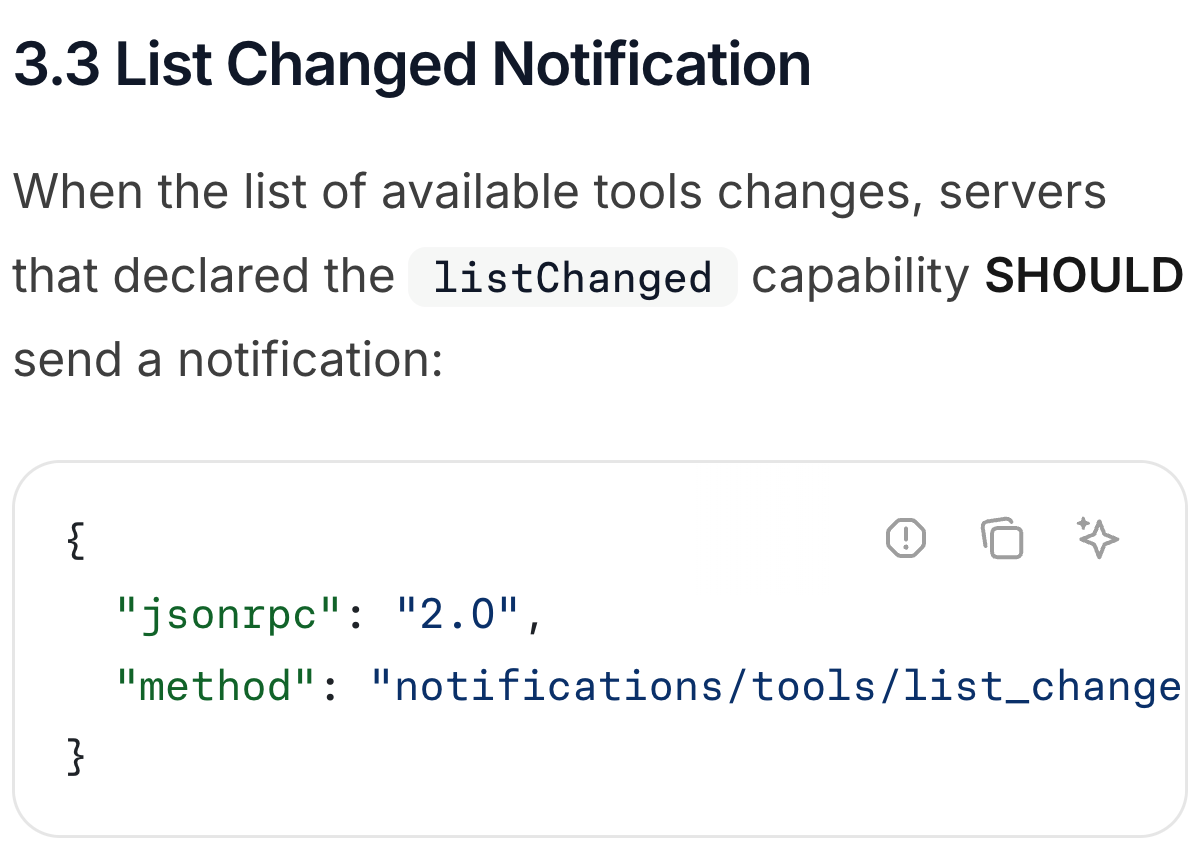
SHOULD is a recommendation (MUST would be a requirement), and it applies only to servers that declared the capability. The notification carries no tool list either; it only tells the client that the list changed, and the client can then send tools/list again. Resources and prompts have matching notifications on their own pages.
If a server declared listChanged: false, or left it out, your client should not count on a notification and has to decide for itself when to list again.
Is this service discovery?
Partly. In service discovery (Part 20), a client looks up in a registry where a service lives. In MCP the client is already connected to the server and knows its address, so it asks what the server can do.
Try it: one tools/list exchange you can print
Our repo has a small stand-in you can run with Node 22 and no installs: node labs/ai-35/measure-tiny-mcp-server-discovery.mjs. It is an in-process simulation, not the official SDK. A hand-written server stand-in talks to a scripted client over an in-memory pipe instead of stdio, and no model reads the result. It also skips pagination and list-changed notifications. We ran it on 2026-11-16 (Node 22.13.1), and every check passed.
On the wire, discovery is one JSON-RPC request and one matching response. After the lifecycle checks, the simulated client sends tools/list with id 5 (Tools: listing tools):
{ "jsonrpc": "2.0", "id": 5, "method": "tools/list", "params": {} }The server answers with the same id, and the tool list sits inside result:
{
  "jsonrpc": "2.0",
  "id": 5,
  "result": {
    "tools": [
      {
        "name": "word_count",
        "description": "Count the words in a piece of text.",
        "inputSchema": {
          "type": "object",
          "properties": {
            "text": { "type": "string", "description": "The text to count" }
          },
          "required": ["text"]
        }
      }
    ]
  }
}
It also prints a second view. The script combines the results of tools/list, resources/list, and prompts/list into this display; it is not one MCP response:
{
  "tools": [
    {
      "name": "word_count",
      "description": "Count the words in a piece of text.",
      "inputSchema": {
        "type": "object",
        "properties": {
          "text": { "type": "string", "description": "The text to count" }
        },
        "required": ["text"]
      }
    }
  ],
  "resources": [
    { "uri": "notes://today", "name": "notes", "description": "Today's short notes", "mimeType": "text/plain" }
  ],
  "prompts": [
    { "name": "summarize_notes", "description": "Summarize the notes in one line.", "arguments": [] }
  ]
}
The tool entry has the two required members plus a description, and the handler stays on the server. Treat this as a picture of the message shape, not as a test of any real client, SDK or model.
Copy-paste prompt for your tool descriptions
If you run an MCP server, paste this into your AI coding assistant with your tool list:
Rewrite each MCP tool description for a new teammate: what it does, when to use it, and what each input means.Then check each result against the real behaviour of the tool. Cut anything the tool does not really do. If you package the same instructions for several agents, one SKILL.md file is another place this text lives.
Our take
The protocol asks for very little: a name and an input schema. The text that tells a model what a tool is for, the description and title, is optional, so it is on you as the server author to fill in the description, and on you as the client author to list again when tools change. If you are deciding whether you need MCP at all, MCP vs API compares the two on one task.
This article summarizes the public Model Context Protocol specification, version 2025-06-18, as checked on 2026-11-16. The weather tool is a concept example, and the payload above comes from our own in-process simulation, not from the official SDK or any AI product.
Frequently asked questions
How does an AI agent discover MCP tools?
After the connection is set up, the agent's MCP client sends a tools/list request. The server replies with a list of tool entries (name, inputSchema and optional fields such as description), and the host can pass them to the model.
What fields does an MCP tool need?
In the MCP schema 2025-06-18 a Tool has two required members, name and inputSchema. title, description, outputSchema, annotations and _meta are optional.
How does an MCP client find out about a new tool?
If the server declared the listChanged capability, it SHOULD send notifications/tools/list_changed when its tools change. The client can then send tools/list again to get the new list.
Sources
- MCP Specification 2025-06-18: Schema Reference, Toolmodelcontextprotocol.io
- MCP Specification 2025-06-18: Server Features, Toolsmodelcontextprotocol.io
- MCP Specification 2025-06-18: Server Features, Resourcesmodelcontextprotocol.io
- MCP Specification 2025-06-18: Server Features, Promptsmodelcontextprotocol.io
- MCP Specification 2025-06-18: Architecturemodelcontextprotocol.io

Written by a software engineer and system architect with 10+ years of building production web, payment, ticketing and accounting systems in Japan and Nepal. About us