# How to use Claude like a professional, not like a casual user
URL: https://systemdesignsimple.com/claude-like-a-pro/
Published: 2026-11-03
Updated: 2026-11-07
Category: AI Tools
Publisher: System Design Simple (https://systemdesignsimple.com)
## Short answer
Casual users ask one-off questions. Professionals build a small system: standing context in Projects, memory or CLAUDE.md; repeatable procedures as Skills; only the connectors a task needs; a check Claude can run to prove the work; hooks and deny rules for anything that must never break; and an independent reviewer plus a human sign-off before anything ships.
## Key facts
- **Standing context:** Projects (apps) and CLAUDE.md (Claude Code) load into every chat or session
- **Skills:** A SKILL.md folder; only name and description load until the skill is used
- **Guideline vs guarantee:** CLAUDE.md and prompts are guidelines; hooks, deny rules and managed settings are enforced by Claude Code
- **Permission rule order:** Deny, then ask, then allow; the first match wins
- **Headless:** claude -p runs once and exits, for scripts, CI and scheduled jobs
- **Best single habit:** Give Claude a check that returns pass or fail, and ask for the evidence
- **Biggest risk:** Hidden instructions in files, websites and untrusted servers or skills
Most people use Claude like a search box: type a question, read the answer, start over tomorrow with no memory of what worked. Professionals use the same model as a system: standing instructions it reads every time, procedures it loads on demand, tools it is allowed to touch, a check it must pass, and a second reviewer before anything ships. This article covers that whole system, in the Claude apps and in Claude Code, with the real setup we use to make this channel's videos.
If someone asks you in an interview "how do you use AI tools safely and well?", this is the answer.
Every feature below was checked against Anthropic's official documentation and Help Center on November 3, 2026. Menus, plans and limits change; when a detail matters to you, open the linked page.
## Prerequisites
**A model only knows what is in front of it.** Each conversation, and each Claude Code session, starts with a fresh context window, and everything Claude uses has to be loaded into it: your message, instructions, files, tool results. Almost every "pro" feature controls what gets loaded, and when.
**Claude can act, not only talk.** It can search, run code, create files and call connected services; in Claude Code it edits files and runs commands on your machine. So the question is not only "is the answer good?" but also "what is it allowed to touch?"
**Models make confident mistakes.** A wrong answer looks exactly like a right one, which is why checks, reviewers and sources matter more than any single feature.
## Definitions
> Definition: **Context window**: the text the model can see while it writes its reply: instructions, the conversation, files and tool output. What is not in it does not exist for the model.
> Definition: **Project (Claude apps)**: a workspace with its own files ("project knowledge") and "project instructions" that Claude uses in every chat inside it.
> Definition: **Skill**: a folder with a `SKILL.md` file (a name, a description and instructions) plus optional scripts and reference files. Claude loads the full instructions only when a request matches the description.
> Definition: **Memory**: in the apps, topics Claude saves about you as you chat, which you can view and edit. In Claude Code, `CLAUDE.md` files you write and "auto memory" notes Claude writes, both loaded at the start of every session.
> Definition: **MCP (Model Context Protocol)**: an open standard, created by Anthropic, for connecting AI apps to external tools and data. A **connector** is the Claude apps' name for a connected MCP server.
> Definition: **Subagent**: a helper Claude Code starts for a side task. It runs in its own context window with its own tools and returns only a summary.
> Definition: **Hook**: a shell command (or prompt) that Claude Code runs at a fixed point, such as before a tool call or when Claude tries to stop. Hooks run every time; the model does not choose.
> Definition: **Permission mode and rules**: Claude Code's settings for what runs without asking. Rules are `allow`, `ask` and `deny`; modes set the baseline, such as asking for everything or accepting file edits.
> Definition: **Headless mode**: running Claude Code non-interactively with `claude -p "prompt"`, which runs once and exits. Used in scripts, CI and scheduled jobs.
## How it works: what Claude actually sees
Think of every request as a desk that is cleared and re-stacked: some papers go on it every time, others are fetched only when needed. The skill is deciding which pile each piece of knowledge belongs in.
| Piece of context | Where | When it is loaded |
| --- | --- | --- |
| Project instructions and project knowledge | Claude apps | Every chat in that project |
| Memory topics | Claude apps | Used across chats (project memory stays in its project) |
| `CLAUDE.md` files in your folder and the folders above it | Claude Code | At launch, every session |
| `CLAUDE.md` files in subfolders | Claude Code | When Claude reads or edits a file in that subfolder |
| Auto memory index (`MEMORY.md`) | Claude Code | Every session, first 200 lines or 25 KB, whichever comes first |
| Skill name and description | Both | Always (about 100 tokens per skill, per the Agent Skills docs) |
| Skill body (`SKILL.md` instructions) | Both | Only when a request matches; the docs give "under 5k tokens" as the typical size |
| Skill scripts and reference files | Both | Only when read; a script's code never enters context, only its output |
| Subagent's work | Claude Code | Stays in the subagent; only its summary comes back |
Anthropic calls the skill pattern **progressive disclosure**: load information in stages, as needed, instead of all at once. It means you can install many skills without paying for them in every conversation, because "until a Skill is triggered, only its name and description occupy context." The same idea explains why a short `CLAUDE.md` beats a long one: everything in it is on the desk for every task, relevant or not. Claude Code's docs suggest keeping each `CLAUDE.md` under 200 lines.
One more mechanism matters: **who decides**. Text you write (a prompt, `CLAUDE.md`, a skill) is read by the model, and the model decides what to do with it. Configuration (a hook, a deny rule, a managed setting) is enforced by Claude Code itself, the "harness" around the model. We come back to this in [Guidelines vs guarantees](#guidelines-vs-guarantees), because it is the single idea that most separates casual from professional use.
## The Claude apps: Projects, Skills, memory, connectors and more
### Projects: stop pasting the same background
A Project is the first upgrade from casual use. You add files as **project knowledge** and write **project instructions**, which Claude "will use for all the chats within the project," per the Help Center. Projects are available on every plan, including Free.
Two details people miss. First, "context is not shared across chats within a project unless the information is added into the project knowledge base," so if a chat produced a decision worth keeping, add it to the knowledge. Second, on paid plans, when knowledge nears the context limit, Claude switches to a retrieval mode (RAG) and pulls the relevant parts instead of reading everything, so name files clearly and keep one topic per file. Keep the instructions short: audience, tone, output format, and the rules the files do not show.
### Skills: package a procedure once
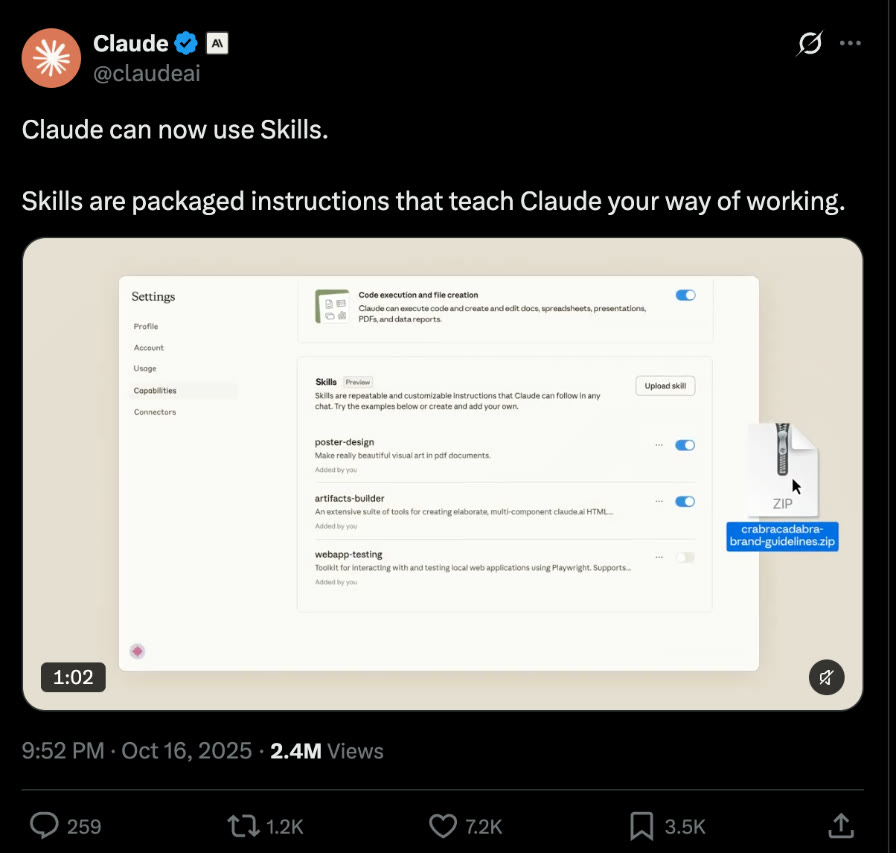
How Anthropic introduced Skills: post on X by @claudeai, 16 Oct 2025. Screenshot; open the original post.
A Skill is a folder with a `SKILL.md` file. The front matter holds a `name` (lowercase letters, numbers and hyphens, up to 64 characters) and a `description` (up to 1,024 characters) that says what the skill does and *when to use it*. The body holds the instructions, and the folder can carry scripts, templates and reference files.
In the apps, Anthropic ships built-in skills for Word, Excel, PowerPoint and PDF files, and you can upload your own as a ZIP under **Customize > Skills** (code execution must be on). Claude "determines when each skill is needed based on your request," which is why the description is the most important line: it is what your request is matched against.
Use a skill when you keep pasting the same procedure. Two honest limits: custom skills **do not sync** between claude.ai, the API and Claude Code, and a skill can contain code, so Anthropic advises using skills only from trusted sources and treating any other skill "like installing software."
### Memory: know what it keeps, and when to turn it off
Claude's memory in the apps saves individual topics as you chat, and you can also say "remember this." You can read, edit or delete every topic under **Settings > Your Claude**, next to "Your memory." Each Project has its own memory: inside a project Claude uses that project's memory plus your non-project memory, but not other projects' memory.
Be deliberate about it. **Review the list** now and then and delete anything stale, because a wrong memory is repeated confidently. Use an **incognito chat** (the ghost icon) for anything you do not want kept: it is not saved to history or memory. Or **turn memory off for one chat** from the "+" menu before the first message when you want an answer not shaped by your history. On paid plans Claude can also search past chats; on Team and Enterprise plans the owner decides whether memory is available.
### Connectors and MCP: give Claude your real tools, carefully
Connectors let Claude read from and act in other services. **Directory** connectors are verified listings; **custom** connectors point at the URL of a remote MCP server, which must be reachable from the public internet because connections come from Anthropic's cloud. Add them under **Customize > Connectors** and enable them per chat from the "+" button.
Anthropic's warning: "Custom connectors allow you to connect Claude to arbitrary services that have not been verified by Anthropic," and malicious servers may hide instructions. During Research, connector tools can run without further approval, so the Help Center advises disabling tools that write. Connect read access first and switch off tools you do not use.
### Artifacts: work you will keep editing
An artifact is something Claude makes that you would show to someone (a document, a diagram, a small interactive tool) and it opens beside the conversation, where you can edit it and come back to it. The Help Center says Claude makes one when content is substantial and self-contained, typically over 15 lines, and likely to be reused. Ask for one on purpose when you want a living document; ask for plain text when you only want an answer. Use only artifacts from people you trust.
### Research and extended thinking: pick the right depth
Anthropic's guidance separates three modes. **Web search** is for simple facts that take "one or two tool calls." **Extended thinking** is for hard reasoning that needs no fresh web data, such as maths or debugging. **Research** is for wide gathering, "five or more tool calls over 1-3 minutes," and returns a longer report "with proper citations." Treat Research like a junior researcher: say what a good answer looks like, and open the citations before you repeat anything. A citation proves Claude found a page, not that the page says what the summary claims.
### Files and data analysis: let it compute instead of guess
With code execution on ("Code execution and file creation," or "Create and edit files" in the newer layout), Claude runs code in a sandbox: it analyzes CSV and TSV files, extracts data from PDFs, draws charts, and creates Excel, PowerPoint, Word and PDF files, up to 30 MB per file. For numbers, this is the difference between a guess and an answer: ask it to compute from the file and show the code it used. The Help Center is frank about the risk: "It is possible for a bad actor to inconspicuously add instructions via external files or websites," and Claude "can be tricked into sending information from its context." Keep files from strangers out of chats with sensitive data.
## Claude Code: the professional setup
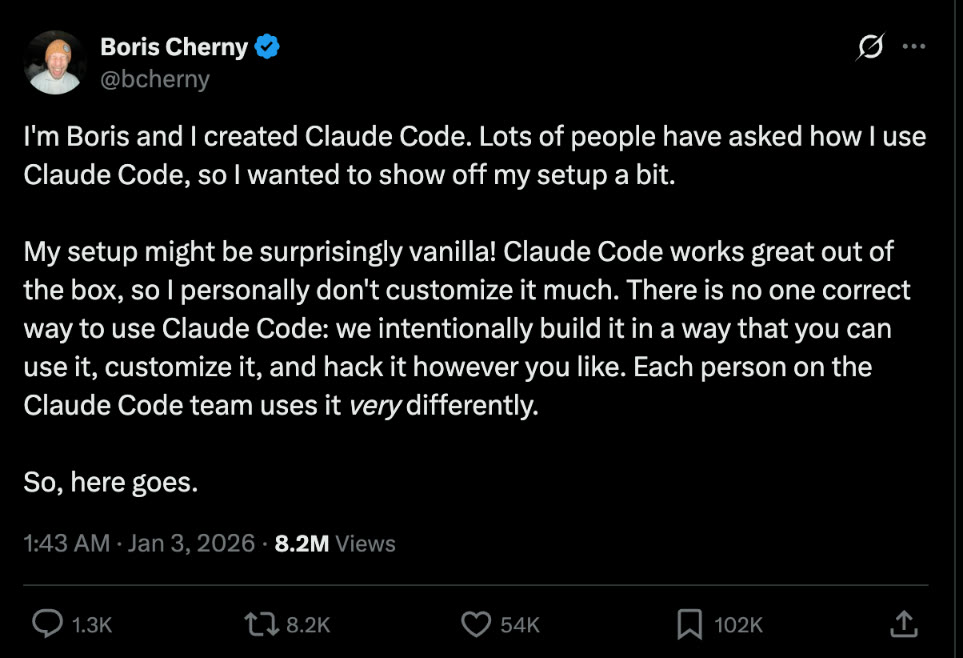
A useful reminder before the features: the person who built Claude Code says his own setup is close to the defaults. Learn the defaults first, then add a feature only when a real problem asks for it.
Boris Cherny, who created Claude Code, opening his thread on his own setup: post on X by @bcherny, 3 Jan 2026. Screenshot; open the original post.
Claude Code is Claude in your terminal, IDE or desktop app: it reads your project, edits files and runs commands. Anthropic's best practices page says the defaults usually do the right thing; setup pays off when your project has knowledge, rules or limits that Claude cannot see in the code.
### CLAUDE.md: the project's standing instructions
`CLAUDE.md` is a markdown file Claude Code loads at the start of every session. There are several levels, and they are concatenated rather than replacing each other:
| File | Who it is for |
| --- | --- |
| `~/.claude/CLAUDE.md` | You, in every project |
| `./CLAUDE.md` or `./.claude/CLAUDE.md` | The team, committed to the repository |
| `./CLAUDE.local.md` | You, in this project only (keep it out of git) |
| A managed policy file set by IT | Everyone in the organization |
Run `/init` to generate a first version, import other files with `@path/to/file`, and check what loaded with `/context`. Claude Code also keeps **auto memory**, notes Claude writes for itself under `~/.claude/projects//memory/`; `/memory` edits both.
What belongs in it? Only what Claude cannot find by reading the repo: the exact test and lint commands, decisions made in meetings, places where the code is misleading, anything you have corrected twice. Not your folder layout. An honest example: our project `CLAUDE.md` grew into a long specification, the direction changed, and it now opens with a line saying the new direction "overrides older sections below." That works, but every stale line still sits in context on every task. The fix is to prune, not to add another override.
### Skills and slash commands
In Claude Code, skills live in `~/.claude/skills//SKILL.md` (personal) or `.claude/skills//SKILL.md` (project, shared through git). Claude loads one when your request matches its description, or you type `/skill-name`. Custom slash commands have been merged into skills: `.claude/commands/deploy.md` and `.claude/skills/deploy/SKILL.md` both create `/deploy`. Add `disable-model-invocation: true` when only you should start a skill, such as a deploy.
Built-in commands worth knowing: `/clear`, `/compact`, `/context`, `/rewind` (roll back to a checkpoint), `/permissions`, `/hooks`, `/mcp`, `/model`, `/effort`, and `/code-review`, which reviews your diff in a fresh subagent that never saw your conversation.
Our own example is the project skill `.claude/skills/make-video/SKILL.md`. Its description names the phrases that trigger it ("make the video", "render episode sd-N"). The body lists what to read first, then numbered steps with explicit stops for the owner (after a five-second sample, and before anything is shared), and ends with one hard line: "Never publish from this skill." A procedure that used to live in chat messages now runs the same way every time.
### Subagents
A subagent has its own context window, system prompt and tool list. It does a side task and returns only a summary, so logs and file dumps never fill your main conversation. Built-in ones include **Explore** (read-only search) and **Plan** (research for plan mode); define your own as markdown files in `.claude/agents/` or `~/.claude/agents/` with a `name`, a `description` and optionally `tools` and `model`. The docs are honest about cost: subagents count toward the same usage limits, and "handing the same task to a subagent doesn't make the answer any better." They help with parallel work, noisy output and **independent review**.
### Hooks
Hooks are commands Claude Code runs at fixed points, configured under a `hooks` key in a settings file. Events include `SessionStart`, `UserPromptSubmit`, `PreToolUse` (can block a tool call), `PostToolUse`, `Notification` and `Stop`. Exit code 2 blocks the action, and stderr goes back to Claude as the reason. Classic uses, both in the [Code](#code) section: format after every edit, and refuse to stop until tests pass. On the owner's Mac a global `Stop` hook also commits and pushes this repository after every turn.
### MCP servers
Add a remote server with `claude mcp add --transport http notion https://mcp.notion.com/mcp`; a local one runs as a process after `--`. Scopes are **local** (default, you in this project), **project** (in `.mcp.json`, shared with the team) and **user** (all your projects). `/mcp` shows status and handles OAuth logins. The docs' warning: "Verify that you trust each MCP server before connecting it."
### Permission modes and allow/deny rules
Permission modes set the baseline for what runs without asking:
| Mode | What it does |
| --- | --- |
| `default` (shown as Manual) | Asks the first time each tool is used |
| `acceptEdits` | Accepts file edits and common file commands like `mkdir` and `mv` in the working directory |
| `plan` | Reads and explores, writes a plan, does not edit your source |
| `auto` | No routine prompts; a background classifier checks actions like shell commands first |
| `dontAsk` | Denies everything that would have prompted, except pre-approved tools; made for locked-down runs |
| `bypassPermissions` | Skips prompts; the docs say to use it only in isolated containers or VMs |
Rules refine the mode. They live in `permissions.allow`, `ask` and `deny`, and look like `Bash(npm run test *)` or `Read(./.env)`. The order is fixed: **deny, then ask, then allow; the first match wins**, so an allow rule cannot carve an exception out of a deny rule. The space before `*` matters: `Bash(git diff *)` does not match `git diff-index`.
One limit every professional should know: a Bash rule matches the command *text*. `Bash(rm *)` stops `rm -rf build/` but not `bash -c 'rm -rf build/'`, so the docs say a deny rule "isn't a security boundary around the program." For real isolation use the sandbox, a container, or a `PreToolUse` hook.
### Plan mode
Press **Shift+Tab** until plan mode is active, start a prompt with `/plan`, or launch with `claude --permission-mode plan`. Claude explores and writes a plan; edits stay blocked until you approve it (**Ctrl+G** lets you edit the plan first). Use it for large changes, or to agree on "done" before any code exists.
### Headless mode for scripts and CI
`claude -p "prompt"` runs once and exits, which is how Claude Code ends up in CI jobs, git hooks and scheduled tasks. The flags you will use most:
- `--allowedTools` pre-approves tools, such as `"Read,Edit,Bash(npm test)"`; `--disallowedTools` removes some.
- `--permission-mode` sets the baseline (`dontAsk`, `acceptEdits`). In recent versions a `-p` run with no mode starts in Manual mode, where anything needing approval is denied.
- `--output-format json` returns one result object; `--json-schema` enforces a shape.
- `--max-turns` or `--max-budget-usd` cap a run; `--continue` or `--resume` carry on a conversation.
- `--bare` skips hooks, skills, MCP servers, auto memory and `CLAUDE.md`, so the run is the same on every machine. The docs recommend it for scripts; it needs an API key, not your subscription login.
One warning from the docs: without `--bare`, a `-p` run in a folder you have never trusted still runs that project's hooks and MCP servers, with no trust dialog. Do not point headless runs at repositories you do not control.
### Worktrees for parallel work
A git worktree is a second working copy of the repository on its own branch. `claude --worktree feature-auth` (or `-w`) creates one under `.claude/worktrees/feature-auth/` and starts Claude there, so two sessions can edit without colliding. A fresh worktree has no gitignored files such as `.env` and no installed dependencies; list files to copy in `.worktreeinclude`. Subagents can get their own with `isolation: worktree`.
### Settings files
Settings are JSON files. Highest precedence first: managed (your organization), command line (`--settings`), project local (`.claude/settings.local.json`), shared project (`.claude/settings.json`, committed) and user (`~/.claude/settings.json`). Lists such as `permissions.allow` merge across files. "Yes, and don't ask again" saves an allow rule to your local file; `/status` shows which files loaded.
Our `.claude/settings.local.json` is a small, specific allow list: `Bash(npx hyperframes *)`, `Bash(npm test)`, `Bash(npm run demo)` and two install commands. Each line removes a prompt we answered "yes" to many times, and nothing more.
## Guidelines vs guarantees
Anthropic's best practices page draws one line that explains most of the setup above. Every instruction is either **non-deterministic** (you write it, the model reads it and decides) or **deterministic** (you configure it, Claude Code enforces it every time).
| | Claude decides (guideline) | Claude Code enforces (guarantee) |
| --- | --- | --- |
| What to do | Your prompt, `CLAUDE.md`, skills | Hooks; skills only you can start |
| What it can touch | Auto mode's classifier | Deny rules, the sandbox, managed settings |
| When it is done | Asking for evidence, `/goal`, `/code-review` | Tests, type checks, a `Stop` hook, CI |
| How much it spends | Effort level | `--max-turns`, `--max-budget-usd`, a spend limit |
| Who has the last word | Claude's summary of what it did | Branch protection, a person approving the merge |
Most of the time you want Claude to decide: it reads the code in front of it and judges whether a guideline fits. But "never read `.env`" or "never edit the generated client" should not depend on what the model remembers on a given turn. The docs' rule of thumb: if you keep adding emphasis to a `CLAUDE.md` line and Claude still misses it, that line belongs in a hook or a deny rule. The memory docs say the same from the other side: `CLAUDE.md` is "context, not enforced configuration."
## Pro habits that matter more than any feature
### 1. Give context, not just a question
Anthropic's prompting guide says to think of Claude as "a brilliant but new employee who lacks context on your norms and workflows." Say who it is for, why it matters and what you already tried. Explaining *why* beats shouting rules: the guide replaces "NEVER use ellipses" with "your response will be read aloud by a text-to-speech engine, so never use ellipses," and Claude generalizes from the reason. In Claude Code: name the file, describe the symptom, say what "fixed" looks like, and hand over the screenshot or log instead of describing it.
### 2. Specify the output format
State length, structure and audience. The guide recommends saying what to do rather than what not to do ("write flowing prose paragraphs" instead of "no markdown"), wrapping parts of a long prompt in XML tags such as ``, and giving three to five examples when format matters. For anything a program reads, ask for JSON and validate it.
### 3. Ask it to verify, and ask for the evidence
"Claude stops when the work looks done." If it has no way to check, you become the test suite. Give it something that returns pass or fail (a test, a build, a linter, a script that diffs output against a fixture) and say "run it and keep going until it passes." Then ask for the *evidence*: the command and its output. "All tests pass" on its own tells you very little.
### 4. Keep a reviewer in the loop
A writer, human or model, is rarely the best judge of its own work. Use a reviewer that did not write it: `/code-review`, a second session, or a different model. We let Claude write and OpenAI's Codex review (see the [worked example](#worked-example) and [Claude Code vs Codex CLI](https://systemdesignsimple.com/claude-code-vs-codex-cli/)). Tell the reviewer what to skip ("skip style"), because the docs warn that a reviewer asked to find problems will always find something, and keep a person as the final approver.
### 5. Keep secrets out
Never paste API keys, passwords or customer data into a prompt "just this once." In Claude Code, deny reads of secret files (`Read(./.env)`, `Read(./.env.*)`), keep keys in environment variables, and never let a script print them; our autopilot prompt says "never print API keys" and the key lives in a gitignored `.env`. Anything in the context can, in the worst case, be leaked by a prompt injection, so the safest secret is one that never enters it.
### 6. Check facts before you repeat them
For anything you will publish or decide on, ask for sources, open them, and confirm the page says what the summary says. Prefer primary sources: official docs, the original paper, the vendor's own announcement. This article was written that way, and features we could not confirm were left out.
### 7. Steer early, restart cleanly
Watch the first minute of any session. Press `Esc` the moment Claude heads the wrong way; it stops and keeps the work so far. The docs' advice after two failed corrections is to run `/clear` and write one better prompt, because a third correction mostly adds to a conversation that already contains two failed attempts.
## Worked example: our video pipeline
Every System Design Simple episode goes through a script that never needs a person to watch the terminal, and every pro habit above shows up in it. The script is `publish/episode.mjs`.
**Claude writes, Codex reviews, loop until pass.** Claude Code runs headless (`claude -p ... --model opus --output-format text`) and must return JSON in a fixed shape: title, on-screen hook, the proof, six to nine beats, sources and notes. Codex then reviews it in a read-only sandbox (`codex exec -s read-only`) against a quality bar of ten pass/fail items, from "hook" and "accuracy" to "humanVoice," and returns a verdict. If the verdict is "revise," Claude rewrites with the review attached and is told it "may keep a point you disagree with, and say why in notes." The loop runs at most four review rounds by default, and one line in the loop matters more than it looks:
```js
// publish/episode.mjs (excerpt)
if (review.verdict === 'pass') { /* wait for the owner in the studio */ return; }
if (r === ROUNDS - 1) break; // the last word is a review, never an unreviewed rewrite
```
The output that reaches the owner has always been reviewed. Nothing is approved by the loop itself: the owner approves in the studio.
**Proof before claims.** When an episode needs a measured number, Claude writes a small lab with tight permissions: `--permission-mode acceptEdits --allowedTools Write Edit Read`, inside the lab folder only, and told "Do not run them." Codex reviews the code *before* it runs (no network, no child processes, no hard-coded results). Then the lab runs under Node's permission model, allowed to read and write only its own folder, and Codex checks that the conclusion is supported by the printed metrics. The video can only claim what survived that review.
**The autopilot.** `publish/auto.mjs` is started by macOS launchd every 30 minutes and does one step per run. To render an approved episode it starts a long headless session:
```js
// publish/auto.mjs (excerpt)
run('claude', ['-p', prompt, '--model', 'opus', '--output-format', 'text',
'--permission-mode', 'acceptEdits',
'--allowedTools', 'Bash Read Write Edit Glob Grep Skill',
'--disallowedTools', 'Bash(git commit:*) Bash(git push:*) Bash(git reset:*) Bash(rm -rf:*)',
'--settings', JSON.stringify({ disableAllHooks: true })], { timeout: 4 * 3600e3 });
```
Read it as a checklist. The prompt opens with "AUTOPILOT, no person is watching," points at the `make-video` skill, and lists hard rules: work only inside the repository, never publish, never commit or push, never print API keys. `--allowedTools` pre-approves what the job needs; `--disallowedTools` removes what it must never run; `disableAllHooks` keeps the owner's auto-commit hook out of the job, because the *script*, not the model, commits after checking the result. The run has a four-hour timeout and must end with one machine-readable line, `AUTO-RESULT: ok ` or `AUTO-RESULT: fail `. A lock file stops runs from overlapping.
**What we would improve, honestly.** Allowing all of `Bash` is broad. The deny list blocks the usual forms of `git commit` or `rm -rf`, but, as the permissions docs warn, not every way of spelling them; the real protections are the human approval steps and the fact that nothing is published without the owner. A tighter version would list the exact commands the render needs, and add `--max-turns` as a second stop besides the timeout.
```text
# the loop, as written in publish/episode.mjs
write (Claude) -> review (Codex, read-only) -> pass -> owner approves in the studio
-> revise -> rewrite (Claude) -> review ...
at most 4 review rounds by default; the loop always ends on a review
```
## Code: files you can copy
**1. A short project `CLAUDE.md`.** Only what Claude cannot read from the code.
```markdown
# CLAUDE.md
## Commands
- Test: `npm test` (one file: `npm test -- path/to/file.test.js`)
- Lint: `npm run lint`
## Decisions not in the code
- Use `lib/errors.js` for API errors; the older `utils/err.js` is deprecated, do not copy it.
- Database migrations need a second reviewer before merge.
## Done means
- Tests and lint pass, and you show the command output.
```
**2. A project skill** at `.claude/skills/release-notes/SKILL.md`. The description says what and when; the body is the procedure.
```markdown
---
name: release-notes
description: Write release notes from merged changes since the last tag. Use when the user asks for release notes, a changelog entry or "what changed since the last release".
---
# Release notes
1. Run `git describe --tags --abbrev=0` to find the last tag, then `git log ..HEAD --oneline`.
2. Group changes into Added, Changed, Fixed. Skip chores and merge commits.
3. One line per change, plain English, no internal ticket jargon.
4. Show the draft and stop. Never create a tag or publish anything.
```
**3. Shared settings** at `.claude/settings.json`: a small allow list, deny rules for secrets, a formatter after edits, and a `Stop` hook that will not let Claude finish while tests fail. Settings files are strict JSON, so no comments.
```json
{
"permissions": {
"allow": ["Bash(npm test)", "Bash(npm run lint)"],
"deny": ["Read(./.env)", "Read(./.env.*)", "Bash(git push *)"]
},
"hooks": {
"PostToolUse": [
{ "matcher": "Edit|Write",
"hooks": [{ "type": "command", "command": "jq -r '.tool_input.file_path' | xargs npx prettier --write" }] }
],
"Stop": [
{ "hooks": [{ "type": "command", "command": "npm test 1>&2 || exit 2" }] }
]
}
}
```
What to observe: ask Claude for a change that breaks a test. Instead of finishing, it receives the failing output (sent to stderr) and keeps working. The docs note that after eight blocked stops in a row with no tool call in between, Claude Code ends the turn anyway, so this is a strong nudge with a safety valve, not an infinite loop.
**4. A headless job** that a CI step or a cron job can run. It pre-approves exactly the tools it needs, refuses everything else, caps the turns and reads the result as JSON.
```sh
# review-diff.sh
git diff main | claude --bare -p \
"Review this diff for bugs and missing tests. Skip style. Reply as JSON: {\"verdict\":\"pass|revise\",\"issues\":[]}" \
--allowedTools "Read" \
--permission-mode dontAsk \
--max-turns 10 \
--output-format json | jq -r '.result'
```
What to observe: the exit code is 0 when the run succeeds, so `set -e` in CI will stop the job if Claude cannot run. `--bare` needs `ANTHROPIC_API_KEY` in the environment. Piping the diff in means Claude does not need Bash permission to read it.
## Failure modes and edge cases
- **Instruction drift.** A long, stale `CLAUDE.md` is followed less reliably. *Fix:* prune; move procedures into skills and must-never rules into hooks or deny rules.
- **A skill that never triggers, or triggers everywhere.** *Fix:* rewrite the description with the words people actually use, and say when *not* to use it.
- **Prompt injection.** A page, PDF or MCP server carries hidden instructions. *Detect:* actions you did not ask for, especially sending data out. *Fix:* trusted sources, read-only tools by default, network off when not needed, no untrusted files next to secrets.
- **"Done" that is not done.** *Detect:* no command output in the reply. *Fix:* require evidence, or enforce it with a `Stop` hook or CI.
- **Headless jobs that silently do nothing.** A `-p` run with no mode set denies whatever needs approval. *Fix:* pre-approve the needed tools, and test on three inputs before three hundred.
- **Wrong memories.** An old preference keeps resurfacing. *Fix:* delete it in Settings > Your Claude or `/memory`.
- **Leftover worktrees.** Headless worktree runs are not cleaned up. *Fix:* `git worktree list`, then `git worktree remove`.
## Trade-offs: where should an instruction live?
| Option | Good for | Costs you | Use when |
| --- | --- | --- | --- |
| The prompt | One-off details of this task | Retyping; lost next time | It only matters today |
| Project instructions / `CLAUDE.md` | Facts and preferences for every task | Context on every request; not enforced | Claude cannot find it in the files and needs it often |
| Skill | A procedure used sometimes | Writing and maintaining a file; separate copies per surface | You keep pasting the same steps |
| Memory | Personal preferences across chats | Can store wrong or stale things | It is about you, not the project |
| Connector / MCP server | Live data and actions in other tools | Trust and injection risk; write access is dangerous | The task needs the real system, not a pasted copy |
| Hook | Steps that must always run | A script to maintain; can block progress | "Almost always" is not good enough |
| Deny rule / managed setting | Things that must never happen | Less flexibility; text-matching limits for Bash | Secrets, protected files, dangerous commands |
| Subagent / second reviewer | Independent checks, parallel work | Extra usage | The work matters enough to be reviewed |
## Common mistakes
- **Mistake:** Starting every chat from zero and re-explaining your work. **Instead:** Put stable background in a Project or `CLAUDE.md` and keep it short.
- **Mistake:** Writing "IMPORTANT" or ALL CAPS on rules Claude keeps missing. **Instead:** Explain why the rule exists, shorten the file, and move rules that cannot bend into a hook or deny rule.
- **Mistake:** Accepting "all tests pass" at face value. **Instead:** Ask for the command and its output, or enforce the check with a `Stop` hook or CI.
- **Mistake:** Connecting every connector and allowing every tool "to save clicks." **Instead:** Connect what this task needs, start read-only, and turn off write tools you are not using.
- **Mistake:** Correcting the same error a third time in one long conversation. **Instead:** `/clear` (or a new chat) and one better prompt that includes what you learned.
- **Mistake:** Repeating a cited claim without opening the source. **Instead:** Open the citation and confirm the page says what the summary says.
## In an interview
"How do you use AI assistants in your work?" is now a common question. Answer it with the same six steps you would use for a design question:
**Clarify** the kind of work and the cost of a mistake. **Assume** the model can be confidently wrong and may read untrusted content. **Structure**: context, procedures, tools, checks, review. **Deep dive** on one example, such as a `Stop` hook. **Trade-offs**: guidelines bend, guarantees do not. **Wrap up**: a person approves anything that cannot be undone.
> **A 60-second answer**I treat the assistant as a fast new colleague, not an oracle. I give it standing context once, in a Project or a CLAUDE.md, with the commands and decisions it cannot find in the code, and I package repeated procedures as skills. I give it only the tools a task needs, read-only first. Every task has a check that returns pass or fail, and I ask for the output, not the claim. Anything that must never happen is a deny rule or a hook, because instructions are guidance and configuration is enforced. Important work gets an independent reviewer, another session or another model, and a person approves anything we cannot undo. Facts I will repeat, I verify at the source.
## Practice
**Q (Beginner): Two chats in the same Project: does the second one know what you said in the first?**
No. The Help Center says context is not shared across chats in a project unless the information is added to the project knowledge. (Project memory may carry some details, but do not rely on it for decisions.)
**Q (Beginner): Which part of a SKILL.md decides whether Claude uses the skill?**
The `description` in the front matter. It is always in context and is what Claude matches your request against, so it must say what the skill does and when to use it.
**Q (Intermediate): You have 30 skills installed. Do all of their instructions fill the context window?**
No. Only each skill's name and description load at startup (about 100 tokens each per the docs). The body loads only when a skill is triggered, and bundled scripts contribute only their output.
**Q (Intermediate): Your settings have `allow: Bash(aws s3 ls)` and `deny: Bash(aws *)`. Does `aws s3 ls` run?**
No. Rules are evaluated deny, then ask, then allow, and the first match wins. An allow rule cannot carve an exception out of a deny rule.
**Q (Intermediate): A rule in CLAUDE.md says "never edit src/gen/," and Claude edited it once. What do you change?**
Move the rule into configuration Claude Code enforces: a deny rule for edits to that path, or a `PreToolUse` hook that blocks it. CLAUDE.md is context, not enforcement.
**Q (Advanced): A nightly `claude -p` job finishes in seconds and changes nothing. Most likely cause?**
Nothing approved the tools it needed. A `-p` run with no permission mode starts in Manual mode and denies calls that need approval. Pre-approve them with `--allowedTools` or set a suitable `--permission-mode`.
**Q (Advanced): Why does a `deny: Bash(rm *)` rule not make a headless job safe?**
Bash rules match the command text; `bash -c 'rm -rf x'` or `/bin/rm` are different text. The docs say a deny rule is not a security boundary around the program. Use the sandbox, a container or a `PreToolUse` hook, plus a human approval step.
**Q (Advanced): In a write-and-review loop, why end on a review instead of a rewrite?**
Because the last rewrite would be the only version no reviewer has seen. Ending on a review guarantees that whatever reaches the human approver has been checked, which is what our `episode.mjs` loop does.
## Cheat sheet
| Term or command | One-line meaning |
| --- | --- |
| Project | Files plus instructions used in every chat inside it (apps) |
| Memory (apps) | Saved topics about you; Settings > Your Claude; incognito skips it |
| Skill / `SKILL.md` | Name + description always loaded; body loaded on use |
| Connector | An MCP server connected to the Claude apps; directory or custom |
| Artifact | Substantial, self-contained output that opens beside the chat |
| Research | Many searches over a few minutes, a cited report |
| `CLAUDE.md` | Standing instructions loaded every Claude Code session; aim under 200 lines |
| `/init`, `/memory`, `/context` | Create CLAUDE.md; edit memory; see what is loaded |
| `/clear`, `/compact`, `/rewind` | Start fresh; summarize; roll back to a checkpoint |
| Subagent | Helper with its own context; returns a summary |
| Hook (exit code 2) | Command at a fixed point; exit 2 blocks and sends stderr to Claude |
| Rule order | deny, then ask, then allow; first match wins |
| Plan mode | Shift+Tab or `/plan`; explore and propose, no edits until approved |
| `claude -p` | Headless run: `--allowedTools`, `--permission-mode`, `--max-turns`, `--output-format json`, `--bare` |
| `claude -w name` | Session in its own git worktree under `.claude/worktrees/` |
| Settings order | managed, command line, local, project, user (highest first) |
## From casual to pro: the checklist
| Casual | Professional |
| --- | --- |
| Re-explains the background in every chat | Keeps it in a Project or a short `CLAUDE.md` |
| Pastes the same steps again and again | Turns them into a skill with a clear description |
| Asks a bare question | Gives context, the reason, and the output format |
| Accepts "done" | Gives a pass/fail check and asks for the output |
| Writes rules in capitals | Puts must-never rules in deny rules and hooks |
| Connects everything | Connects what the task needs, read-only first |
| Lets the writer judge its own work | Adds an independent reviewer and a human sign-off |
| Pastes keys "just this once" | Keeps secrets out of the context entirely |
| Repeats what Claude said | Opens the source first |
| Argues with a derailed chat | Stops early, clears, and writes one better prompt |
| Runs it by hand every time | Scripts it with `claude -p`, narrow tools and a turn cap |
## Further reading
- **Best practices for Claude Code**: guidelines vs guarantees, verification and unattended runs; read this one first.
- **Memory, Skills, Subagents, Hooks, MCP**: one page per feature, with file formats and examples.
- **Permissions and Permission modes**: rule syntax, precedence, the limits of Bash rules, plan mode.
- **Headless, Worktrees, Settings, Commands**: scripts and CI, parallel work, where configuration lives, every slash command.
- **Agent Skills overview** and **Prompting best practices**: progressive disclosure, skill security, and how to write clear prompts.
- **Claude Help Center articles**: Projects, memory, Skills, connectors, artifacts, Research and file creation, with current menus and plans.
To see how limits and plans affect long Claude Code sessions, read [what Claude Ultra changed about the 5-hour limit](https://systemdesignsimple.com/claude-ultra-no-5-hour-limit/).
This article describes Anthropic's publicly documented features as of November 3, 2026, and our own setup. It is not affiliated with or reviewed by Anthropic. Features, menus and plan availability change; check the linked official pages before relying on a detail.
**Read next:** how to create an AI agent skill so you stop repeating instructions, and how Claude Code cloud sessions set up their environment.
## Frequently asked questions
**What is the difference between a Claude Project and a normal chat?**
A Project holds files (project knowledge) and project instructions that Claude uses in every chat inside that project. A normal chat starts with only your account settings and memory. Chats inside a project do not share context with each other unless the information is in the project knowledge.
**What is a Claude Skill?**
A Skill is a folder with a SKILL.md file: YAML front matter with a name and a description, then instructions, plus optional scripts and reference files. Claude sees only the name and description until a request matches, then it reads the full instructions.
**Is CLAUDE.md enough to stop Claude from doing something?**
No. Anthropic's docs describe CLAUDE.md as context, not enforced configuration. Claude follows it almost every time, but for something that must never happen, use a deny rule, a PreToolUse hook or a managed setting, which Claude Code enforces regardless of what the model decides.
**How do I run Claude Code in a script or CI job?**
Use claude -p with the prompt. Pre-approve the tools it needs with --allowedTools, set a permission mode such as dontAsk or acceptEdits, cap the run with --max-turns, and use --output-format json if a program reads the result. The docs recommend --bare for repeatable runs.
**Should I let Claude review its own work?**
Ask it to run tests and show the output, but for important work add a reviewer that did not write it: a fresh session, the /code-review command, or a different model. A reviewer that never saw the reasoning is not swayed by it.
**Are connectors and MCP servers safe?**
Only connect servers you trust. Anthropic warns that custom connectors are not verified by Anthropic and that malicious servers can include hidden instructions. Turn off tools that write or delete when you do not need them.
## Sources
- [Best practices for Claude Code](https://code.claude.com/docs/en/best-practices)
- [How Claude remembers your project (CLAUDE.md and auto memory)](https://code.claude.com/docs/en/memory)
- [Skills in Claude Code](https://code.claude.com/docs/en/skills)
- [Subagents](https://code.claude.com/docs/en/sub-agents)
- [Automate actions with hooks](https://code.claude.com/docs/en/hooks-guide)
- [Connect Claude Code to tools via MCP](https://code.claude.com/docs/en/mcp)
- [Configure permissions](https://code.claude.com/docs/en/permissions)
- [Permission modes](https://code.claude.com/docs/en/permission-modes)
- [Run Claude Code programmatically (headless)](https://code.claude.com/docs/en/headless)
- [Run parallel sessions with worktrees](https://code.claude.com/docs/en/worktrees)
- [Settings files and precedence](https://code.claude.com/docs/en/settings)
- [Claude Code commands](https://code.claude.com/docs/en/commands)
- [Agent Skills overview (Claude Platform docs)](https://platform.claude.com/docs/en/agents-and-tools/agent-skills/overview)
- [Prompting best practices (Claude Platform docs)](https://platform.claude.com/docs/en/build-with-claude/prompt-engineering/claude-prompting-best-practices)
- [How can I create and manage projects? (Claude Help Center)](https://support.claude.com/en/articles/9519177)
- [Using Claude's memory and chat search (Claude Help Center)](https://support.claude.com/en/articles/11817273)
- [Using Skills in Claude (Claude Help Center)](https://support.claude.com/en/articles/12512180)
- [Get started with custom connectors using remote MCP (Claude Help Center)](https://support.claude.com/en/articles/11175166)
- [What are artifacts and how do I use them? (Claude Help Center)](https://support.claude.com/en/articles/9487310)
- [When should I use web search, extended thinking, and research? (Claude Help Center)](https://support.claude.com/en/articles/11095361-when-should-i-use-web-search-extended-thinking-and-research)
- [Create and edit files with Claude (Claude Help Center)](https://support.claude.com/en/articles/12111783-create-and-edit-files-with-claude)